LabelImg




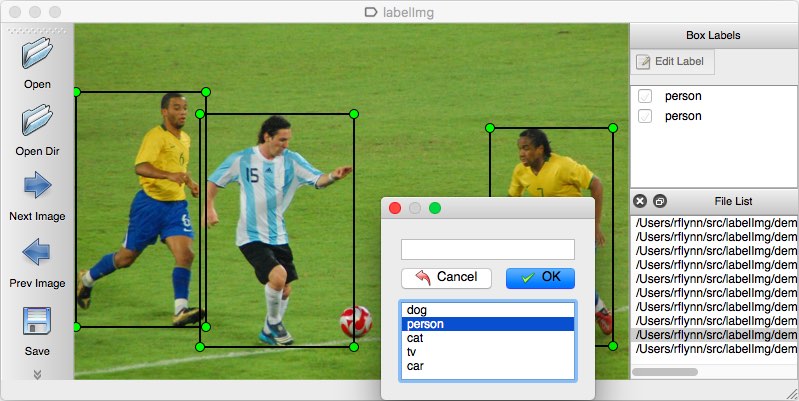
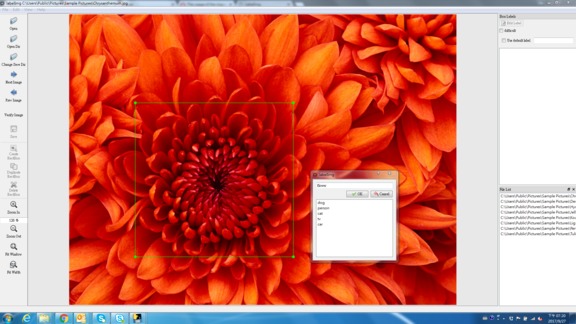
LabelImg is a graphical image annotation tool.
It is written in Python and uses Qt for its graphical interface.
Annotations are saved as XML files in PASCAL VOC format, the format used by ImageNet. Besides, it also supports YOLO and CreateML formats.
Installation
Get from PyPI but only python3.0 or above
This is the simplest (one-command) install method on modern Linux distributions such as Ubuntu and Fedora.
pip3 install labelImg
labelImg
labelImg [IMAGE_PATH] [PRE-DEFINED CLASS FILE]
Build from source
Linux/Ubuntu/Mac requires at least Python 2.6 and has been tested with PyQt 4.8. However, Python 3 or above and PyQt5 are strongly recommended.
Ubuntu Linux
Python 3 + Qt5
sudo apt-get install pyqt5-dev-tools
sudo pip3 install -r requirements/requirements-linux-python3.txt
make qt5py3
python3 labelImg.py
python3 labelImg.py [IMAGE_PATH] [PRE-DEFINED CLASS FILE]
macOS
Python 3 + Qt5
brew install qt  # Install qt-5.x.x by Homebrew
brew install libxml2

or using pip

pip3 install pyqt5 lxml # Install qt and lxml by pip

make qt5py3
python3 labelImg.py
python3 labelImg.py [IMAGE_PATH] [PRE-DEFINED CLASS FILE]
Python 3 Virtualenv (Recommended)
Virtualenv can avoid a lot of the QT / Python version issues
brew install python3
pip3 install pipenv
pipenv run pip install pyqt5==5.15.2 lxml
pipenv run make qt5py3
pipenv run python3 labelImg.py
[Optional] rm -rf build dist; python setup.py py2app -A;mv "dist/labelImg.app" /Applications
Note: The Last command gives you a nice .app file with a new SVG Icon in your /Applications folder. You can consider using the script: build-tools/build-for-macos.sh
Windows
Install Python, PyQt5 and install lxml.
Open cmd and go to the labelImg directory
pyrcc4 -o libs/resources.py resources.qrc
For pyqt5, pyrcc5 -o libs/resources.py resources.qrc

python labelImg.py
python labelImg.py [IMAGE_PATH] [PRE-DEFINED CLASS FILE]
Windows + Anaconda
Download and install Anaconda (Python 3+)
Open the Anaconda Prompt and go to the labelImg directory
conda install pyqt=5
conda install -c anaconda lxml
pyrcc5 -o libs/resources.py resources.qrc
python labelImg.py
python labelImg.py [IMAGE_PATH] [PRE-DEFINED CLASS FILE]
Use Docker
docker run -it \
--user $(id -u) \
-e DISPLAY=unix$DISPLAY \
--workdir=$(pwd) \
--volume="/home/$USER:/home/$USER" \
--volume="/etc/group:/etc/group:ro" \
--volume="/etc/passwd:/etc/passwd:ro" \
--volume="/etc/shadow:/etc/shadow:ro" \
--volume="/etc/sudoers.d:/etc/sudoers.d:ro" \
-v /tmp/.X11-unix:/tmp/.X11-unix \
tzutalin/py2qt4

make qt4py2;./labelImg.py
You can pull the image which has all of the installed and required dependencies. Watch a demo video
Usage
Steps (PascalVOC)
- Build and launch using the instructions above.
- Click 'Change default saved annotation folder' in Menu/File
- Click 'Open Dir'
- Click 'Create RectBox'
- Click and release left mouse to select a region to annotate the rect box
- You can use right mouse to drag the rect box to copy or move it
The annotation will be saved to the folder you specify.
You can refer to the below hotkeys to speed up your workflow.
Steps (YOLO)
- In
data/predefined_classes.txtdefine the list of classes that will be used for your training. - Build and launch using the instructions above.
- Right below "Save" button in the toolbar, click "PascalVOC" button to switch to YOLO format.
- You may use Open/OpenDIR to process single or multiple images. When finished with a single image, click save.
A txt file of YOLO format will be saved in the same folder as your image with same name. A file named "classes.txt" is saved to that folder too. "classes.txt" defines the list of class names that your YOLO label refers to.
Note:
- Your label list shall not change in the middle of processing a list of images. When you save an image, classes.txt will also get updated, while previous annotations will not be updated.
- You shouldn't use "default class" function when saving to YOLO format, it will not be referred.
- When saving as YOLO format, "difficult" flag is discarded.
Create pre-defined classes
You can edit the data/predefined_classes.txt to load pre-defined classes
Annotation visualization
- Copy the existing lables file to same folder with the images. The labels file name must be same with image file name.
- Click File and choose 'Open Dir' then Open the image folder.
- Select image in File List, it will appear the bounding box and label for all objects in that image.
(Choose Display Labels mode in View to show/hide lablels)
Hotkeys
| Ctrl + u | Load all of the images from a directory |
| Ctrl + r | Change the default annotation target dir |
| Ctrl + s | Save |
| Ctrl + d | Copy the current label and rect box |
| Ctrl + Shift + d | Delete the current image |
| Space | Flag the current image as verified |
| w | Create a rect box |
| d | Next image |
| a | Previous image |
| del | Delete the selected rect box |
| Ctrl++ | Zoom in |
| Ctrl-- | Zoom out |
| ↑→↓← | Keyboard arrows to move selected rect box |
Verify Image:
When pressing space, the user can flag the image as verified, a green background will appear. This is used when creating a dataset automatically, the user can then through all the pictures and flag them instead of annotate them.
Difficult:
The difficult field is set to 1 indicates that the object has been annotated as "difficult", for example, an object which is clearly visible but difficult to recognize without substantial use of context. According to your deep neural network implementation, you can include or exclude difficult objects during training.
How to reset the settings
In case there are issues with loading the classes, you can either:
- From the top menu of the labelimg click on Menu/File/Reset All
-
- Remove the .labelImgSettings.pkl from your home directory. In Linux and Mac you can do:
- rm ~/.labelImgSettings.pkl
How to contribute
Send a pull request
License
Citation: Tzutalin. LabelImg. Git code (2015). https://github.com/tzutalin/labelImg
Related and additional tools
- ImageNet Utils to download image, create a label text for machine learning, etc
- Use Docker to run labelImg
- Generating the PASCAL VOC TFRecord files
- App Icon based on Icon by Nick Roach (GPL)
- Setup python development in vscode
- The link of this project on iHub platform
- Convert annotation files to CSV format or format for Google Cloud AutoML

 38 Dec 13, 2022
 60 Jan 03, 2023
 11 Dec 14, 2022
 363 Dec 27, 2022
 13.1k Jan 02, 2023
 53 Nov 23, 2022
 171 Nov 23, 2022
 183 Dec 16, 2022
 2 Aug 24, 2022
 9 Jun 06, 2022
 4 Jan 17, 2022
 19 Oct 21, 2022
 2 Nov 17, 2022
 2 Oct 18, 2021
 15 Jun 11, 2022
 130 Dec 13, 2022
 57 Dec 28, 2022
 15 Nov 04, 2022
 3 Jun 17, 2022
 3 Jul 30, 2022