Solcast Integration for Home Assistant

Overview

Solcast Solar

Home Assistant(https://www.home-assistant.io/) Component

hacs_badge

This custom component integrates the Solcast API into Home Assistant.

Modified from the great works of

  • dannerph/homeassistant-solcast
  • cjtapper/solcast-py
  • home-assistant-libs/forecast_solar

Basic Installation/Configuration Instructions:

Add a new HA Integration selecting 'Solcast PV Solar'

Setup the Recorder to record data.. something like

recorder:
  purge_keep_days: 31
  include:
    entity_globs:
      - sensor.solcast*

integration

Getting a Solcast API Key:

Sign up for an API key (https://solcast.com/)

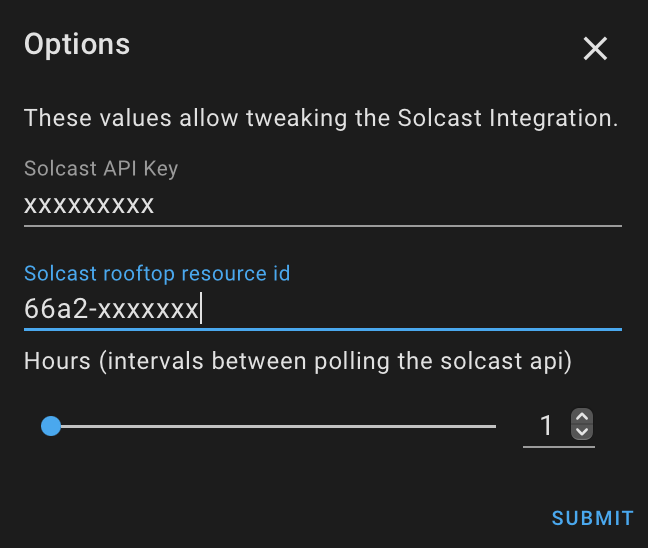
Create a Rooftop entity on the Solcast website. This will generate a rooftop_id (resource id) Copy the id and api for this integration to work.

img1 img2

Comments
  • Upgrade to HomeAssistant 2022.6 beta release breaks SolCast

    Upgrade to HomeAssistant 2022.6 beta release breaks SolCast

    After upgrade to the next beta SolCast breaks: https://rc.home-assistant.io/blog/2022/05/25/release-20226/

    This error originated from a custom integration.
    
    Logger: custom_components.solcast_solar
    Source: custom_components/solcast_solar/__init__.py:492
    Integration: Solcast PV Forecast (documentation, issues)
    First occurred: 7:44:57 AM (3 occurrences)
    Last logged: 7:44:57 AM
    
    get_forecast_sensor_state: Traceback (most recent call last): File "/config/custom_components/solcast_solar/__init__.py", line 432, in get_forecast_sensor_state event_s: list[int] = [event.event_data for event in events] File "/usr/local/lib/python3.9/site-packages/sqlalchemy/orm/query.py", line 2896, in __iter__ return self._iter().__iter__() File "/usr/local/lib/python3.9/site-packages/sqlalchemy/orm/query.py", line 2903, in _iter result = self.session.execute( File "/usr/local/lib/python3.9/site-packages/sqlalchemy/orm/session.py", line 1695, in execute conn = self._connection_for_bind(bind) File "/usr/local/lib/python3.9/site-packages/sqlalchemy/orm/session.py", line 1536, in _connection_for_bind return self._transaction._connection_for_bind( File "/usr/local/lib/python3.9/site-packages/sqlalchemy/orm/session.py", line 747, in _connection_for_bind conn = bind.connect() File "/usr/local/lib/python3.9/site-packages/sqlalchemy/future/engine.py", line 406, in connect return super(Engine, self).connect() File "/usr/local/lib/python3.9/site-packages/sqlalchemy/engine/base.py", line 3234, in connect return self._connection_cls(self, close_with_result=close_with_result) File "/usr/local/lib/python3.9/site-packages/sqlalchemy/engine/base.py", line 96, in __init__ else engine.raw_connection() File "/usr/local/lib/python3.9/site-packages/sqlalchemy/engine/base.py", line 3313, in raw_connection return self._wrap_pool_connect(self.pool.connect, _connection) File "/usr/local/lib/python3.9/site-packages/sqlalchemy/engine/base.py", line 3280, in _wrap_pool_connect return fn() File "/usr/local/lib/python3.9/site-packages/sqlalchemy/pool/impl.py", line 382, in connect return _ConnectionFairy._checkout(self, self._fairy) File "/usr/local/lib/python3.9/site-packages/sqlalchemy/pool/base.py", line 868, in _checkout fairy = _ConnectionRecord.checkout(pool) File "/usr/local/lib/python3.9/site-packages/sqlalchemy/pool/base.py", line 476, in checkout rec = pool._do_get() File "/usr/src/homeassistant/homeassistant/components/recorder/pool.py", line 75, in _do_get check_loop( File "/usr/src/homeassistant/homeassistant/util/async_.py", line 168, in check_loop raise RuntimeError( RuntimeError: Blocking calls must be done in the executor or a separate thread; Use homeassistant.components.recorder.get_instance(hass).async_add_executor_job(); at homeassistant/components/recorder/pool.py, line 75: check_loop(

    get_forecast_sensor_state: Traceback (most recent call last): File "/config/custom_components/solcast_solar/__init__.py", line 482, in get_forecast_sensor_state event_s: list[int] = [event.event_data for event in events] File "/usr/local/lib/python3.9/site-packages/sqlalchemy/orm/query.py", line 2896, in __iter__ return self._iter().__iter__() File "/usr/local/lib/python3.9/site-packages/sqlalchemy/orm/query.py", line 2903, in _iter result = self.session.execute( File "/usr/local/lib/python3.9/site-packages/sqlalchemy/orm/session.py", line 1695, in execute conn = self._connection_for_bind(bind) File "/usr/local/lib/python3.9/site-packages/sqlalchemy/orm/session.py", line 1536, in _connection_for_bind return self._transaction._connection_for_bind( File "/usr/local/lib/python3.9/site-packages/sqlalchemy/orm/session.py", line 747, in _connection_for_bind conn = bind.connect() File "/usr/local/lib/python3.9/site-packages/sqlalchemy/future/engine.py", line 406, in connect return super(Engine, self).connect() File "/usr/local/lib/python3.9/site-packages/sqlalchemy/engine/base.py", line 3234, in connect return self._connection_cls(self, close_with_result=close_with_result) File "/usr/local/lib/python3.9/site-packages/sqlalchemy/engine/base.py", line 96, in __init__ else engine.raw_connection() File "/usr/local/lib/python3.9/site-packages/sqlalchemy/engine/base.py", line 3313, in raw_connection return self._wrap_pool_connect(self.pool.connect, _connection) File "/usr/local/lib/python3.9/site-packages/sqlalchemy/engine/base.py", line 3280, in _wrap_pool_connect return fn() File "/usr/local/lib/python3.9/site-packages/sqlalchemy/pool/impl.py", line 382, in connect return _ConnectionFairy._checkout(self, self._fairy) File "/usr/local/lib/python3.9/site-packages/sqlalchemy/pool/base.py", line 868, in _checkout fairy = _ConnectionRecord.checkout(pool) File "/usr/local/lib/python3.9/site-packages/sqlalchemy/pool/base.py", line 476, in checkout rec = pool._do_get() File "/usr/src/homeassistant/homeassistant/components/recorder/pool.py", line 75, in _do_get check_loop( File "/usr/src/homeassistant/homeassistant/util/async_.py", line 168, in check_loop raise RuntimeError( RuntimeError: Blocking calls must be done in the executor or a separate thread; Use homeassistant.components.recorder.get_instance(hass).async_add_executor_job(); at homeassistant/components/recorder/pool.py, line 75: check_loop(
    get_forecast_sensor_state: Traceback (most recent call last): File "/config/custom_components/solcast_solar/__init__.py", line 457, in get_forecast_sensor_state event_s: list[int] = [event.event_data for event in events] File "/usr/local/lib/python3.9/site-packages/sqlalchemy/orm/query.py", line 2896, in __iter__ return self._iter().__iter__() File "/usr/local/lib/python3.9/site-packages/sqlalchemy/orm/query.py", line 2903, in _iter result = self.session.execute( File "/usr/local/lib/python3.9/site-packages/sqlalchemy/orm/session.py", line 1695, in execute conn = self._connection_for_bind(bind) File "/usr/local/lib/python3.9/site-packages/sqlalchemy/orm/session.py", line 1536, in _connection_for_bind return self._transaction._connection_for_bind( File "/usr/local/lib/python3.9/site-packages/sqlalchemy/orm/session.py", line 747, in _connection_for_bind conn = bind.connect() File "/usr/local/lib/python3.9/site-packages/sqlalchemy/future/engine.py", line 406, in connect return super(Engine, self).connect() File "/usr/local/lib/python3.9/site-packages/sqlalchemy/engine/base.py", line 3234, in connect return self._connection_cls(self, close_with_result=close_with_result) File "/usr/local/lib/python3.9/site-packages/sqlalchemy/engine/base.py", line 96, in __init__ else engine.raw_connection() File "/usr/local/lib/python3.9/site-packages/sqlalchemy/engine/base.py", line 3313, in raw_connection return self._wrap_pool_connect(self.pool.connect, _connection) File "/usr/local/lib/python3.9/site-packages/sqlalchemy/engine/base.py", line 3280, in _wrap_pool_connect return fn() File "/usr/local/lib/python3.9/site-packages/sqlalchemy/pool/impl.py", line 382, in connect return _ConnectionFairy._checkout(self, self._fairy) File "/usr/local/lib/python3.9/site-packages/sqlalchemy/pool/base.py", line 868, in _checkout fairy = _ConnectionRecord.checkout(pool) File "/usr/local/lib/python3.9/site-packages/sqlalchemy/pool/base.py", line 476, in checkout rec = pool._do_get() File "/usr/src/homeassistant/homeassistant/components/recorder/pool.py", line 75, in _do_get check_loop( File "/usr/src/homeassistant/homeassistant/util/async_.py", line 168, in check_loop raise RuntimeError( RuntimeError: Blocking calls must be done in the executor or a separate thread; Use homeassistant.components.recorder.get_instance(hass).async_add_executor_job(); at homeassistant/components/recorder/pool.py, line 75: check_loop(
    opened by purcell-lab 53
  • [2.0] Forecast production / Inverter output not matching Solcast?

    [2.0] Forecast production / Inverter output not matching Solcast?

    Thanks for the new release! However, all my HA Solar graphs are now showing double the Solcast production and forecast estimates? :-)

    In Solcast:

    image

    In Home Assistant, it's showing I'll reach 10kW output? (my inverter is 5kW)

    image

    Here's yesterday's graph, which (mostly) lined up, before the update to 2.0 image

    opened by jasonpstokes 45
  • 1.0.8 making multiple API requests per hour, exceeding Solcast limit

    1.0.8 making multiple API requests per hour, exceeding Solcast limit

    The updated integration is using a lot of calls - 55 calls in 8 hours? (ie. more than the limit!?).

    Screenshot_20211013-200446

    The flat maxed-out line was a couple of template sensors I was using, until I found and installed your integration for the Energy portal, about 3 weeks ago. It was working well, until the update yesterday.

    Having some issues (it wouldn't update and maxed out the API calls), last night I removed the integration and custom component (restarting HA) and after the Solcast UTC counter reset this morning, I reinstalled them both "from scratch". It's getting values again, but has already maxed out the API calls so won't get anything tomorrow morning until the counter resets at 11am local time.

    I'm not sure how to see/provide the logs from your HACS add-on though?

    Thanks for your work on this integration! :-)

    opened by jasonpstokes 45
  • Forecast timing doesn't seem to recognise time zone

    Forecast timing doesn't seem to recognise time zone

    Just thought I'd raise this as no one else seems to have this issue.

    My forecasts are basically showing peak solar at midnight and vice versa. image

    I've checked locations and timezones on both Solcast and HA, also tried removing Solcast and reinstalling again.

    Solcast looks fine. image

    Extracting the CSV shows the peak at around 2-3am

    image

    So I'd say that the forecast data isn't translating to my timezone.

    Not keen on a full HA rebuild so I'm out of ideas.

    opened by snowgumrd 43
  • Solcast values zero and unknown - still have lots of API calls

    Solcast values zero and unknown - still have lots of API calls

    Periodically my Solcast values seem to stop, show zeros and unknowns. Unlike a previous issue I found I can confirm the daily API allowance is still well over zero when this happens. I am in a development/trial HA solution so I am making changes quite a bit, including adding removing integrations and restarting the HA occasionally, so I can't rule that out as a potential link to this issue, however I can see it happening at times where my HA and Internet appears to be stable.

    So I don't have a fully scientific and reproducible basis for the Solcast zero/unknown values, but I thought I would raise the issue and then see if anyone else is seeing similar.

    opened by BettySwallocks 38
  • Call requests to Solcast

    Call requests to Solcast

    How can I only make manual requests for calls to solcast?

    having the free account I wanted to choose the moment that I want to make the 10 data requests

    it's possible?

    Thanks.

    opened by jouking 27
  • Old feature that was removed in the lattest updates

    Old feature that was removed in the lattest updates

    "Alter TZ offset for the Energy graph" option was available in 2.2.3 version but it was removed from the version 3.0.6. Capture

    If you can add the option again it will be highly appreciated.

    opened by mousawm 21
  • Out of scale chart

    Out of scale chart

    Hi! Since some release ago I start to see an out of scale chart that push down my real pv data (home 6kw pv) shown in the same chart. The chart: Screenshot_2022-07-18-23-13-30-43_c3a231c25ed346e59462e84656a70e50

    The solcast sensors: Screenshot_2022-07-18-23-27-06-77_c3a231c25ed346e59462e84656a70e50

    🤔🤔

    good first issue 
    opened by Extreme79 18
  • V3.03 Causing list index out of range

    V3.03 Causing list index out of range

    This seems to be occurring every hour.

    This error originated from a custom integration.
    
    Logger: custom_components.solcast_solar.coordinator
    Source: custom_components/solcast_solar/coordinator.py:109 
    Integration: Solcast PV Forecast (documentation, issues) 
    First occurred: 12:00:04 (5 occurrences) 
    Last logged: 16:00:04
    
    update_forecast: Traceback (most recent call last): File "/config/custom_components/solcast_solar/coordinator.py", line 106, in update_forecast update_callback() File "/config/custom_components/solcast_solar/sensor.py", line 208, in _handle_coordinator_update self._sensor_data = self.coordinator.get_sensor_value(self.entity_description.key) File "/config/custom_components/solcast_solar/coordinator.py", line 128, in get_sensor_value return self.solcast.get_forecast_this_hour() File "/config/custom_components/solcast_solar/solcastapi.py", line 185, in get_forecast_this_hour return round(g[0]['pv_estimate'] * 1000,0) IndexError: list index out of range
    
    2022-06-08 14:00:04 ERROR (MainThread) [custom_components.solcast_solar.coordinator] update_forecast: Traceback (most recent call last):
    File "/config/custom_components/solcast_solar/coordinator.py", line 106, in update_forecast
    update_callback()
    File "/config/custom_components/solcast_solar/sensor.py", line 208, in _handle_coordinator_update
    self._sensor_data = self.coordinator.get_sensor_value(self.entity_description.key)
    File "/config/custom_components/solcast_solar/coordinator.py", line 128, in get_sensor_value
    return self.solcast.get_forecast_this_hour()
    File "/config/custom_components/solcast_solar/solcastapi.py", line 185, in get_forecast_this_hour
    return round(g[0]['pv_estimate'] * 1000,0)
    IndexError: list index out of range
    

    Have attached my solcast.json file (renamed as txt) that's been retrieved.

    solcast.txt

    opened by gedger 15
  • ERROR (MainThread) [custom_components.solcast_solar] sunrise_call_action:

    ERROR (MainThread) [custom_components.solcast_solar] sunrise_call_action:

    Hi,

    I just updated to latest V2.0.4 and got this error.

    2021-11-02 09:35:41 ERROR (MainThread) [custom_components.solcast_solar] sunrise_call_action: Traceback (most recent call last): File "/config/custom_components/solcast_solar/init.py", line 291, in sunrise_call_action ac = int(ac) TypeError: int() argument must be a string, a bytes-like object or a number, not 'NoneType'

    Full log for context

    2021-11-02 09:35:40 DEBUG (MainThread) [custom_components.solcast_solar] Setting up Solcast for rooftop id XXXX-XXXX-XXXX-XXXX 2021-11-02 09:35:40 DEBUG (MainThread) [custom_components.solcast_solar] registering API limit reset 2021-11-02 09:35:40 DEBUG (MainThread) [custom_components.solcast_solar] registering daily forecast update at 00:00:00 2021-11-02 09:35:40 DEBUG (MainThread) [custom_components.solcast_solar] registered forecast_today sensor sensor.solcast_forecast_today 2021-11-02 09:35:40 DEBUG (MainThread) [custom_components.solcast_solar] registered forecast_today_remaining sensor sensor.solcast_forecast_today_remaining 2021-11-02 09:35:40 DEBUG (MainThread) [custom_components.solcast_solar] registered forecast_tomorrow sensor sensor.solcast_forecast_tomorrow 2021-11-02 09:35:40 DEBUG (MainThread) [custom_components.solcast_solar] registered API count sensor sensor.solcast_remaining_api_count 2021-11-02 09:35:40 DEBUG (MainThread) [custom_components.solcast_solar] registered last_update sensor sensor.solcast_last_updated 2021-11-02 09:35:41 ERROR (MainThread) [custom_components.solcast_solar] sunrise_call_action: Traceback (most recent call last): File "/config/custom_components/solcast_solar/init.py", line 291, in sunrise_call_action ac = int(ac) TypeError: int() argument must be a string, a bytes-like object or a number, not 'NoneType' 2021-11-02 09:35:41 DEBUG (MainThread) [custom_components.solcast_solar] Updating Solcast estimated_actuals data 2021-11-02 09:35:41 DEBUG (MainThread) [custom_components.solcast_solar] Updated API count sensor 2021-11-02 09:35:41 DEBUG (MainThread) [custom_components.solcast_solar] Updated last_update (datetime) that successfully called Solcast API sensor 2021-11-02 09:35:41 DEBUG (MainThread) [custom_components.solcast_solar] Forecast successfully fetched and entity available 2021-11-02 09:35:43 DEBUG (MainThread) [custom_components.solcast_solar] Updated forecasts from Solcast API 2021-11-02 09:35:43 DEBUG (MainThread) [custom_components.solcast_solar] Notified 1 sensor listeners 2021-11-02 09:35:43 DEBUG (MainThread) [custom_components.solcast_solar] Notified 1 sensor listeners 2021-11-02 09:35:43 DEBUG (MainThread) [custom_components.solcast_solar] Notified 1 sensor listeners 2021-11-02 09:35:43 DEBUG (MainThread) [custom_components.solcast_solar] Notified 5 sensor listeners

    opened by del13r 15
  • Solcast don't update anymore

    Solcast don't update anymore

    Hi, Since a few day I don't get any updstes (polls) from the Solcast integration in HA. Al sensor values show zeros and the last update is 4 days ago. On the solcast website I can see in the plant profile all the values updated. Any idea what could be the reason?

    HA Version: 2022.9.7

    Thanks and Kind regards Timo

    opened by aechile 14
  • solcast_forecast_today attributes forecast and detailedForecast don't match, for the same period

    solcast_forecast_today attributes forecast and detailedForecast don't match, for the same period

    Hi, this is a great utility, thanks. I've been trying to reproduce the solcast graph with the 10/90 confidence area using the "detailedForecast" attribute and the ApexCharts card. But I noticed that this doesn't match either the solcast website representation of my home solar site or the "forecast" data in HA for the same sensor and period. This seems odd.

    For example from today's data I see in HA:

    forecast:

    • period_start: '2022-12-16T10:00:00+00:00' pv_estimate: 1.4065 detailedForecast:
    • period_start: '2022-12-16T10:00:00+00:00' pv_estimate: 0.7285 pv_estimate10: 0.59025 pv_estimate90: 0.7384

    Any ideas?

    opened by BobC76 5
Releases(v3.0.30)
  • v3.0.30(Dec 14, 2022)

    • merged in some work by @696GrocuttT PR into this release
    • fixed code to do with using up all allowed api counts
    • this release will most likely stuff up the current API counter, but after the UTC counter reset all will be right in the world of api counting again
    Source code(tar.gz)
    Source code(zip)
  • v3.0.29(Dec 14, 2022)

    • changed Peak Time Today/Tomorrow sensor from datetime to time
    • changed back the unit for peak measurement to Wh as the sensor is telling the peak/max hours generated forecast for the hour
    • added new configuration option for the integration to disable auto polling. Users can then setup their own automation to poll for data when they like (mostly due to the fact that Solcast have changed the API allowance for new accounts to just 10 per day)
    • API counter sensor now shows total used instead of allowance remaining as some have 10 others 50. It will 'Exceeded API Allowance' if you have none left
    Source code(tar.gz)
    Source code(zip)
  • v3.0.27(Dec 12, 2022)

    • changed unit for peak measurement #86 tbanks @Ivesvdf
    • some other minor text changes for logs
    • changed service call thanks @696GrocuttT
    • including fix for issue #83 (was pre-release v3.0.26)
    Source code(tar.gz)
    Source code(zip)
  • v3.0.26(Nov 8, 2022)

  • v3.0.25(Nov 4, 2022)

  • v3.0.23(Oct 13, 2022)

  • v3.0.22(Sep 25, 2022)

  • v3.0.21(Sep 18, 2022)

  • v3.0.20(Sep 6, 2022)

  • v3.0.19(Aug 7, 2022)

    FIX: coordinator.py", line 133, in update_forecast for update_callback in self._listeners: RuntimeError: dictionary changed size during iteration

    Source code(tar.gz)
    Source code(zip)
  • v3.0.17(Jul 18, 2022)

  • v3.0.16(Jul 13, 2022)

  • v3.0.15(Jul 4, 2022)

  • v3.0.13(Jun 30, 2022)

  • v3.0.12(Jun 22, 2022)

  • v3.0.11(Jun 22, 2022)

    • added timeout for solcast api server connections
    • added previous 7 day graph data to the energy dashboard (only works if you are recording data)
    Source code(tar.gz)
    Source code(zip)
  • v3.0.9(Jun 20, 2022)

    • users upgrading from v3.0.5 or lover, need to delete the 'solcast.json' file in the HA>config directory to stop any errors
    • renamed sensors with the prefix "solcast_" to help naming sensors easier
    • ** you will get double ups of the sensors in the integration because of the naming change. these will show greyed out in the list or with the values like unknown or unavailable etc.. just delete these old sensors one by one from the integration **
    Source code(tar.gz)
    Source code(zip)
  • v3.0.6(Jun 19, 2022)

    • fixed lots of little bugs and problems.
    • added ability to add multiple solcast accounts. Just comma seperate the api_keys in the integration config.
    • remained API Counter to API Left. shows how many is remaining rather than used count.
    • 'actual forecast' data is now only called once, the last api call at sunset. OR during integration install first run.
    • forecast data is still called every hour between sunrise and sunset and once at midnight every day. Just delete the old API Counter sensor as its not used now
    Source code(tar.gz)
    Source code(zip)
  • v3.0.5_beta(Jun 10, 2022)

  • v3.0.4_beta(Jun 9, 2022)

  • v3.0.3_beta(Jun 8, 2022)

  • v3.0.0_beta(Jun 8, 2022)

    Changes

    Complete re write. v3.0 now Do not update this if you like the way the older version worked There are many changes to this integration

    Simple setup.. just need the API key

    • This is now as it should be, a 'forecast' integration (it does not graph past data currently)
    • Forecast includes sensors for "today" and "tomorrow" total production, max hour production and time.. this hour and next production
    • Forecast graph info for the next 7 days of data available

    Integration contains

    • API Counter (int)
    • API Last Polled (date/time)
    • Forecast Next Hour (Wh)
    • Forecast This Hour (Wh)
    • Forecast Today (kWh) (Attributes calculated from 'pv_estimate')
    • Forecast Tomorrow (kWh) (Attributes calculated from 'pv_estimate')
    • Peak Forecast Today (Wh)
    • Peak Forecast Tomorrow (Wh)
    • Peak Time Today (date/time)
    • Peak Time Tomorrow (date/time)
    Source code(tar.gz)
    Source code(zip)
  • v.2.2.3(Feb 27, 2022)

  • v2.2.1(Feb 5, 2022)

    Small improvement for migrating configuration

    fixed issue #25 added new config for tz offset for those in issue #21 You will probably have to edit each of your rooftop site integrations to set the default value to 0 (ZERO) !!! ONLY change this value from 0 if you have problems with the graph not lining up!!!!

    Screen Shot 2022-02-03 at 12 46 02 pm Screen Shot 2022-02-03 at 12 45 11 pm Source code(tar.gz)
    Source code(zip)
  • v2.1.8(Feb 2, 2022)

  • v2.1.7(Dec 6, 2021)

    making the integration compatible with the upcoming HA 2021.12 version

    Do not install unless you are using the latest HA BETA 2021.12 - you have been warned :)

    Source code(tar.gz)
    Source code(zip)
  • v2.1.5(Nov 10, 2021)

    • learnt some new ha api functions to make things nicer
    • move the forecast graph over by 30min. looks better now
    • some code clean up.. less messy
    Source code(tar.gz)
    Source code(zip)
  • v2.1.3(Nov 9, 2021)

  • v2.1.2(Nov 8, 2021)

  • v2.1.1(Nov 7, 2021)

    better databasing of info new events for deleting and updating of data

    can choose to disable auto fetching of data so that you can call this yourself in custom self made automations etc

    Source code(tar.gz)
    Source code(zip)
Owner
Greg
Greg
Slientruss3d : Python for stable truss analysis tool

slientruss3d : Python for stable truss analysis tool Desciption slientruss3d is a python package which can solve the resistances, internal forces and

3 Dec 26, 2022
Gunakan Dengan Bijak!!

YMBF Made with ❤️ by ikiwzXD_ menu Results notice me: if you get cp results, save 3/7 days then log in. Install script on Termux $ pkg update && pkg u

Ikiwz 0 Jul 11, 2022
Simple logger for Urbit pier size, with systemd timer template

urbit-piermon Simple logger for Urbit pier size, with systemd timer template. Syntax piermon.py -i [PATH TO PIER] -o [PATH TO OUTPUT CSV] systemd serv

1 Nov 07, 2021
Attempt at creating organized collection of little handy snippets of code I'm receiving along the way

ChaosCode Attempt at creating organized collection of little handy snippets of code I'm receiving along the way I always considered coding and program

INFU 4 Nov 26, 2022
SimBiber - A tool for simplifying bibtex with official info

SimBiber: A tool for simplifying bibtex with official info. We often need to sim

336 Jan 02, 2023
CupScript is a simple programing language made with python

CupScript CupScript is a simple programming language made with python It includes some basic functions, variables, loops, and some other built in func

FUSEN 23 Dec 29, 2022
Python module used to generate random facts

Randfacts is a python library that generates random facts. You can use randfacts.get_fact() to return a random fun fact. Disclaimer: Facts are not gua

Tabulate 14 Dec 14, 2022
Slotscheck - Find mistakes in your slots definitions

🎰 Slotscheck Adding __slots__ to a class in Python is a great way to reduce mem

Arie Bovenberg 67 Dec 31, 2022
An interactive course to git

OperatorEquals' Sandbox Git Course! Preface This Git course is an ongoing project containing use cases that I've met (and still meet) while working in

John Torakis 62 Sep 19, 2022
This is a pretty basic but relatively nice looking Python Pomodoro Timer.

Python Pomodoro-Timer This is a pretty basic but relatively nice looking Pomodoro Timer. Currently its set to a very basic mode, but the funcationalit

EmmHarris 2 Oct 18, 2021
API to summarize input text

summaries API to summarize input text normal run $ docker-compose exec web python -m pytest disable warnings $ docker-compose exec web python -m pytes

Brad 1 Sep 08, 2021
Kivy program for identification & rotation sensing of objects on multi-touch tables.

ObjectViz ObjectViz is a multitouch object detection solution, enabling you to create physical markers out of any reliable multitouch solution. It's e

TangibleDisplay 8 Apr 04, 2022
the classic version Of torrentleechx #Unmaintained #Archived

TorrentleechX-Classic Old Modified Version Repo #Unmaintained #Archived for support join here working example group Leech Here For Any Issues/Imroveme

XcodersHub 18 Jan 30, 2022
Flames Calculater App used to calculate flames status between two names created using python's Flask web framework.

Flames Finder Web App Flames Calculater App used to calculate flames status between two names created using python's Flask web framework. First, App g

Siva Prakash 4 Jan 02, 2022
Python wrapper around Apple App Store Api

App Store Connect Api This is a Python wrapper around the Apple App Store Api : https://developer.apple.com/documentation/appstoreconnectapi So far, i

123 Jan 06, 2023
An application to see if your Ethereum staking validator(s) are members of the current or next post-Altair sync committees.

eth_sync_committee.py Since the Altair upgrade, 512 validators are randomly chosen every 256 epochs (~27 hours) to form a sync committee. Validators i

4 Oct 27, 2022
A package with multiple bias correction methods for climatic variables, including the QM, DQM, QDM, UQM, and SDM methods

A package with multiple bias correction methods for climatic variables, including the QM, DQM, QDM, UQM, and SDM methods

Sebastián A. Aedo Quililongo 9 Nov 18, 2022
Modelling and Implementation of Cable Driven Parallel Manipulator System with Tension Control

Cable Driven Parallel Robots (CDPR) is also known as Cable-Suspended Robots are the emerging and flexible end effector manipulation system. Cable-driven parallel robots (CDPRs) are categorized as a t

Siddharth U 0 Jul 19, 2022
Hacking and Learning consistently for 100 days straight af.

#100DaysOfHacking Hacking and Learning consistently for 100 days straight af. [yes, no breaks except mental-break ones, Obviously.] This Repo is one s

FENIL SHAH 17 Sep 09, 2022
Cool little Python scripts & projects I've made.

Little Python Projects A repository for neat little Python scripts I've made! How to run a script: *NOTE: You'll need to install Python v3 or higher.

dood 1 Jan 19, 2022