Clustergram - Visualization and diagnostics for cluster analysis in Python

Overview

Clustergram

logo clustergram

Visualization and diagnostics for cluster analysis

DOI

Clustergram is a diagram proposed by Matthias Schonlau in his paper The clustergram: A graph for visualizing hierarchical and nonhierarchical cluster analyses.

In hierarchical cluster analysis, dendrograms are used to visualize how clusters are formed. I propose an alternative graph called a “clustergram” to examine how cluster members are assigned to clusters as the number of clusters increases. This graph is useful in exploratory analysis for nonhierarchical clustering algorithms such as k-means and for hierarchical cluster algorithms when the number of observations is large enough to make dendrograms impractical.

The clustergram was later implemented in R by Tal Galili, who also gives a thorough explanation of the concept.

This is a Python translation of Tal's script written for scikit-learn and RAPIDS cuML implementations of K-Means, Mini Batch K-Means and Gaussian Mixture Model (scikit-learn only) clustering, plus hierarchical/agglomerative clustering using SciPy. Alternatively, you can create clustergram using from_* constructors based on alternative clustering algorithms.

Getting started

You can install clustergram from conda or pip:

conda install clustergram -c conda-forge
pip install clustergram

In any case, you still need to install your selected backend (scikit-learn and scipy or cuML).

The example of clustergram on Palmer penguins dataset:

import seaborn
df = seaborn.load_dataset('penguins')

First we have to select numerical data and scale them.

from sklearn.preprocessing import scale
data = scale(df.drop(columns=['species', 'island', 'sex']).dropna())

And then we can simply pass the data to clustergram.

from clustergram import Clustergram

cgram = Clustergram(range(1, 8))
cgram.fit(data)
cgram.plot()
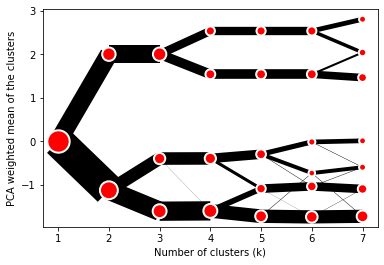
Default clustergram

Styling

Clustergram.plot() returns matplotlib axis and can be fully customised as any other matplotlib plot.

seaborn.set(style='whitegrid')

cgram.plot(
    ax=ax,
    size=0.5,
    linewidth=0.5,
    cluster_style={"color": "lightblue", "edgecolor": "black"},
    line_style={"color": "red", "linestyle": "-."},
    figsize=(12, 8)
)
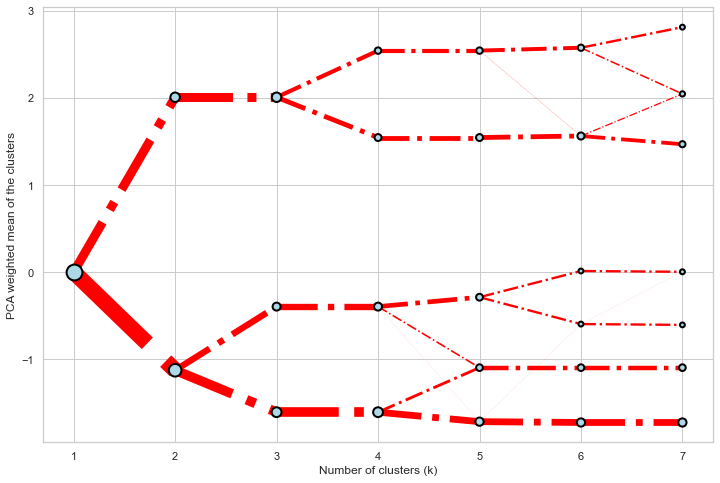
Colored clustergram

Mean options

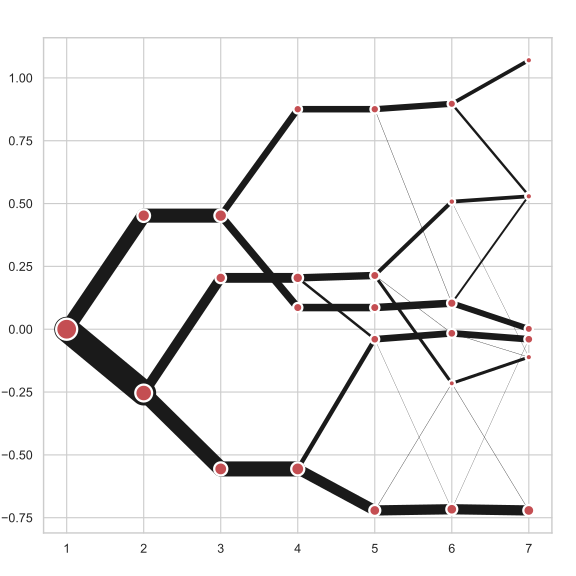
On the y axis, a clustergram can use mean values as in the original paper by Matthias Schonlau or PCA weighted mean values as in the implementation by Tal Galili.

cgram = Clustergram(range(1, 8))
cgram.fit(data)
cgram.plot(figsize=(12, 8), pca_weighted=True)
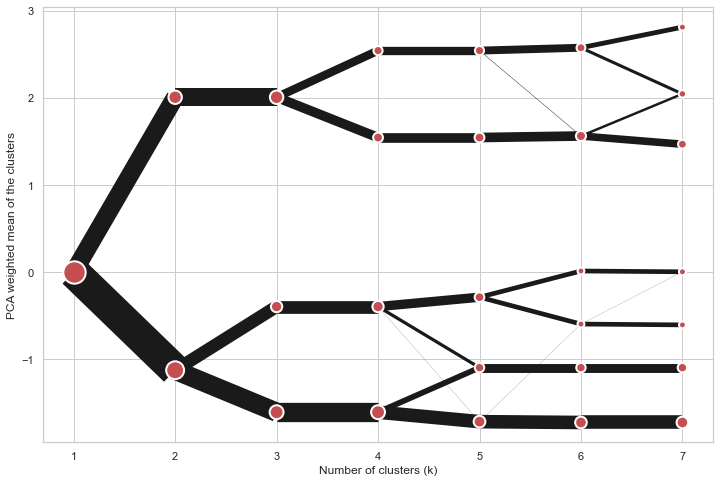
Default clustergram

cgram = Clustergram(range(1, 8))
cgram.fit(data)
cgram.plot(figsize=(12, 8), pca_weighted=False)
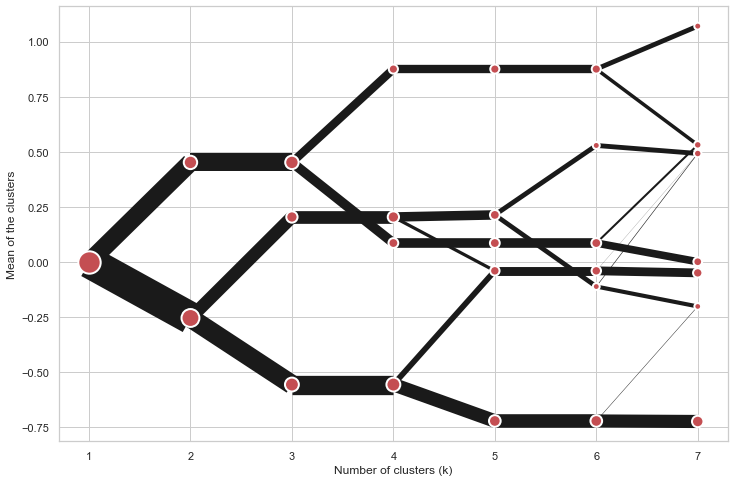
Default clustergram

Scikit-learn, SciPy and RAPIDS cuML backends

Clustergram offers three backends for the computation - scikit-learn and scipy which use CPU and RAPIDS.AI cuML, which uses GPU. Note that all are optional dependencies but you will need at least one of them to generate clustergram.

Using scikit-learn (default):

cgram = Clustergram(range(1, 8), backend='sklearn')
cgram.fit(data)
cgram.plot()

Using cuML:

cgram = Clustergram(range(1, 8), backend='cuML')
cgram.fit(data)
cgram.plot()

data can be all data types supported by the selected backend (including cudf.DataFrame with cuML backend).

Supported methods

Clustergram currently supports K-Means, Mini Batch K-Means, Gaussian Mixture Model and SciPy's hierarchical clustering methods. Note tha GMM and Mini Batch K-Means are supported only for scikit-learn backend and hierarchical methods are supported only for scipy backend.

Using K-Means (default):

cgram = Clustergram(range(1, 8), method='kmeans')
cgram.fit(data)
cgram.plot()

Using Mini Batch K-Means, which can provide significant speedup over K-Means:

cgram = Clustergram(range(1, 8), method='minibatchkmeans', batch_size=100)
cgram.fit(data)
cgram.plot()

Using Gaussian Mixture Model:

cgram = Clustergram(range(1, 8), method='gmm')
cgram.fit(data)
cgram.plot()

Using Ward's hierarchical clustering:

cgram = Clustergram(range(1, 8), method='hierarchical', linkage='ward')
cgram.fit(data)
cgram.plot()

Manual input

Alternatively, you can create clustergram using from_data or from_centers methods based on alternative clustering algorithms.

Using Clustergram.from_data which creates cluster centers as mean or median values:

data = numpy.array([[-1, -1, 0, 10], [1, 1, 10, 2], [0, 0, 20, 4]])
labels = pandas.DataFrame({1: [0, 0, 0], 2: [0, 0, 1], 3: [0, 2, 1]})

cgram = Clustergram.from_data(data, labels)
cgram.plot()

Using Clustergram.from_centers based on explicit cluster centers.:

labels = pandas.DataFrame({1: [0, 0, 0], 2: [0, 0, 1], 3: [0, 2, 1]})
centers = {
            1: np.array([[0, 0]]),
            2: np.array([[-1, -1], [1, 1]]),
            3: np.array([[-1, -1], [1, 1], [0, 0]]),
        }
cgram = Clustergram.from_centers(centers, labels)
cgram.plot(pca_weighted=False)

To support PCA weighted plots you also need to pass data:

cgram = Clustergram.from_centers(centers, labels, data=data)
cgram.plot()

Partial plot

Clustergram.plot() can also plot only a part of the diagram, if you want to focus on a limited range of k.

cgram = Clustergram(range(1, 20))
cgram.fit(data)
cgram.plot(figsize=(12, 8))
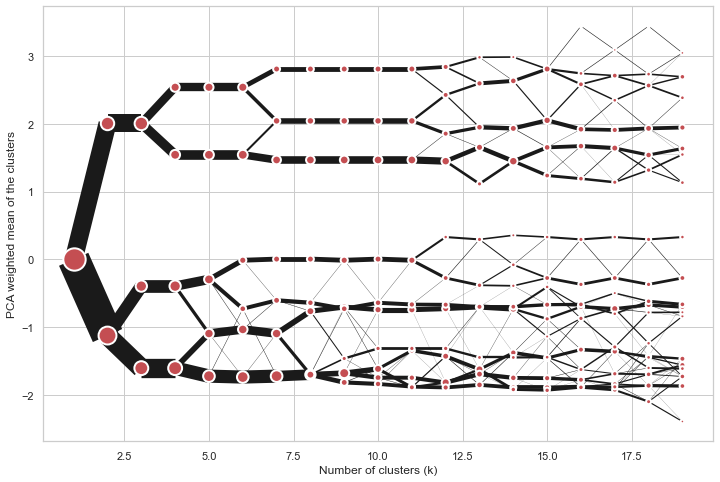
Long clustergram

cgram.plot(k_range=range(3, 10), figsize=(12, 8))
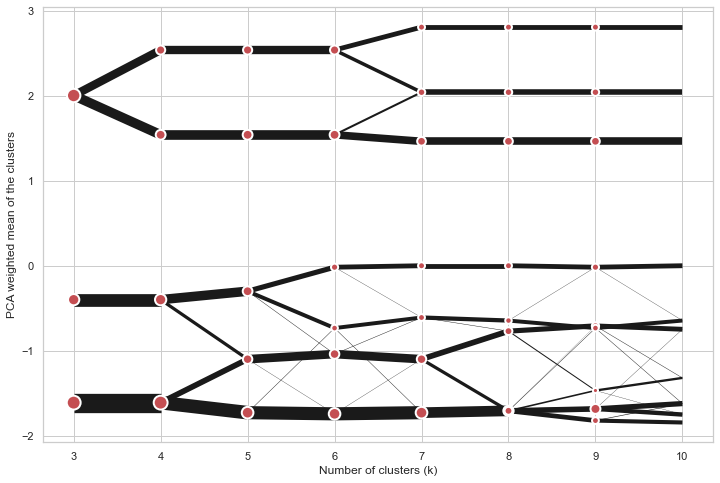
Limited clustergram

Additional clustering performance evaluation

Clustergam includes handy wrappers around a selection of clustering performance metrics offered by scikit-learn. Data which were originally computed on GPU are converted to numpy on the fly.

Silhouette score

Compute the mean Silhouette Coefficient of all samples. See scikit-learn documentation for details.

>>> cgram.silhouette_score()
2    0.531540
3    0.447219
4    0.400154
5    0.377720
6    0.372128
7    0.331575
Name: silhouette_score, dtype: float64

Once computed, resulting Series is available as cgram.silhouette. Calling the original method will recompute the score.

Calinski and Harabasz score

Compute the Calinski and Harabasz score, also known as the Variance Ratio Criterion. See scikit-learn documentation for details.

>>> cgram.calinski_harabasz_score()
2    482.191469
3    441.677075
4    400.392131
5    411.175066
6    382.731416
7    352.447569
Name: calinski_harabasz_score, dtype: float64

Once computed, resulting Series is available as cgram.calinski_harabasz. Calling the original method will recompute the score.

Davies-Bouldin score

Compute the Davies-Bouldin score. See scikit-learn documentation for details.

>>> cgram.davies_bouldin_score()
2    0.714064
3    0.943553
4    0.943320
5    0.973248
6    0.950910
7    1.074937
Name: davies_bouldin_score, dtype: float64

Once computed, resulting Series is available as cgram.davies_bouldin. Calling the original method will recompute the score.

Acessing labels

Clustergram stores resulting labels for each of the tested options, which can be accessed as:

>>> cgram.labels
     1  2  3  4  5  6  7
0    0  0  2  2  3  2  1
1    0  0  2  2  3  2  1
2    0  0  2  2  3  2  1
3    0  0  2  2  3  2  1
4    0  0  2  2  0  0  3
..  .. .. .. .. .. .. ..
337  0  1  1  3  2  5  0
338  0  1  1  3  2  5  0
339  0  1  1  1  1  1  4
340  0  1  1  3  2  5  5
341  0  1  1  1  1  1  5

Saving clustergram

You can save both plot and clustergram.Clustergram to a disk.

Saving plot

Clustergram.plot() returns matplotlib axis object and as such can be saved as any other plot:

import matplotlib.pyplot as plt

cgram.plot()
plt.savefig('clustergram.svg')

Saving object

If you want to save your computed clustergram.Clustergram object to a disk, you can use pickle library:

import pickle

with open('clustergram.pickle','wb') as f:
    pickle.dump(cgram, f)

Then loading is equally simple:

with open('clustergram.pickle','rb') as f:
    loaded = pickle.load(f)

References

Schonlau M. The clustergram: a graph for visualizing hierarchical and non-hierarchical cluster analyses. The Stata Journal, 2002; 2 (4):391-402.

Schonlau M. Visualizing Hierarchical and Non-Hierarchical Cluster Analyses with Clustergrams. Computational Statistics: 2004; 19(1):95-111.

https://www.r-statistics.com/2010/06/clustergram-visualization-and-diagnostics-for-cluster-analysis-r-code/

Comments
  • ENH: support interactive bokeh plots

    ENH: support interactive bokeh plots

    Adds Clustergram.bokeh() method which generates clustergram in a form of internactive bokeh plot. On top of an ability to zoom to specific sections shows the count of observations and cluster label (linked to Clustergram.labels).

    To-do:

    • [ ] documentation
    • [x] check RAPIDS compatibility

    I think I'll need to split docs into muliple pages at this point.

    opened by martinfleis 1
  • ENH: from_data and from_centers methods

    ENH: from_data and from_centers methods

    Addind the ability to create clustergram using custom data, without the need to run any cluster algorithm within clustergram itself.

    from_data gets labels and data and creates cluster centers as mean or median values.

    from_centers utilises custom centers when mean/median is not the optimal solution (like in case of GMM for example).

    Closes #10

    opened by martinfleis 1
  • skip k=1 for K-Means

    skip k=1 for K-Means

    k=1 does not need to be modelled, cluster centre is a pure mean of an input array. All the other options require k=1 e.g to fit gaussian.

    Skip k=1 in all k-means implementations to get avoid unnecessary computation.

    opened by martinfleis 0
  • ENH: add bokeh plotting backend

    ENH: add bokeh plotting backend

    With some larger clustergrams it may be quite useful to have the ability to zoom to certain places interactively. I think that bokeh plotting backend would be good for that.

    opened by martinfleis 0
  • ENH: expose labels, refactor plot computation internals, add additional metrics

    ENH: expose labels, refactor plot computation internals, add additional metrics

    Closes #7

    This refactors internals a bit, which in turn allows exposing the actual clustering labels for each tested iteration.

    Aso adding a few additional methods to assess clustering performance on top of clustergram.

    opened by martinfleis 0
  • Support multiple PCAs

    Support multiple PCAs

    The current way of weighting by PCA is hard-coded to use the first one. But it could be useful to see clustergrams weighted by other PCAs as well.

    And it would be super cool to get a 3d version with the first component on one axis and a second one on the other (not sure how useful though :D).

    opened by martinfleis 0
  • Can this work with cluster made by top2vec ?

    Can this work with cluster made by top2vec ?

    Thanks for your interesting package.

    Do you think Clustergram could work with top2vec ? https://github.com/ddangelov/Top2Vec

    I saw that there is the option to create a clustergram from a DataFrame.

    In top2vec, each "document" to cluster is represented as a embedding of a certain dimension, 256 , for example.

    So I could indeed generate a data frame, like this:

    | x0 | x1| ... | x255 | topic | | -----|----|---- | -------| -- | | 0.5| 0.2 | ....| -0.2 | 2 | | 0.7| 0.2 | ....| -0.1 | 2 | | 0.5| 0.2 | ....| -0.2 | 3 |

    Does Clustergram assume anything on the rows of this data frame ? I saw that the from_data method either takes "mean" or "medium" as method to calculate the cluster centers.

    In word vector, we use typically the cosine distance to calculate distances between the vectors. Does this have any influence ?

    top2vec calculates as well the "topic vectors" as a mean of the "document vectors", I believe.

    opened by behrica 17
Releases(v0.6.0)
Owner
Martin Fleischmann
Researcher in geographic data science. Member of @geopandas and @pysal development teams.
Martin Fleischmann
Intrinsic Image Harmonization

Intrinsic Image Harmonization [Paper] Zonghui Guo, Haiyong Zheng, Yufeng Jiang, Zhaorui Gu, Bing Zheng Here we provide PyTorch implementation and the

VISION @ OUC 44 Dec 21, 2022
[ECCV'20] Convolutional Occupancy Networks

Convolutional Occupancy Networks Paper | Supplementary | Video | Teaser Video | Project Page | Blog Post This repository contains the implementation o

622 Dec 30, 2022
一个多模态内容理解算法框架,其中包含数据处理、预训练模型、常见模型以及模型加速等模块。

Overview 架构设计 插件介绍 安装使用 框架简介 方便使用,支持多模态,多任务的统一训练框架 能力列表: bert + 分类任务 自定义任务训练(插件注册) 框架设计 框架采用分层的思想组织模型训练流程。 DATA 层负责读取用户数据,根据 field 管理数据。 Parser 层负责转换原

Tencent 265 Dec 22, 2022
PSML: A Multi-scale Time-series Dataset for Machine Learning in Decarbonized Energy Grids

PSML: A Multi-scale Time-series Dataset for Machine Learning in Decarbonized Energy Grids The electric grid is a key enabling infrastructure for the a

Texas A&M Engineering Research 19 Jan 07, 2023
Code for "Optimizing risk-based breast cancer screening policies with reinforcement learning"

Tempo: Optimizing risk-based breast cancer screening policies with reinforcement learning Introduction This repository was used to develop Tempo, as d

Adam Yala 12 Oct 11, 2022
PSTR: End-to-End One-Step Person Search With Transformers (CVPR2022)

PSTR (CVPR2022) This code is an official implementation of "PSTR: End-to-End One-Step Person Search With Transformers (CVPR2022)". End-to-end one-step

Jiale Cao 28 Dec 13, 2022
DeepVoxels is an object-specific, persistent 3D feature embedding.

DeepVoxels is an object-specific, persistent 3D feature embedding. It is found by globally optimizing over all available 2D observations of

Vincent Sitzmann 196 Dec 25, 2022
Styleformer - Official Pytorch Implementation

Styleformer -- Official PyTorch implementation Styleformer: Transformer based Generative Adversarial Networks with Style Vector(https://arxiv.org/abs/

Jeeseung Park 159 Dec 12, 2022
Powerful and efficient Computer Vision Annotation Tool (CVAT)

Computer Vision Annotation Tool (CVAT) CVAT is free, online, interactive video and image annotation tool for computer vision. It is being used by our

OpenVINO Toolkit 8.6k Jan 01, 2023
Audio Visual Emotion Recognition using TDA

Audio Visual Emotion Recognition using TDA RAVDESS database with two datasets analyzed: Video and Audio dataset: Audio-Dataset: https://www.kaggle.com

Combinatorial Image Analysis research group 3 May 11, 2022
GAN Image Generator and Characterwise Image Recognizer with python

MODEL SUMMARY 모델의 구조는 크게 6단계로 나뉩니다. STEP 0: Input Image Predict 할 이미지를 모델에 입력합니다. STEP 1: Make Black and White Image STEP 1 은 입력받은 이미지의 글자를 흑색으로, 배경을

Juwan HAN 1 Feb 09, 2022
FastCover: A Self-Supervised Learning Framework for Multi-Hop Influence Maximization in Social Networks by Anonymous.

FastCover: A Self-Supervised Learning Framework for Multi-Hop Influence Maximization in Social Networks by Anonymous.

0 Apr 02, 2021
Neural Factorization of Shape and Reflectance Under An Unknown Illumination

NeRFactor [Paper] [Video] [Project] This is the authors' code release for: NeRFactor: Neural Factorization of Shape and Reflectance Under an Unknown I

Google 283 Jan 04, 2023
Final Project for the CS238: Decision Making Under Uncertainty course at Stanford University in Autumn '21.

Final Project for the CS238: Decision Making Under Uncertainty course at Stanford University in Autumn '21. We optimized wind turbine placement in a wind farm, subject to wake effects, using Q-learni

Manasi Sharma 2 Sep 27, 2022
The Most Efficient Temporal Difference Learning Framework for 2048

moporgic/TDL2048+ TDL2048+ is a highly optimized temporal difference (TD) learning framework for 2048. Features Many common methods related to 2048 ar

Hung Guei 5 Nov 23, 2022
BiSeNet based on pytorch

BiSeNet BiSeNet based on pytorch 0.4.1 and python 3.6 Dataset Download CamVid dataset from Google Drive or Baidu Yun(6xw4). Pretrained model Download

367 Dec 26, 2022
Efficient electromagnetic solver based on rigorous coupled-wave analysis for 3D and 2D multi-layered structures with in-plane periodicity

Efficient electromagnetic solver based on rigorous coupled-wave analysis for 3D and 2D multi-layered structures with in-plane periodicity, such as gratings, photonic-crystal slabs, metasurfaces, surf

Alex Song 17 Dec 19, 2022
Neural Scene Flow Fields for Space-Time View Synthesis of Dynamic Scenes

Neural Scene Flow Fields PyTorch implementation of paper "Neural Scene Flow Fields for Space-Time View Synthesis of Dynamic Scenes", CVPR 2021 [Projec

Zhengqi Li 583 Dec 30, 2022
PyTorch implementation of Memory-based semantic segmentation for off-road unstructured natural environments.

MemSeg: Memory-based semantic segmentation for off-road unstructured natural environments Introduction This repository is a PyTorch implementation of

11 Nov 28, 2022
Code Release for the paper "TriBERT: Full-body Human-centric Audio-visual Representation Learning for Visual Sound Separation"

TriBERT This repository contains the code for the NeurIPS 2021 paper titled "TriBERT: Full-body Human-centric Audio-visual Representation Learning for

UBC Computer Vision Group 8 Aug 31, 2022