Command-line tool for looking up colors and palettes.

Overview

Colorpedia

Colorpedia is a command-line tool for looking up colors, shades and palettes.

Supported color models: HEX, RGB, HSL, HSV, CMYK.
Demo GIF Build CodeQL Codecov PyPI version GitHub license Python version

Requirements

  • Modern terminal with true color and utf-8 support (e.g. Windows Terminal, PowerShell, iTerm2, Terminator)
  • Python 3.6+

Installation

Install via pip:

pip install colorpedia

For conda users:

conda install colorpedia -c conda-forge

You can then use the color command:

color --help

If you have a name collision on Windows, use colorpedia instead:

colorpedia --help

Usage

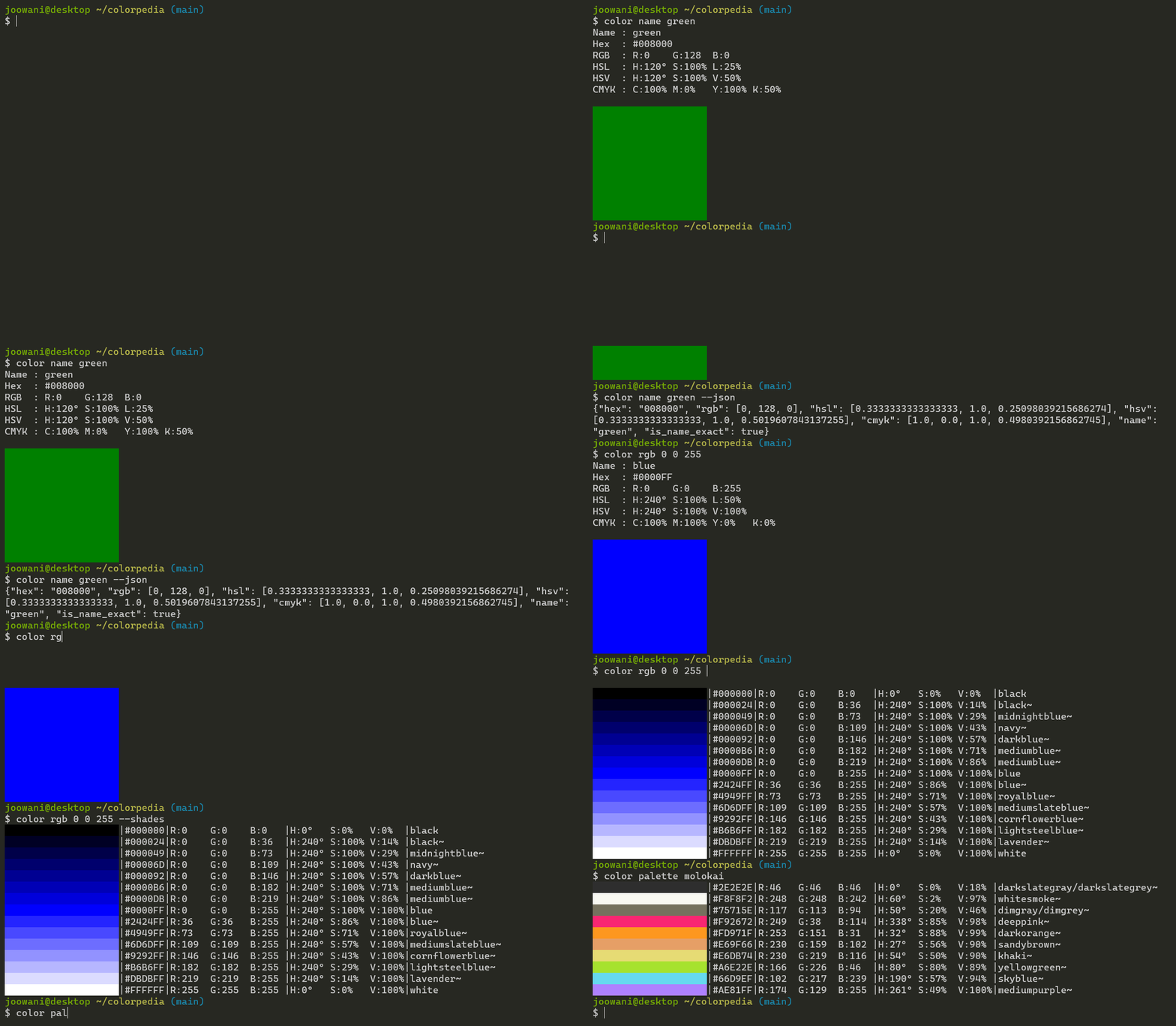
Look up colors using various color models:

color name green            # CSS3 color name
color hex FFFFFF            # hex code without the hash (#) prefix
color rgb 255 255 255       # RGB (Red Green Blue)
color hsl 360 100 100       # HSL (Hue Saturation Lightness)
color hsv 360 100 100       # HSV (Hue Saturation Brightness)
color cmyk 100 100 100 100  # CMYK (Cyan Magenta Yellow Black)

Use --shades to display shades of a color:

color name green --shades    # Display 15 colors by default
color hex FFFFFF --shades=5  # Display 5 shades

Look up color palettes:

color palette molokai
color palette facebook
color palette zenburn

Control the output with global flags:

color name yellow --all      # Display all details
color name yellow --json     # Display in JSON format
color name yellow --units    # Display unit symbols
color name yellow --nojson   # Do not display in JSON
color name yellow --nounits  # Do not display unit symbols

Combine with other command-line tools like jq:

color palette molokai | cut -d'|' -f 2,3,4
color name blue --range --json | jq .[0].name

Use --help to display more information on each subcommand:

color name --help
color rgb --help
color palette --help

Tab Completion

For Bash, add the following line in ~/.bashrc or ~/.bash_profile:

source <(color -- --completion)

For Zsh, add the following lines in ~/.zshrc:

autoload -U +X compinit && compinit
autoload -U +X bashcompinit && bashcompinit

source <(color -- --completion | sed "s/:/: /g")

Replace color with colorpedia if you are using the latter.

Configuration

Initialize the configuration file to customize CLI behavior:

color config init

The command above creates ~/.config/colorpedia/config.json with default settings:

{
  // Always display in JSON format. Use with --nojson global flag.
  "always_output_json": false,
  
  // Suffix for approximate color names (e.g. "green~").
  "approx_name_suffix": "~",
  
  // Default number of shades displayed when --shades is used without a count.
  "default_shades_count": 15,
  
  // Display degrees angle (°) symbol. Use with --nounits global flag.
  "display_degree_symbol": false,
  
  // Display percentage (%) symbol. Use with --nounits global flag.
  "display_percent_symbol": false,
  
  // Height of the color box displayed in single-color (get) view.
  "get_view_color_height": 10,
  
  // Width of the color box displayed in single-color (get) view.
  "get_view_color_width": 20,
  
  // Keys displayed in single-color (get) view.
  "get_view_keys": ["name", "hex", "rgb", "color", "hsl", "hsv", "cmyk"],
  
  // Keys displayed in JSON view.
  "json_keys": ["name", "is_name_exact", "hex", "rgb", "hsl", "hsv", "cmyk"],
  
  // Width of the color box displayed in multi-color (list) view.
  "list_view_color_width": 20,
  
  // Keys displayed in multi-color (list) view.
  "list_view_keys": ["name", "hex", "rgb", "color", "hsl", "hsv", "cmyk"],
  
  // Always uppercase hex codes if set to true, lowercase if set to false.
  "uppercase_hex_codes": true
}

Display or edit the configuration file:

color config show  # Display configuration
color config edit  # Edit configuration via a text editor

Technical Notes

  • Names of "unknown" colors are approximated using minimum RGB delta:
    delta = (R1 - R2) ^ 2 + (G1 - G2) ^ 2 + (B1 - B2) ^ 2
    
    If there is are ties, all names are included in the output.
  • Percentage values use 0 - 100 scale by default, 0 - 1 scale in JSON.
  • Degree angles use 0 - 360 scale by default, 0 - 1 scale in JSON.
  • Percent and degree unit symbols are omitted in JSON.
  • If HSV/HSL/CMYK values do not map exactly to an RGB triplet, they are rounded to the nearest one.
You might also like...
A lightweight Python module and command-line tool for generating NATO APP-6(D) compliant military symbols from both ID codes and natural language names

Python military symbols This is a lightweight Python module, including a command-line script, to generate NATO APP-6(D) compliant military symbol icon

Python command line tool and python engine to label table fields and fields in data files.

Python command line tool and python engine to label table fields and fields in data files. It could help to find meaningful data in your tables and data files or to find Personal identifable information (PII).

A command line tool to hide and reveal information inside images (works for both PNGs and JPGs)

Imgrerite A command line tool to hide and reveal information inside images (works for both PNGs and JPGs) Dependencies Python 3 Git Most of the Linux

gget is a free and open-source command-line tool and Python package that enables efficient querying of genomic databases.

gget is a free and open-source command-line tool and Python package that enables efficient querying of genomic databases. gget consists of a collection of separate but interoperable modules, each designed to facilitate one type of database querying in a single line of code.

Simple command line tool for text to image generation using OpenAI's CLIP and Siren (Implicit neural representation network)

Simple command line tool for text to image generation using OpenAI's CLIP and Siren (Implicit neural representation network)

Free and Open-Source Command Line tool for Text Replacement

Sniplet Free and Open Source Text Replacement Tool Description: Sniplet is a work in progress CLI tool which can do text replacement globally in Linux

A command line tool to remove background from video and image

A command line tool to remove background from video and image, brought to you by BackgroundRemover.app which is an app made by nadermx powered by this tool

A command line tool (and Python library) for archiving Twitter JSON

A command line tool (and Python library) for archiving Twitter JSON

Command line tool to keep track of your favorite playlists on YouTube and many other places.

Command line tool to keep track of your favorite playlists on YouTube and many other places.

Comments
  • Bad hex code when using 212121

    Bad hex code when using 212121

    Cool tool! Thank you so much for sharing it!

    Entity | Version --- | --- colorpedia | 1.1.0 Python | 3.9.1

    When I run

    % color hex 212121
    Bad hex code (expecting a string matching ^(?:[0-9a-fA-F]{3}){1,2}$)
    

    #212121 seems to be a valid hex code.

    opened by paw-lu 9
  • [Feature Suggestion] Commands to manipulate user-defined palettes

    [Feature Suggestion] Commands to manipulate user-defined palettes

    To add a new palette,

    colorpedia palette create <name> <path_to_json_file>

    If there is already one, ask the user if want to overwrite or not.

    To delete a palette,

    colorpedia palette remove <name>

    enhancement 
    opened by dinhanhx 3
  • Colorpedia

    Colorpedia

    just installed colorpedia using pip... I cant seem to run this .. I am getting the following error message

    Traceback (most recent call last): File "/Users/user/anaconda3/bin/color", line 5, in from colorpedia.cli import entry_point File "/Users/user/anaconda3/lib/python3.6/site-packages/colorpedia/init.py", line 1, in from colorpedia.color import Color File "/Users/user/anaconda3/lib/python3.6/site-packages/colorpedia/color.py", line 1, in from dataclasses import dataclass ModuleNotFoundError: No module named 'dataclasses'

    Please help

    opened by coderchai 2
Releases(1.2.3)
Convert shellcode generated using pe_2_shellcode to cdb format.

pe2shc-to-cdb This tool will convert shellcode generated using pe_to_shellcode to cdb format. Cdb.exe is a LOLBIN which can help evade detection & app

mrd0x 75 Jan 05, 2023
A simple python script to execute a command when a YubiKey is disconnected

YubiKeyExecute A python script to execute a command when a YubiKey / YubiKeys are disconnected. ‏‏‎ ‎ How to use: 1. Download the latest release and d

6 Mar 12, 2022
📦 A command line utility to put text in a box.

boxie A command line utility to put text in a box. Installation pip install boxie If you are on Linux you may need to use sudo to access this globally

Eliaz Bobadilla 10 Jun 30, 2022
A VIM-inspired filemanager for the console

ranger 1.9.3 ranger is a console file manager with VI key bindings. It provides a minimalistic and nice curses interface with a view on the directory

12.6k Dec 30, 2022
CLI tool for typescript tasks & migrations

typed CLI tool for typescript tasks & migrations Installation Usage $ typed --list Subcommands: bootstrap 🔨 Bootstrap your environment for TypeS

Lob 1 Nov 15, 2021
Wordle - Wordle solver with python

wordle what is wordle? https://www.powerlanguage.co.uk/wordle/ preparing $ pip i

shidocchi 0 Jan 24, 2022
ctree - command line christmas tree

ctree ctree - command line christmas tree It is small python script that prints a christmas tree in terminal. It is colourful and always gives you a d

15 Aug 15, 2022
Unpacks things.

$ unp_ unp is a command line tool that can unpack archives easily. It mainly acts as a wrapper around other shell tools that you can find on v

Armin Ronacher 405 Jan 03, 2023
Un module simple pour demander l'accord de l'utilisateur dans une CLI.

Demande de confirmation utilisateur pour CLI Présentation ask_lib est un module pour le langage Python proposant une seule fonction; ask(). Le but pri

CallMePixelMan 7 May 09, 2022
Sink is a CLI tool that allows users to synchronize their local folders to their Google Drives. It is similar to the Git CLI and allows fast and reliable syncs with the drive.

Sink is a CLI synchronisation tool that enables a user to synchronise local system files and folders with their Google Drives. It follows a git C

Yash Thakre 16 May 29, 2022
commandline version of wordle game and my auto solver.

Wordle Machine (and Wordle Game) (in commandline) My implementation of the Wordle game (inspired by https://www.powerlanguage.co.uk/wordle/) and my in

Kevin Xu 11 Jan 03, 2023
tox-server is a command line tool which runs tox in a loop and calls it with commands from a remote CLI.

Tox Server tox-server is a command line tool which runs tox in a loop and calls it with commands from a remote CLI. It responds to commands via ZeroMQ

Alexander Rudy 3 Jan 10, 2022
Logic-Sim - A clone of 'Digital Logic Sim' from Sebastian Lague

Logic Simulator This is a clone of 'Digital Logic Sim' from Sebastian Lague. But

Ethan 1 Feb 01, 2022
Command-line interface to PyPI Stats API to get download stats for Python packages

pypistats Python 3.6+ interface to PyPI Stats API to get aggregate download statistics on Python packages on the Python Package Index without having t

Hugo van Kemenade 140 Jan 03, 2023
Generate your name in Ascii modular type art through the terminal

ASCII Name Generator Designed and developed by Eduardo Aire The ASCII Art Name Generator is a simple program that helps you to have a practical Shell/

Eduardo Aire 1 Nov 17, 2021
spotifytools is a Python command line tool

spotifytools spotifytools is a Python command line tool Documentation The documentation is available on the following link Releases Instalation instru

0 Sep 28, 2021
A terminal client for connecting to hack.chat servers

A terminal client for connecting to hack.chat servers.

V9 2 Sep 21, 2022
Create animated ASCII-art for the command line almost instantly!

clippy Create and play colored 🟥 🟩 🟦 or colorless ⬛️ ⬜️ animated, or static, ASCII-art in the command line! clippy can help if you are wanting to;

Connor 10 Jun 26, 2022
:computer: tmux session manager. built on libtmux

tmuxp, tmux session manager. built on libtmux. We need help! tmuxp is a trusted session manager for tmux. If you could lend your time to helping answe

python utilities for tmux 3.6k Jan 01, 2023
Command line parser for common log format (Nginx default).

Command line parser for common log format (Nginx default).

Lucian Marin 138 Dec 19, 2022

