Learning to Stylize Novel Views
Contact: Hsin-Ping Huang ([email protected])
Introduction
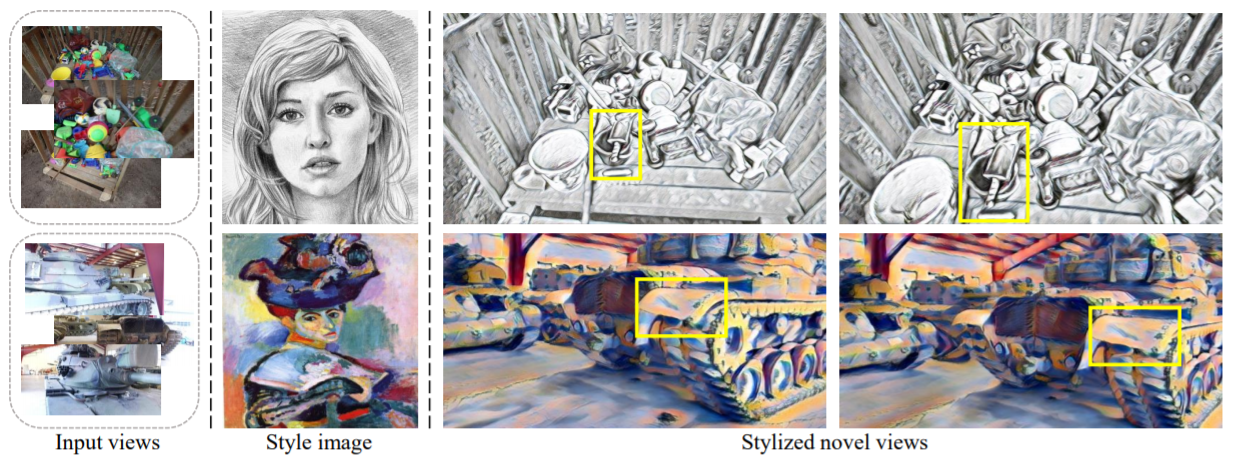
We tackle a 3D scene stylization problem - generating stylized images of a scene from arbitrary novel views given a set of images of the same scene and a reference image of the desired style as inputs. Direct solution of combining novel view synthesis and stylization approaches lead to results that are blurry or not consistent across different views. We propose a point cloud-based method for consistent 3D scene stylization. First, we construct the point cloud by back-projecting the image features to the 3D space. Second, we develop point cloud aggregation modules to gather the style information of the 3D scene, and then modulate the features in the point cloud with a linear transformation matrix. Finally, we project the transformed features to 2D space to obtain the novel views. Experimental results on two diverse datasets of real-world scenes validate that our method generates consistent stylized novel view synthesis results against other alternative approaches.
Paper
Learning to Stylize Novel Views
Hsin-Ping Huang, Hung-Yu Tseng, Saurabh Saini, Maneesh Singh, and Ming-Hsuan Yang
IEEE International Conference on Computer Vision (ICCV), 2021
Please cite our paper if you find it useful for your research.
@inproceedings{huang_2021_3d_scene_stylization,
   title = {Learning to Stylize Novel Views},
   author={Huang, Hsin-Ping and Tseng, Hung-Yu and Saini, Saurabh and Singh, Maneesh and Yang, Ming-Hsuan},
   booktitle = {ICCV},
   year={2021}
}
Installation and Usage
Kaggle account
- To download the WikiArt dataset, you would need to register for a Kaggle account.
- Sign up for a Kaggle account at https://www.kaggle.com.
- Go to top right and select the 'Account' tab of your user profile (https://www.kaggle.com/username/account)
- Select 'Create API Token'. This will trigger the download of kaggle.json.
- Place this file in the location ~/.kaggle/kaggle.json
- chmod 600 ~/.kaggle/kaggle.json
Install
- Clone this repo
git clone https://github.com/hhsinping/stylescene.git
cd stylescene
- Create conda environment and install required packages
- Python 3.9
- Pytorch 1.7.1, Torchvision 0.8.2, Pytorch-lightning 0.7.1
- matplotlib, scikit-image, opencv-python, kaggle
- Pointnet2_Pytorch
- Pytorch3D 0.4.0
conda create -n stylescene python=3.9.1
conda activate stylescene
pip install torch==1.7.1+cu110 torchvision==0.8.2+cu110 -f https://download.pytorch.org/whl/torch_stable.html
pip install matplotlib==3.4.1 scikit-image==0.18.1 opencv-python==4.5.1.48 pytorch-lightning==0.7.1 kaggle
pip install "git+git://github.com/erikwijmans/Pointnet2_PyTorch.git#egg=pointnet2_ops&subdirectory=pointnet2_ops_lib"
curl -LO https://github.com/NVIDIA/cub/archive/1.10.0.tar.gz
tar xzf 1.10.0.tar.gz
export CUB_HOME=$PWD/cub-1.10.0
git clone https://github.com/facebookresearch/pytorch3d.git
cd pytorch3d
git checkout 340662e
pip install -e .
cd -
Our code has been tested on Ubuntu 20.04, CUDA 11.1 with a RTX 2080 Ti GPU.
Datasets
- Download datasets, pretrained model, complie C++ code using the following script. This script will:
- Download Tanks and Temples dataset
- Download continous testing sequences of Truck, M60, Train, Playground scenes
- Download 120 testing styles
- Download WikiArt dataset from Kaggle
- Download pretrained models
- Complie the c++ code in preprocess/ext/preprocess/ and stylescene/ext/preprocess/
bash download_data.sh
- Preprocess Tanks and Temples dataset
This script will generate points.npy and r31.npy for each training and testing scene.
points.npy records the 3D coordinates of the re-projected point cloud and its correspoinding 2D positions in source images
r31.npy contains the extracted VGG features of sources images
cd preprocess
python Get_feat.py
cd ..
Testing example
cd stylescene/exp
vim ../config.py
Set Train = False
Set Test_style = [0-119 (refer to the index of style images in ../../style_data/style120/)]
To evaluate the network you can run
python exp.py --net fixed_vgg16unet3_unet4.64.3 --cmd eval --iter [n_iter/last] --eval-dsets tat-subseq --eval-scale 0.25
Generated images can be found at experiments/tat_nbs5_s0.25_p192_fixed_vgg16unet3_unet4.64.3/tat_subseq_[sequence_name]_0.25_n4/
Training example
cd stylescene/exp
vim ../config.py
Set Train = True
To train the network from scratch you can run
python exp.py --net fixed_vgg16unet3_unet4.64.3 --cmd retrain
To train the network from a checkpoint you can run
python exp.py --net fixed_vgg16unet3_unet4.64.3 --cmd resume
Generated images can be found at ./log
Saved model and training log can be found at experiments/tat_nbs5_s0.25_p192_fixed_vgg16unet3_unet4.64.3/
Acknowledgement
The implementation is partly based on the following projects: Free View Synthesis, Linear Style Transfer, PointNet++, SynSin.

 53 Dec 27, 2022
 31 Sep 25, 2021
 253 Jan 06, 2023
 42 Dec 06, 2022
 155 Jan 04, 2023
 14 Jul 24, 2022
 1.8k Jan 01, 2023
 29 Oct 06, 2022
 67 Dec 31, 2022
 4.5k Dec 23, 2022
 111 Dec 16, 2022
 1 Jan 04, 2022
 231 Jan 05, 2023
 783 Jan 04, 2023
 9 Jan 02, 2023
 339 Oct 27, 2022
 25 Jul 20, 2022
 250 Dec 25, 2022
 109 Dec 14, 2022
 9 Jul 30, 2022