A blender import/export system for Defold

Overview

defold-blender-export

A Blender export system for the Defold game engine.

Setup Notes

There are no exhaustive documents for this tool yet. Its just not complete, so everything is very much 'in flux'.

Note: The Sync Tool is now a Blender Only addon. This makes building Defold resource collections much simpler.

To use the tool follow the guide below.

  1. Copy the blender/addons/sync_tool folder to the blender addons folder. See blender docs for this.
  2. Or.. you can copy the blender/addons/sync_tool/* files into the folder where your blender source file is, and the scripts should work from there.
  3. Open the blender file you want to work in (or open the test.blend to see an example already setup)
  4. Open the text editor in blender and loadin in the script "defoldSynUI.py"
  5. Run this file. You should see "bpy.ops.text.run_script()" in the Info Window in blender.
  6. Open the 3D layout window in blender and ensure you are in "Object Mode".
  7. Examine the Tools menu on the right side of the Layout 3D View (see below) alt text
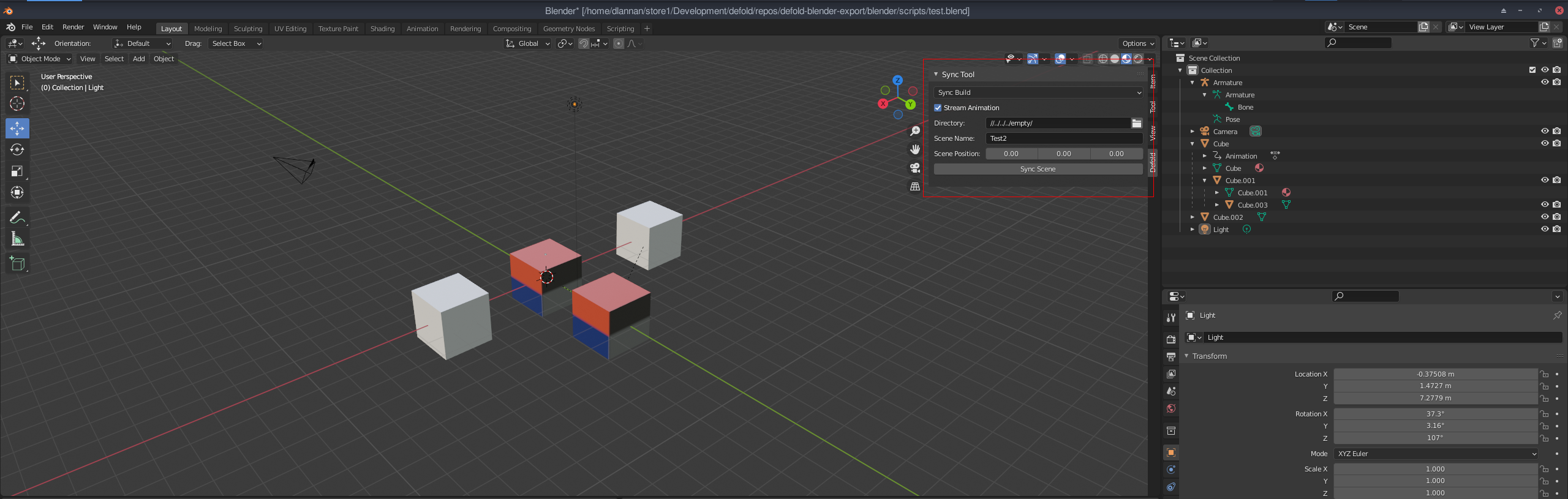
  8. Enter the appropriate properties for Scene Name and Directory (project directory to save into).
  9. Select "Sync Build" for the scene mode and press the "Sync Scene" button when ready.

A folder will be created in the target project directory with all the resources needed to load the scene into Defold.

At a minimum you should see a collection file and some gameobjects (in the gameobjects folder). You can open this project and open the collection. While the "Sync" tickbox is enabled, data will be written to the collection file - do not save new objects into it while Sync is on - they will be overwritten. Sync can be unticked at any time and the data will stop pushing to the collection.

Once this is setup you can add/edit the blender scene as you need and any Sync's you do, will update the meshes, textures and object positions in Defold.

Issues

There are a number of odd issues using this system. It is early days, so they will be ironed out. Some limitations on what Blender can stream:

  • Only single texture for each object is used (this is a Defold thing).
  • Object materials only use model materials at the moment. This might change to PBR materials.
  • Lights and Camera are added in Defold, but they are not yet setup to operate correctly (TBD)
  • Many features are only partially functional. Tread carefully :)
Comments
  • The addon just don't work

    The addon just don't work

    I properly set up everything, gave admin permission to both blender and the interpreter, but still, when I click to sync it doesnt do anything. Thats my scene: image

    opened by Caue-Aron 3
  • Support multiple UV coords

    Support multiple UV coords

    Based on discussion here with Ivan_Lytkin: https://forum.defold.com/t/building-a-sync-tool-for-blender-to-defold/69920

    Potentially add a new stream for texcoord1 in the buffer files. This could allow multiple coord access in the material.

    To be tested.

    opened by dlannan 2
  • Alpha channel in Blender BSDF mapped to Albedo texture

    Alpha channel in Blender BSDF mapped to Albedo texture

    Now that tools are available to merge texture channels together to minimise the number of samplers in the Simple PBR shader, it is planned to add the Alpha channel in blender bsdf material into the output Albedo alpha channel. This will produce more consistent alpha sync results without the need for render script changes.

    enhancement 
    opened by dlannan 1
  • Add error reporting and logging

    Add error reporting and logging

    Due to requirements for correct scene and material construction to have a successful export, I need to add some logging and reporting so users can determine what issues there might be. image

    This has been added. Included this issue so that I can track specific enhancements.

    enhancement 
    opened by dlannan 0
  • Remove root rotation for Defold world space transform.

    Remove root rotation for Defold world space transform.

    The current sync tool adds a root node with a rotational transform to get the Blender world space into the Defold world space.

    The problem with applying a complete transform is animations and some object hierarchies. I need to spend some time make a suitable solution (preferably in the lua side of things) to do this vertex + object + anim transform correctly.

    The current system is not ideal because images may come out flipped on a surface (due to the rotation).

    enhancement 
    opened by dlannan 0
  • Simple PBR lighting

    Simple PBR lighting

    The lighting in Simple PBR is essentially the same as the Defold default model lighting - very rudimentary. It is intended that up to 4 dynamic lights are supported. With possibly Point, Spot and Directional types supported.

    This issue is to research some of this and maintain documentation on the process. The solving of this feature will be needed before shadows and some GI solutions are attempted.

    enhancement 
    opened by dlannan 1
  • Split animations into per action dae's with no meshes.

    Split animations into per action dae's with no meshes.

    The current animation export is messy and can be difficult to get right with multiple animations within a scene. The goal is:

    • Output meshes individually. And identify animated meshes. These will be tagged as "Defold models" but still use a mesh buffer.
    • Detect all animation actions and save them out as animation only dae files containing only the skeletons and the skins. No meshes.
    • Export script info (into the meta data table) that allows easy access to available animations, and how to play them (maybe with correct timing and configs too).

    Once complete, it should allow multiple animations in a scene to be easily exported to Defold and easily run in Defold.

    enhancement 
    opened by dlannan 1
Releases(v1.3.1)
  • v1.3.1(Nov 2, 2022)

  • v1.3.0(Oct 29, 2022)

    A sizable upgrade. Including new LightMapping capabilities.

    Features:

    • LightMapper support (with modifications)
    • General Blender LightMap support.
    • New PBR Lightmap material for Defold.
    • Lightmap and Simple material support in the same scene

    Details on the forum about the new features.

    Source code(tar.gz)
    Source code(zip)
    defender.zip(1.58 MB)
  • v1.2.0(Sep 20, 2022)

    Thanks to Aronimo and Makaber for all the testing and digging a Windows issue has finally been resolved (hence 1.2)

    • Windows utf8 to wide char support in file paths.
    • Some cleanup in the code.

    OSX and Linux have not been heavily tested with this release. Debian 11 seems ok so far (need to add some auto tests).

    Source code(tar.gz)
    Source code(zip)
    defender.zip(1.53 MB)
  • v1.1.1(Sep 3, 2022)

    Added new logging system which begins to provide feedback to the user about scene related issues. Currently supports:

    • Material type checking
    • Collection checking (for existence)
    • Luajit permissions levels (reports where file cannot be executed from).
    • Outputs log report that can be sent to me.

    The main aim of the logging is to catch more and more anomalies that are unsupported in Blender when converting to Defold.

    Source code(tar.gz)
    Source code(zip)
    defender.zip(1.49 MB)
  • v1.1.0(Aug 28, 2022)

    Release supporting incoming changes to Defold for support with gltf and glb mesh and animation data.

    • Added selection for gltf and glb
    • Added updates to export gltf and glb
    • Minor bug fixes for mesh construction
    • Change to new name Defender
    Source code(tar.gz)
    Source code(zip)
    defender.zip(1.49 MB)
  • v1.0.8(Apr 13, 2022)

  • v1.0.6(Mar 16, 2022)

    New fixes for Windows platforms.

    • Pathing was broken on both the blender python side and lua export side.
    • Fixed a number of issues with catching script errors.

    Working on OSX and animation action naming (multiple daes per model - 1 for each action).

    Source code(tar.gz)
    Source code(zip)
    sync_tool.zip(1.36 MB)
  • v1.0.5(Feb 28, 2022)

    Added a new automatic creation of an alpha channel from the Blender Alpha channel in Principled BSDF materials. Important notes of this new feature:

    • If the base color has an alpha channel, and you want to use that, set the Alpha channel to 1.0 value.
    • If you use an Alpha of anything other than 1.0 without a texture then the whole alpha for the material will use that value.
    • To set an alpha mask, simply add it as a texture to the material Alpha channel.

    Alpha textures must be greyscale or all the rgba channels are the same. When merged with the base color, the alpha is merged into a single 8 bit channel for Defold.

    Source code(tar.gz)
    Source code(zip)
    sync_tool.zip(1.34 MB)
  • v1.0.4(Feb 26, 2022)

    Release notes:

    • New ao + metallic + roughness map (as per Khronos GLTF PBR)
    • Fixes to pbr simple material params
    • Bug fixes
    • New png texture merging tools. This will allow alpha merge from alpha channel into the Albedo + Alpha texture (TBD)
    Source code(tar.gz)
    Source code(zip)
    sync_tool.zip(1.34 MB)
  • v1.0.3(Feb 23, 2022)

  • v1.0.2(Feb 22, 2022)

  • v1.0.1(Feb 22, 2022)

  • v1.0.0(Feb 22, 2022)

    Release 1.0 Initial module release for Blender 2.8 and above. Follow install guide on github. Main features:

    • Sync static meshes with hierarchy
    • Sync directly to a Defold project folder
    • Support Animation
    • Lights and Camera - early support
    • Meta Data supported
    • Builtin model material
    • Custom Simple PBR material

    Note: Uses luajit to execute scripts. See install guide.

    Source code(tar.gz)
    Source code(zip)
    sync_tool.zip(1.16 MB)
Owner
David Lannan
David Lannan
Mathematical learnings with Lean, for those of us who wish we knew more of both!

Lean for the Inept Mathematician This repository contains source files for a number of articles or posts aimed at explaining bite-sized mathematical c

Julian Berman 8 Feb 14, 2022
Homework 2: Matplotlib and Data Visualization

Homework 2: Matplotlib and Data Visualization Overview These data visualizations were created for my introductory computer science course using Python

Sophia Huang 12 Oct 20, 2022
HW 02 for CS40 - matplotlib practice

HW 02 for CS40 - matplotlib practice project instructions https://github.com/mikeizbicki/cmc-csci040/tree/2021fall/hw_02 Drake Lyric Analysis Bar Char

13 Oct 27, 2021
Minimal Ethereum fee data viewer for the terminal, contained in a single python script.

Minimal Ethereum fee data viewer for the terminal, contained in a single python script. Connects to your node and displays some metrics in real-time.

48 Dec 05, 2022
Python script to generate a visualization of various sorting algorithms, image or video.

sorting_algo_visualizer Python script to generate a visualization of various sorting algorithms, image or video.

146 Nov 12, 2022
在原神中使用围栏绘图

yuanshen_draw 在原神中使用围栏绘图 文件说明 toLines.py 将一张图片转换为对应的线条集合,视频可以按帧转换。 draw.py 在原神家园里绘制一张线条图。 draw_video.py 在原神家园里绘制视频(自动按帧摆放,截图(win)并回收) cat_to_video.py

14 Oct 08, 2022
Open-questions - Open questions for Bellingcat technical contributors

Open questions for Bellingcat technical contributors These are difficult, long-term projects that would contribute to open source investigations at Be

Bellingcat 234 Dec 31, 2022
A simple project on Data Visualization for CSCI-40 course.

Simple-Data-Visualization A simple project on Data Visualization for CSCI-40 course - the instructions can be found here SAT results in New York in 20

Hugo Matousek 8 Oct 27, 2021
An adaptable Snakemake workflow which uses GATKs best practice recommendations to perform germline mutation calling starting with BAM files

Germline Mutation Calling This Snakemake workflow follows the GATK best-practice recommandations to call small germline variants. The pipeline require

12 Dec 24, 2022
100 Days of Code The Complete Python Pro Bootcamp for 2022

100-Day-With-Python 100 Days of Code - The Complete Python Pro Bootcamp for 2022. In this course, I spend with python language over 100 days, and I up

Rajdip Das 8 Jun 22, 2022
Python package for hypergraph analysis and visualization.

The HyperNetX library provides classes and methods for the analysis and visualization of complex network data. HyperNetX uses data structures designed to represent set systems containing nested data

Pacific Northwest National Laboratory 304 Dec 27, 2022
demir.ai Dataset Operations

demir.ai Dataset Operations With this application, you can have the empty values (nan/null) deleted or filled before giving your dataset to machine le

Ahmet Furkan DEMIR 8 Nov 01, 2022
Histogramming for analysis powered by boost-histogram

Hist Hist is an analyst-friendly front-end for boost-histogram, designed for Python 3.7+ (3.6 users get version 2.4). See what's new. Installation You

Scikit-HEP Project 97 Dec 25, 2022
This is a learning tool and exploration app made using the Dash interactive Python framework developed by Plotly

Support Vector Machine (SVM) Explorer This app has been moved here. This repo is likely outdated and will not be updated. This is a learning tool and

Plotly 150 Nov 03, 2022
Python support for Godot 🐍🐍🐍

Godot Python, because you want Python on Godot ! The goal of this project is to provide Python language support as a scripting module for the Godot ga

Emmanuel Leblond 1.4k Jan 04, 2023
Runtime analysis of code with plotting

Runtime analysis of code with plotting A quick comparison among Python, Cython, and the C languages A Programming Assignment regarding the Programming

Cena Ashoori 2 Dec 24, 2021
Schema validation just got Pythonic

Schema validation just got Pythonic schema is a library for validating Python data structures, such as those obtained from config-files, forms, extern

Vladimir Keleshev 2.7k Jan 06, 2023
Political elections, appointment, analysis and visualization in Python

Political elections, appointment, analysis and visualization in Python poli-sci-kit is a Python package for political science appointment and election

Andrew Tavis McAllister 9 Dec 01, 2022
Handout for the tutorial "Creating publication-quality figures with matplotlib"

Handout for the tutorial "Creating publication-quality figures with matplotlib"

JB Mouret 1.9k Jan 02, 2023
Project coded in Python using Pandas to look at changes in chase% for batters facing a pitcher first time through the order vs. thrid time

Project coded in Python using Pandas to look at changes in chase% for batters facing a pitcher first time through the order vs. thrid time

Jason Kraynak 1 Jan 07, 2022