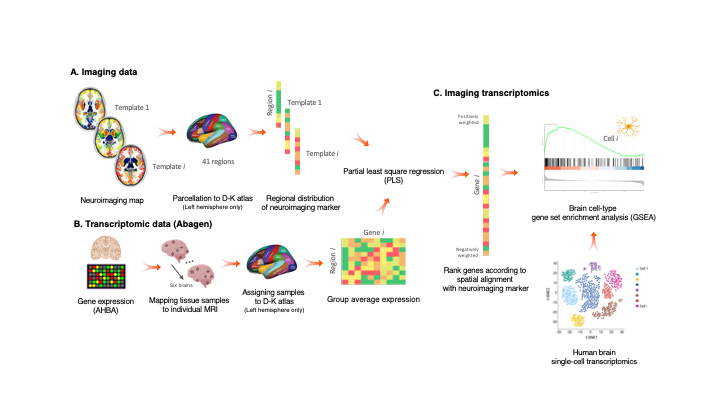
A package, and script, to perform imaging transcriptomics on a neuroimaging scan.

Overview

Imaging Transcriptomics

DOI License: GPL v3 Maintainer Generic badge Documentation Status

Imaging-transcriptomics_overwiew

Imaging transcriptomics is a methodology that allows to identify patterns of correlation between gene expression and some property of brain structure or function as measured by neuroimaging (e.g., MRI, fMRI, PET).


The imaging-transcriptomics package allows performing imaging transcriptomics analysis on a neuroimaging scan (e.g., PET, MRI, fMRI...).

The software is implemented in Python3 (v.3.7), its source code is available on GitHub, it can be installed via Pypi and is released under the GPL v3 license.

NOTE Versions from v1.0.0 are or will be maintained. The original script linked by the BioRxiv preprint (v0.0) is still available on GitHub but no changes will be made to that code. If you have downloaded or used that script please update to the newer version by installing this new version.

Installation

NOTE We recommend to install the package in a dedicated environment of your choice (e.g., venv or anaconda). Once you have created your environment and you have activated it, you can follow the below guide to install the package and dependencies. This process will avoid clashes between conflicting packages that could happen during/after the installation.

To install the imaging-transcriptomics Python package, first you will need to install a packages that can't be installed directly from PyPi, but require to be downloaded from GitHub. The package to install is pypyls. To install this package you can follow the installation on the documentation for the package or simply run the command

pip install -e git+https://github.com/netneurolab/pypyls.git/#egg=pyls

to download the package, and its dependencies directly from GitHub by using pip.

Once this package is installed you can install the imaging-transcriptomics package by running

pip install imaging-transcriptomics

Usage

Once installed the software can be used in two ways:

  • as standalone script
  • as part of some python script

WARNING Before running the script make sure the Pyhton environment where you have installed the package is activated.

Standalone script


To run the standalone script from the terminal use the command:

imagingtranscriptomics options

The options available are:

  • -i (--input): Path to the imaging file to analise. The path should be given to the program as an absolute path (e.g., /Users/myusername/Documents/my_scan.nii, since a relative path could raise permission errors and crashes. The script only accepts imaging files in the NIfTI format (.nii, .nii.gz).
  • -v (--variance): Amount of variance that the PLS components must explain. This MUST be in the range 0-100.

    NOTE: if the variance given as input is in the range 0-1 the script will treat this as 30% the same way as if the number was in the range 10-100 (e.g., the script treats the inputs -v 30 and -v 0.3 in the exact same way and the resulting components will explain 30% of the variance).

  • -n (--ncomp): Number of components to be used in the PLS regression. The number MUST be in the range 1-15.
  • --corr: Run the analysis using Spearman correlation instead of PLS.

    NOTE: if you run with the --corr command no other input is required, apart from the input scan (-i).

  • -o (--output) (optional): Path where to save the results. If none is provided the results will be saved in the same directory as the input scan.

WARNING: The -i flag is MANDATORY to run the script, and so is one, and only one, of the -n or -v flags. These last two are mutually exclusive, meaning that ONLY one of the two has to be given as input.

Part of Python script


When used as part of a Python script the library can be imported as:

import imaging_transcriptomics as imt

The core class of the package is the ImagingTranscriptomics class which gives access to the methods used in the standalone script. To use the analysis in your scripts you can initialise the class and then simply call the ImagingTranscriptomics().run() method.

import numpy as np
import imaging_transcriptomics as imt
my_data = np.ones(41)  # MUST be of size 41 
                       # (corresponds to the regions in left hemisphere of the DK atlas)

analysis = imt.ImagingTranscriptomics(my_data, n_components=1)
analysis.run()
# If instead of running PLS you want to analysze the data with correlation you can run the analysis with:
analysis.run(method="corr")

Once completed the results will be part of the analysis object and can be accessed with analysis.gene_results.

The import of the imaging_transcriptomics package will import other helpful functions for input and reporting. For a complete explanation of this please refer to the official documentation of the package.

Documentation

The documentation of the script is available at imaging-transcriptomics.rtfd.io/.

Troubleshooting

For any problems with the software you can open an issue in GitHub or contact the maintainer) of the package.

Citing

If you publish work using imaging-transcriptomics as part of your analysis please cite:

Imaging transcriptomics: Convergent cellular, transcriptomic, and molecular neuroimaging signatures in the healthy adult human brain. Daniel Martins, Alessio Giacomel, Steven CR Williams, Federico Turkheimer, Ottavia Dipasquale, Mattia Veronese, PET templates working group. bioRxiv 2021.06.18.448872; doi: https://doi.org/10.1101/2021.06.18.448872

Imaging-transcriptomics: Second release update (v1.0.2).Alessio Giacomel, & Daniel Martins. (2021). Zenodo. https://doi.org/10.5281/zenodo.5726839

Comments
  • pip installation can not resolve enigmatoolbox dependencies

    pip installation can not resolve enigmatoolbox dependencies

    After pip install -e git+https://github.com/netneurolab/pypyls.git/#egg=pyls and pip install imaging-transcriptomics in a new conda environment with Python=3.8, an error was occurred when import imaging-transcriptomics package that it can't find the module named enigmatoolbox. I figured out that the enigmatoolbox package seems can not be resolve by pip installation automatically, so I have to install the enigmatoolbox package from Github manually, with the code bellow according to the document of enigmatoolbox:

    git clone https://github.com/MICA-MNI/ENIGMA.git
    cd ENIGMA
    python setup.py install
    
    opened by YCHuang0610 4
  • DK atlas regions

    DK atlas regions

    Dear alegiac95,

    thanks for providing the scripts! I have just gone through the paper and description of this GitHub repo and I want to adapt your software to my project. However, I use the typical implementation of the DK from Freesurfer with 34 cortical DK ROIs instead of the 41 ROIs that you have used and, if I'm not mistaken, 41 ROIs are required to implement the script as ist is. Is it possible to change the input to other cortical parcellations as well (i.e., DK-34)?

    Cheers, Melissa

    enhancement 
    opened by Melissa1909 3
  • Script not calling the correct python version

    Script not calling the correct python version

    The script in version v1.0.0 is invoking the #!/usr/bin/env python interpreter, which could generate some issue if you default python is python2 (e.g., in older MacOS versions).

    bug 
    opened by alegiac95 1
  • Version 1.1.0

    Version 1.1.0

    Updated the scripts with:

    • support for both full brain analysis and cortical regions only
    • GSEA analysis (both during the analysis and as a separate script)
    • pdf report of the analysis
    opened by alegiac95 0
  • clean code and fix test

    clean code and fix test

    This commit does an extensive code cleaning following the PEP8 standard. It also fixes a test that was most probably intended for previous unstable versions of the software.

    Still to do:

    • Remove logging
    opened by matteofrigo 0
  • Add mathematical background on PLS

    Add mathematical background on PLS

    A more detailed explanation on PLS model and regression is required in the docs.

    • [ ] Add a general mathematical formulation of PLS
    • [ ] Use of PLS in neuroimaging applications
    • [ ] Description of the SIMPLS algorithm used by pypls

    In addition provide some background on correlation, since it is now added to the methods available in the python package/script

    documentation 
    opened by alegiac95 0
Releases(v.1.1.8)
Building blocks for uncertainty-aware cycle consistency presented at NeurIPS'21.

UncertaintyAwareCycleConsistency This repository provides the building blocks and the API for the work presented in the NeurIPS'21 paper Robustness vi

EML Tübingen 19 Dec 12, 2022
Detecting drunk people through thermal images using Deep Learning (CNN)

Drunk Detection CNN Detecting drunk people through thermal images using Deep Learning (CNN) Dataset We used thermal images provided by Electronics Lab

Giacomo Ferretti 3 Oct 27, 2022
PURE: End-to-End Relation Extraction

PURE: End-to-End Relation Extraction This repository contains (PyTorch) code and pre-trained models for PURE (the Princeton University Relation Extrac

Princeton Natural Language Processing 657 Jan 09, 2023
Uncertainty-aware Semantic Segmentation of LiDAR Point Clouds for Autonomous Driving

SalsaNext: Fast, Uncertainty-aware Semantic Segmentation of LiDAR Point Clouds for Autonomous Driving Abstract In this paper, we introduce SalsaNext f

308 Jan 04, 2023
PyTorch implementations of Generative Adversarial Networks.

This repository has gone stale as I unfortunately do not have the time to maintain it anymore. If you would like to continue the development of it as

Erik Linder-Norén 13.4k Jan 08, 2023
Bot developed in Python that automates races in pegaxy.

español | português About it: This is a fork from pega-racing-bot. This bot, developed in Python, is to automate races in pegaxy. The game developers

4 Apr 08, 2022
Code release for Local Light Field Fusion at SIGGRAPH 2019

Local Light Field Fusion Project | Video | Paper Tensorflow implementation for novel view synthesis from sparse input images. Local Light Field Fusion

1.1k Dec 27, 2022
Fully Convlutional Neural Networks for state-of-the-art time series classification

Deep Learning for Time Series Classification As the simplest type of time series data, univariate time series provides a reasonably good starting poin

Stephen 572 Dec 23, 2022
这是一个利用facenet和retinaface实现人脸识别的库,可以进行在线的人脸识别。

Facenet+Retinaface:人脸识别模型在Pytorch当中的实现 目录 注意事项 Attention 所需环境 Environment 文件下载 Download 预测步骤 How2predict 参考资料 Reference 注意事项 该库中包含了两个网络,分别是retinaface和

Bubbliiiing 102 Dec 30, 2022
🍀 Pytorch implementation of various Attention Mechanisms, MLP, Re-parameter, Convolution, which is helpful to further understand papers.⭐⭐⭐

🍀 Pytorch implementation of various Attention Mechanisms, MLP, Re-parameter, Convolution, which is helpful to further understand papers.⭐⭐⭐

xmu-xiaoma66 7.7k Jan 05, 2023
TACTO: A Fast, Flexible and Open-source Simulator for High-Resolution Vision-based Tactile Sensors

TACTO: A Fast, Flexible and Open-source Simulator for High-Resolution Vision-based Tactile Sensors This package provides a simulator for vision-based

Facebook Research 255 Dec 27, 2022
Few-shot Learning of GPT-3

Few-shot Learning With Language Models This is a codebase to perform few-shot "in-context" learning using language models similar to the GPT-3 paper.

Tony Z. Zhao 224 Dec 28, 2022
Symbolic Music Generation with Diffusion Models

Symbolic Music Generation with Diffusion Models Supplementary code release for our work Symbolic Music Generation with Diffusion Models. Installation

Magenta 119 Jan 07, 2023
Construct a neural network frame by Numpy

本项目的CSDN博客链接:https://blog.csdn.net/weixin_41578567/article/details/111482022 1. 概览 本项目主要用于神经网络的学习,通过基于numpy的实现,了解神经网络底层前向传播、反向传播以及各类优化器的原理。 该项目目前已实现的功

24 Jan 22, 2022
The trained model and denoising example for paper : Cardiopulmonary Auscultation Enhancement with a Two-Stage Noise Cancellation Approach

The trained model and denoising example for paper : Cardiopulmonary Auscultation Enhancement with a Two-Stage Noise Cancellation Approach

ycj_project 1 Jan 18, 2022
NPBG++: Accelerating Neural Point-Based Graphics

[CVPR 2022] NPBG++: Accelerating Neural Point-Based Graphics Project Page | Paper This repository contains the official Python implementation of the p

Ruslan Rakhimov 57 Dec 03, 2022
AI-Fitness-Tracker - AI Fitness Tracker With Python

AI-Fitness-Tracker We have build a AI based Fitness Tracker using OpenCV and Pyt

Sharvari Mangale 5 Feb 09, 2022
A novel method to tune language models. Codes and datasets for paper ``GPT understands, too''.

P-tuning A novel method to tune language models. Codes and datasets for paper ``GPT understands, too''. How to use our code We have released the code

THUDM 562 Dec 27, 2022
A new test set for ImageNet

ImageNetV2 The ImageNetV2 dataset contains new test data for the ImageNet benchmark. This repository provides associated code for assembling and worki

186 Dec 18, 2022
Deploy pytorch classification model using Flask and Streamlit

Deploy pytorch classification model using Flask and Streamlit

Ben Seo 1 Nov 17, 2021