PcapXray - A Network Forensics Tool - To visualize a Packet Capture offline as a Network Diagram

Overview

PcapXray Build Status codecov defcon27

A Network Forensics Tool - To visualize a Packet Capture offline as a Network Diagram including device identification, highlight important communication and file extraction
Alt text

PcapXray Design Specification

Wiki has more help too.

Goal:

Given a Pcap File, plot a network diagram displaying hosts in the network, network traffic, highlight important traffic and Tor traffic as well as potential malicious traffic including data involved in the communication.

Problem:

  • Investigation of a Pcap file takes a long time given initial glitch to start the investigation

  • Faced by every forensics investigator and anyone who is analyzing the network

  • Location: https://github.com/Srinivas11789/PcapXray

Solution: Speed up the investigation process

  • Make a network diagram with the following features from a Pcap file Tool Highlights:
  • Network Diagram – Summary Network Diagram of full network
  • Information:
    • Web Traffic with Server Details
    • Tor Traffic
    • Possible Malicious traffic
    • Data Obtained from Packet in Report – Device/Traffic/Payloads
    • Device Details

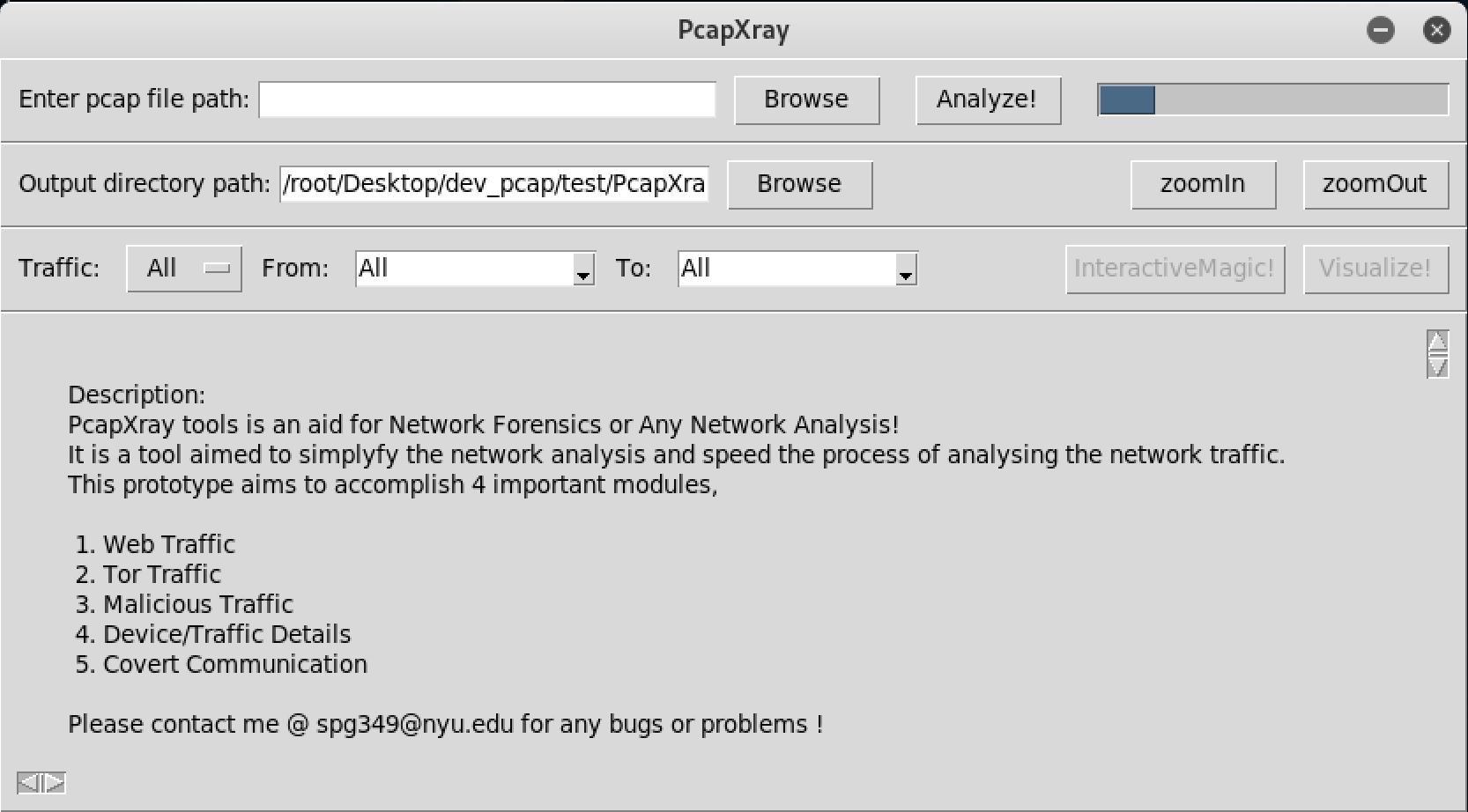
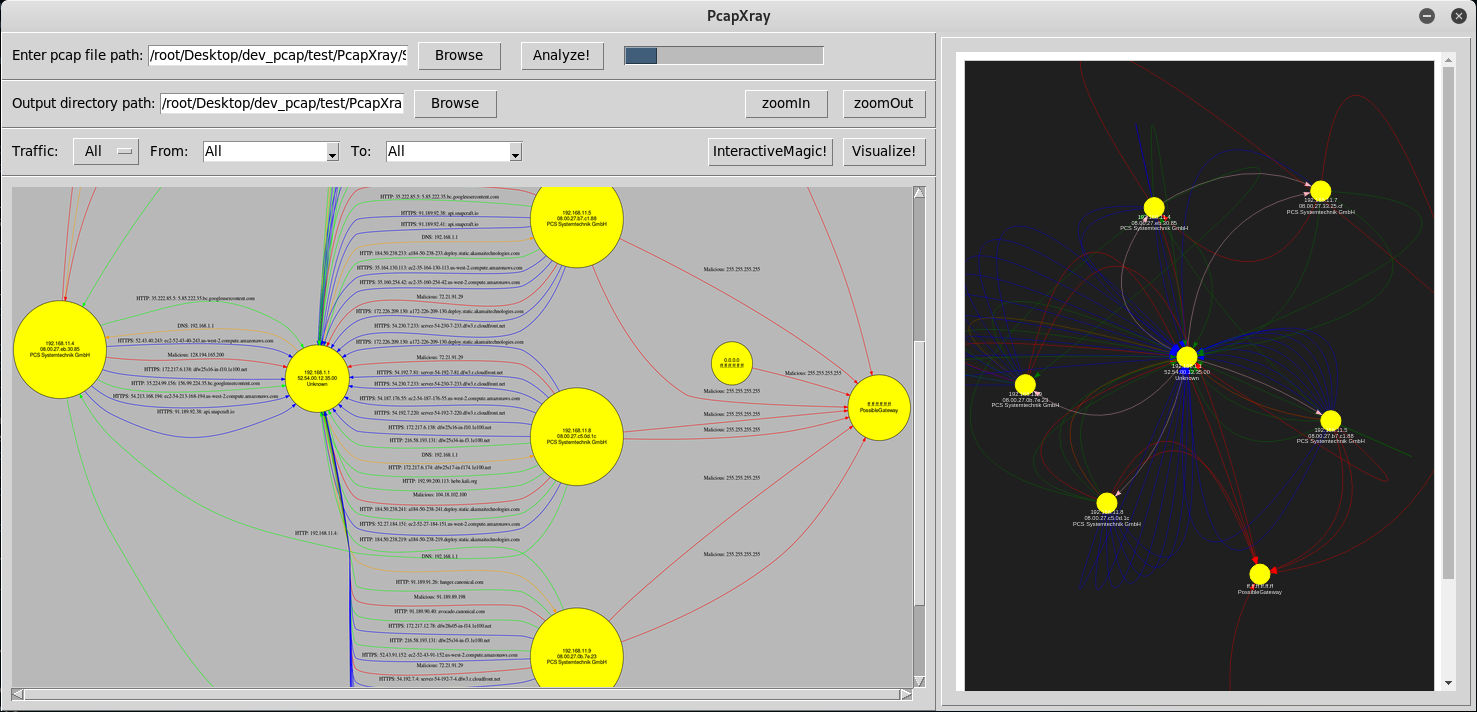
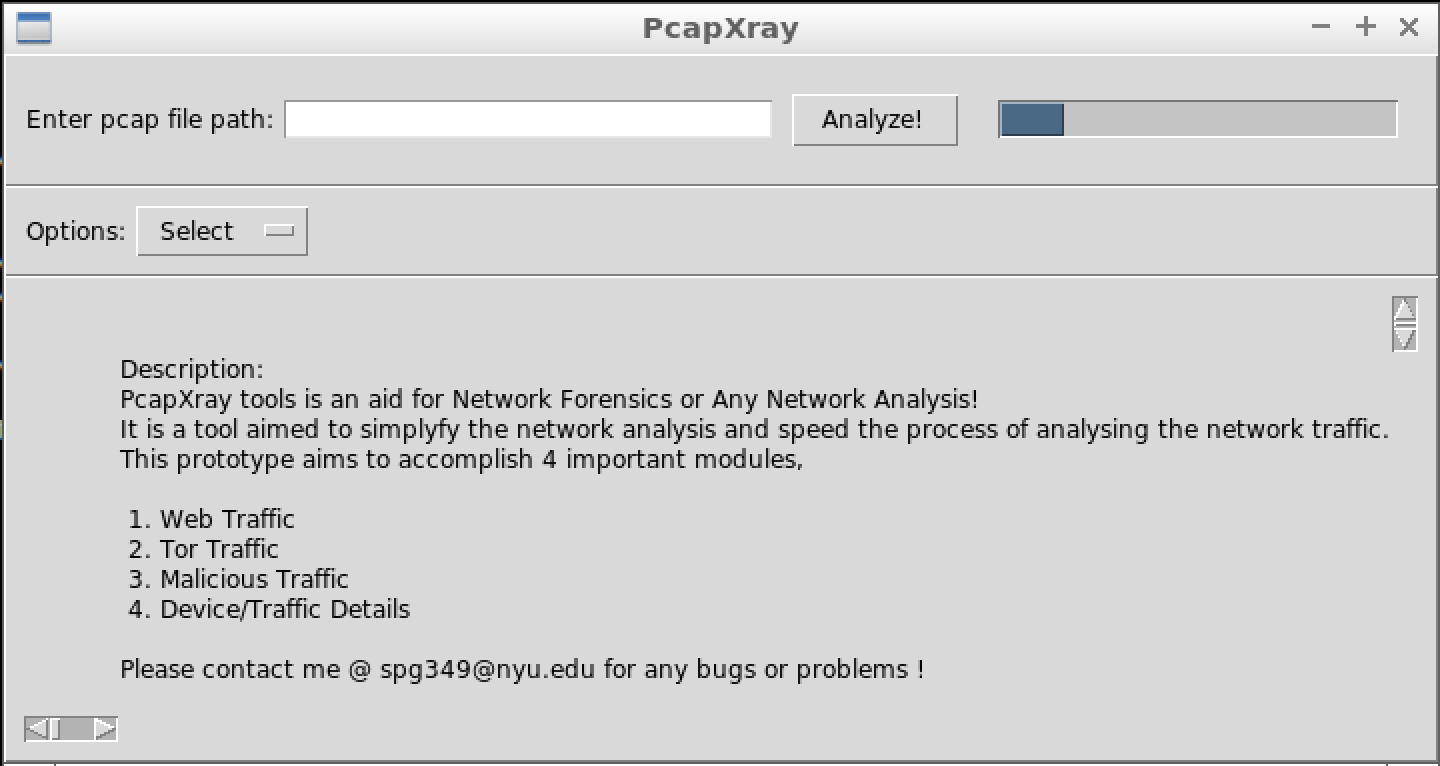
Tool Image:

Alt text

Alt text

Components:

  • Network Diagram
  • Device/Traffic Details and Analysis
  • Malicious Traffic Identification
  • Tor Traffic
  • GUI – a gui with options to upload pcap file and display the network diagram

Setup

  • Python 3
apt install python3-pip
apt install python3-tk
apt install graphviz
apt install python3-pil python3-pil.imagetk
pip3 install -r requirements.txt
python3 Source/main.py

( Make sure to escalate privilege to allow file creations - Run with sudo )

For MAC:

brew install graphviz
  • Python 2
apt install python-tk
apt install graphviz
pip install -r requirements.txt
python Source/main.py

( Make sure to escalate privilege to allow file creations - Run with sudo )

Python Libraries Used: - All these libraries are required for functionality

  • Tkinter and TTK – Install from pip or apt-get – Ensure Tkinter and graphviz is installed (Most Linux contain by default)
    • apt install python-tk
    • apt install graphviz
    • apt install python3-tk (for python3 support)
    • Sometimes ImageTk errors are thrown in python3 env --> use apt install python3-pil python3-pil.imagetk
  • All these are included in the requirements.txt file
    • Scapy – rdpcap to read the packets from the pcap file
    • Ipwhois – to obtain whois information from ip
    • Netaddr – to check ip information type
    • Pillow – image processing library
    • Stem – tor consensus data fetch library
    • pyGraphviz – plot graph
    • Networkx – plot graph
    • Matplotlib – plot graph (not used as of now)

Demo

Alt text

Getting started:

  • Clone the repository
  • pip install -r requirements.txt
  • python Source/main.py

Additional Information:

  • Tested on Linux
  • Options for Traffic include - Web (HTTP and HTTPS), Tor, Malicious, ICMP, DNS

Challenges:

  • Unstability of the TK GUI:
    • Decision on the GUI between Django and TK, settled upon tk for a simple local interface, but the unstability of the tk gui caused a number of problems
  • Graph Plotting:
    • Plotting a proper network graph which is readable from the data obtained was quite an effort, used different libraries to arrive at one.
  • Performance and Timing:
    • The performance and timing of the total application was a big challenge with different data gathering and output generation

Known Bugs:

  • Memory Hogging

    • Sometimes memory hogging occurs when lower RAM is present in the system as the data stored in the memory from the pcap file is huge
    • Should be Fixed by moving data into a database than the memory itself
  • Race Condition

    • Due to mainloop of the TK gui, other threads could undergo a race condition
    • Should be fixed by moving to a better structured TK implementation or Web GUI
  • Tk GUI Unstability:

    • Same reason as above
  • Code:

    • clumsy and unstructured code flow
  • Current Fix in rare occasions: If any of the above issue occurs the progress bar keeps running and no output is generated, a restart of the app would be required.

Docker Containers of PcapXray

  • Dockerfile present in the root folder was used to build images
  • Already built docker images are found at dockerhub
    • srinivas11789/pcapxray-1.0
    • srinivas11789/pcapxray-2.2
  • Performing the steps in run.sh file manually would work to launch the tool via docker (I can help with errors)
  • Running run.sh scripts is an attempt to automate (would not work 100 percent)
    • tested on mac and linux - will be better soon!...

Immediate Future Tasks: (Target: 3.0)

  • Clean up code (beautify code base from being a prototype)
  • Report generation on unique folders for all assets of a packet capture
  • Suspicious activity detection
  • Support more pcap reader engine
  • Traffic support: ICMP, DNS
  • Known file type detection and Extract
  • Python2 and Python3
  • Interactive map

Future:

  • Structured and clean code flow
  • Change the database from JSON to sqlite or prominent database, due to memory hogging
  • Change fronend to web based such as Django
  • Make the application more stable
  • More protocol support
  • Clean up code

Credits:

  • Thanks for making it better,
    • Professor Marc Budofsky
    • Kevin Gallagher
  • Thanks for all the dependent libraries used
  • Logo created with logomakr.com and www.inkscape.org

Analytics

Just for Security Fun!

Comments
  • Error on Start

    Error on Start

    Traceback (most recent call last):
      File "Source/main.py", line 12, in <module>
        import userInterface
    ImportError: No module named userInterface
    

    I get this error on macOS 10.13.5, running Python 2.7.15. This error occurs after running pip install -r requirements.txt.

    Looks like a very cool project, hoping there's an easy package to install that makes it mac compatible, but I'm not seeing anything by googling around.

    opened by seajaysec 3
  • Modernize Python 2 code to get ready for Python 3

    Modernize Python 2 code to get ready for Python 3

    Make the minimal, safe changes required to convert the repo's code to be syntax compatible with both Python 2 and Python 3. There may be other changes required to complete a port to Python 3 but this PR is a minimal, safe first step.

    Run: futurize --stage1 -w **/*.py

    See Stage 1: "safe" fixes http://python-future.org/automatic_conversion.html#stage-1-safe-fixes
    
    opened by cclauss 3
  • NSOpenPanel: NSInternalInconsistencyException with tk ui in mac os

    NSOpenPanel: NSInternalInconsistencyException with tk ui in mac os

    2022-02-15 09:17:23.967 Python[9628:502841] *** Assertion failure in -[NSOpenPanel beginServicePanel:asyncExHandler:], NSVBOpenAndSavePanels.m:1907
    2022-02-15 09:17:24.004 Python[9628:502841] -[NSSavePanel beginWithCompletionHandler:]_block_invoke caught non-fatal NSInternalInconsistencyException '<NSOpenPanel: 0x7fcecb72f600> is attempting to advance this Open/Save panel to run phase while another self.advanceToRunPhaseCompletionHandler is in waiting for a previous attempt. An Open/Save panel cannot start to advance more than once.' with user dictionary {
    ...
    
    opened by Srinivas11789 1
  • Fallback toggle for interactive graph

    Fallback toggle for interactive graph

    In recent python version py3.8, the app does not start due to dependency library support.

    • As a partial fix, add a fallback method to resort to launching interactive graph in system default browser.
    • This should auto-fix once the respective support is added upstream.
    opened by Srinivas11789 1
  • PcapXray 2.8

    PcapXray 2.8

    Changes:

    • Design: Add flow charts for PcapXray
    • Feature: File Signature analysis for covert traffic - add magic number analysis on payload
    • Enhance: Update pyshark engine code to work with engine selections in the UI
      • The UI is disabled for now due to pending issue solves with pyshark
    • Fix for some ctf problems and MAC spoofing scenarios --> shows up as weird traffic
    opened by Srinivas11789 1
  • PcapXray 2.7

    PcapXray 2.7

    Features:

    • Covert communication ( focus on icmp and dns for now)
      • Block and Algorithm to predict covert ICMP and DNS traffic.
    • Mac bug hacky fix - launch interactive on a browser until main bug gets solved

    Test:

    • Built primarily with learning from network forensics challenges from ( will improvise )
      • DNSCAP —> https://ctftime.org/task/3418 [DNS]
      • PcapMeIfYouCan —> https://ctftime.org/task/7087 [DNS]
      • Biz4rre —> https://ctftime.org/task/6748 [ICMP]
      • FromOurFriendsNextHop —> https://ctftime.org/task/7099 [DNS]
      • Fuzzy —> https://ctftime.org/task/6928 [DNS]
      • Data Exfil —> https://ctftime.org/task/5735 [DNS]
      • https://www.netresec.com/?page=PcapFiles
    opened by Srinivas11789 1
  • Covert communication

    Covert communication

    • Block and Algorithm to predict covert ICMP and DNS traffic.
    • Alter lan hosts schema to support solving CTF chals
    • covert traffic in graph
    • Built primarily with network forensics challenges from
      • DNSCAP —> https://ctftime.org/task/3418 [DNS]
      • PcapMeIfYouCan —> https://ctftime.org/task/7087 [DNS]
      • Biz4rre —> https://ctftime.org/task/6748 [ICMP]
      • Sniffed Off the wire —> https://ctftime.org/task/4758 [TCP]
      • FromOurFriendsNextHop —> https://ctftime.org/task/7099 [DNS]
      • Fuzzy —> https://ctftime.org/task/6928 [DNS]
      • Data Exfil —> https://ctftime.org/task/5735 [DNS]
    opened by Srinivas11789 1
  • Interactive map

    Interactive map

    • Interactive Maps (with python _ interaction)
      • CEF method
    • Python2 fixes for stability ( hopefully stable now )
    • Partial MAC support now ( limited )
      • No interactive maps in mac due to Cef crashes

    Screen Shot 2019-06-30 at 4 48 31 PM

    opened by Srinivas11789 1
  • Graph Enhancements

    Graph Enhancements

    • gateway identification logic
    • hybrid L2 + L3 routing
    • refactor of Reports + PcapRead
    • Graph enhancements - different alignment and arrangement for larger graphs
    • Options additions
    • Image resolution changes ( >= 600 makes the loading slow )
    • Huge number of nodes now get different alignment (circo)
    • improved payload arrangement

    Still require improvements on:

    • Higher image resolution can be set to make a big graph more legible but makes tkinter image loading much slower - hot fix soon
    Screen Shot 2019-05-10 at 9 35 41 AM

    Example FTP Payload:

    Screen Shot 2019-05-10 at 9 49 11 AM
    opened by Srinivas11789 1
  • PcapXray 2.0

    PcapXray 2.0

    Release bump to 2.0 (A bulk set of features)

    • UI features - Browse, Zoom, Icon
    • Docker image + automated app start (run.sh + docker) --> supports mac and linux (pending test on windows)
    • Bug: init main.py (system path fix)
    • More tests
    opened by Srinivas11789 1
  • startup error

    startup error

    Hello, What is this error:

    ┌──(root㉿kali)-[~/PcapXray] └─# python3 Source/main.py Interactive graph in app wont work as python version/platform is not supported (will launch in default browser) Traceback (most recent call last): File "/root/PcapXray/Source/main.py", line 52, in main() File "/root/PcapXray/Source/main.py", line 41, in main base = Tk() File "/usr/lib/python3.10/tkinter/init.py", line 2299, in init self.tk = _tkinter.create(screenName, baseName, className, interactive, wantobjects, useTk, sync, use) _tkinter.TclError: no display name and no $DISPLAY environment variable

    opened by nmaphacker 1
  • Added Sqlite DB functionality for packet data and pcap session loading.

    Added Sqlite DB functionality for packet data and pcap session loading.

    on-behalf-of: @org [email protected]

    Technica has added Sqlite db functionality for the packet data and a prototype for the destination hosts was also added, though not used/tested. This version is also capable of loading previously analyzed pcap data sessions; based on the name of the pcap file/sqlite db file. There is a bug in this version to be noted. The device information that is used during visualization is not persisted in the database, but kept in Global Memory which is erased when the application is closed. If the same PCAP is analyzed again, the data is pulled from the Sqlite database but the analyze portion is skipped so the device information will be missing.

    opened by mbernardo 0
  • Exception: Python version not supported: 3.8.2

    Exception: Python version not supported: 3.8.2

    Python 3.8.2

    sudo python3 Source/main.py Traceback (most recent call last): File "Source/main.py", line 12, in from cefpython3 import cefpython as cef File "/Library/Frameworks/Python.framework/Versions/3.8/lib/python3.8/site-packages/cefpython3/init.py", line 64, in raise Exception("Python version not supported: " + sys.version) Exception: Python version not supported: 3.8.2 (v3.8.2:7b3ab5921f, Feb 24 2020, 17:52:18) [Clang 6.0 (clang-600.0.57)]

    opened by M0dred 2
  • Interactive graph does not work if the full file path name has more than one

    Interactive graph does not work if the full file path name has more than one "."

    • pyvis has a check for assert len(name.split(".")) == 2 which fails when a filename with full path containing "."

    Hacky Fix:

    • Have no "." when along the folders where PcapXray is located.
    opened by Srinivas11789 0
  • Infinite progress bar problem

    Infinite progress bar problem

    Issue: Sometimes the progress bar keeps loading even when the backend thread has finished its job. Temperory Fix: Restarting the tool solves this error. ( bad fix )

    opened by Srinivas11789 0
Releases(3_0)
  • 3_0(Aug 22, 2019)

    🚀 🎆 PcapXray 3.0 🎆 🚀

    • Bump release as a checkpoint for 2.0 -> 3.0 work
    • Update defcon27 demolabs asset

    HighLights

    • Covert communication
    • Better UI and controls
    • Interactive Map
    • Python2 and Python3
    • TLS Insight
    Source code(tar.gz)
    Source code(zip)
  • v2_9(Aug 12, 2019)

  • 2_8_1(Aug 7, 2019)

    🕵 Version 2.8 🕵️‍♀️ ➕ ➕

    Changes:

    • Design: Add flow charts for PcapXray
    • Feature: File Signature analysis for covert traffic - add magic number analysis on payload
    • Enhance: Update pyshark engine code to work with engine selections in the UI
      • The UI is disabled for now due to pending issue solves with pyshark
    • Fix for some ctf problems and MAC spoofing scenarios --> shows up as weird traffic
    Source code(tar.gz)
    Source code(zip)
  • 2_8(Aug 6, 2019)

    Changes:

    • Design: Add flow charts for PcapXray
    • Feature: File Signature analysis for covert traffic - add magic number analysis on payload
    • Enhance: Update pyshark engine code to work with engine selections in the UI
      • The UI is disabled for now due to pending issue solves with pyshark
    • Fix for some ctf problems and MAC spoofing scenarios --> shows up as weird traffic
    Source code(tar.gz)
    Source code(zip)
  • v2_7(Aug 3, 2019)

    🕵 Version 2.7 🕵️‍♀️

    Features:

    • Covert communication ( focus on icmp and dns for now)
    • Block and Algorithm to predict covert ICMP and DNS traffic.
    • Mac bug hacky fix - launch interactive on a browser until main bug gets solved
    Source code(tar.gz)
    Source code(zip)
  • v2_6(Jul 2, 2019)

  • v2_6_beta(Jul 1, 2019)

  • 2.5(May 15, 2019)

  • v2.4(May 4, 2019)

    PcapXray v2.4 :sparkler:

    screen2_2_4

    • Include ICMP and DNS traffic category and record payloads
    • Add provision for more pcap engines
    • License compliance with respect to the other libraries
    • Huge refactor
    • Memory component to hold data and record
    • Custom destination for Report
    • Support both python3 and python2
    • Increase test coverage
    Source code(tar.gz)
    Source code(zip)
  • v2.3-beta(May 2, 2019)

    • Include ICMP and DNS traffic category and record payloads
    • Add provision for more pcap engines
    • License compliance with respect to the other libraries
    • Huge refactor
    • Memory component to hold data and record
    • Custom destination for Report
    • Support both python3 and python2
    • Increase test coverage
    Source code(tar.gz)
    Source code(zip)
  • v2.2(Jan 17, 2019)

  • v2.2-beta(Jan 17, 2019)

  • v2.1-beta(Jan 15, 2019)

  • v2.0-beta(Jan 14, 2019)

    Bump version to 2.0 - Bunch of features and fixes

    Features:

    • UI features - Browse, Zoom, Icon
    • Docker image + automated app start (run.sh + docker) --> supports mac and linux (pending test on windows)
    • Bug: init main.py (system path fix)
    • More tests
    screen shot 2019-01-14 at 10 36 02 am Source code(tar.gz)
    Source code(zip)
  • v1.0(Jan 14, 2019)

Owner
Srinivas P G
Love building/breaking things --> Code || Test, Plan, Break, Debug (Loop!)
Srinivas P G
Dnspython is a DNS toolkit for Python.

dnspython is a DNS toolkit for Python. It supports almost all record types. It can be used for queries, zone transfers, and dynamic updates. It supports TSIG authenticated messages and EDNS0.

Bob Halley 2.1k Jan 06, 2023
NetworkX is a Python package for the creation, manipulation, and study of the structure, dynamics, and functions of complex networks.

NetworkX is a Python package for the creation, manipulation, and study of the structure, dynamics, and functions of complex networks.

NetworkX 12k Jan 02, 2023
Way find out if DNS is down or your instance

DNS-PING Way to find out if DNS is down or your instance Problem: At times it happens that DNS provider services of a website URL is down and so to re

Giten Mitra 4 Nov 18, 2022
Display ip2.network active live streams.

Display ip2.network active live streams.

Daeshon Jones 0 Oct 31, 2021
this is demo of tool dosploit for test and dos in network with python

this tool for dos and pentest vul SKILLS: syn flood udp flood $ git clone https://github.com/amicheh/demo_dosploit/ $ cd demo_dosploit $ python3 -m pi

yaser amir chehrazi 5 Sep 22, 2022
A simple tool to utilize the basic functionality of the Private API From Virus Total

Welcome To VT-SCAN (viurs total api) Information This is a simple tool to utilize the basic functionality of the Private API From Virus Total. with th

0X0ŽĒR∅⁰ 1 Sep 21, 2022
Exfiltrate files using the HTTP protocol version ("HTTP/1.0" is a 0 and "HTTP/1.1" is a 1)

http-protocol-exfil Use the HTTP protocol version to send a file bit by bit ("HTTP/1.0" is a 0 and "HTTP/1.1" is a 1). It uses GET requests so the Blu

Ricardo Ruiz 23 Apr 30, 2022
RollerScanner — Fast Port Scanner Written On Python

RollerScanner RollerScanner — Fast Port Scanner Written On Python Installation You should clone this repository using: git clone https://github.com/Ma

68 Nov 09, 2022
Heroku Cloudflare App Domain

Heroku Cloudflare App Domain Creating branded herokuapp.com-like domains using Cloudflare, based on the app name (eg my-app-prod.example.com). Feature

Torchbox 2 Oct 04, 2022
A Python based command line ARP Spoofer utility, which takes input as arguments for the exact target IP and gateway IP for which you wish to Spoof ARP request

A Python based command line ARP Spoofer utility, which takes input as arguments for the exact target IP and gateway IP for which you wish to Spoof ARP request

Abhinandan Khurana 1 Feb 10, 2022
libsigrok stacked Protocol Decoder for TPM 2.0 transactions from an SPI bus. BitLocker Volume Master Key (VMK) are automatically extracted.

libsigrok stacked Protocol Decoder for TPM 2.0 transactions from an SPI bus. BitLocker Volume Master Key (VMK) are automatically extracted.

Jordan Ovrè 9 Dec 26, 2022
GhostVPN - Simple and lightweight TUI application for CyberGhostVPN

GhostVPN Simple and lightweight TUI application for CyberGhostVPN. Screenshot Us

Mehmet Ali KERİMOĞLU 5 Jul 27, 2022
IP Rover - An Excellent OSINT tool to get information of any ip address

IP Rover - An Excellent OSINT tool to get information of any ip address. All details are explained in below screenshot

Saad 20 Dec 16, 2022
pfSense integration with Home Assistant

hass-pfsense Join pfSense with home-assistant! hass-pfsense uses the built-in xmlrpc service of pfSense for all interactions. No special plugins or so

Travis Glenn Hansen 105 Dec 24, 2022
Simple reverse backdoor utility, that uses sockets to communicate.

reverse_backdoor Simple reverse backdoor utility, that uses sockets to communicate. How to use Run rev_bd_listener.py using command below: $ python3 r

1 Dec 10, 2021
A benchmark for stateful fuzzing of network protocols

A benchmark for stateful fuzzing of network protocols

3 Apr 25, 2022
the objective of this project is to create a Node Js server with a Python client

Socket.io-Server-client Objective The objective of this project is to send data real time ,we use socket.io(server, client) on this project Server Nod

Reda Ennakouri 5 Mar 07, 2022
A simple framwork to streamline the Domain Adaptation training process.

FastDA Introduction This is a simple framework for domain adaptation training. You can use it to build your own training process. It heavily relies on

Vincent Zhang 7 Nov 22, 2022
NanoChat - nano chat server and client

NanoChat This is a work in progress! NanoChat is an application for connecting with your friends using Python that uses ONLY default Python libraries.

Miss Bliss 1 Nov 13, 2021
Eclipse zenoh Python API

Eclipse zenoh Python API Eclipse zenoh is an extremely efficient and fault-tolerant Named Data Networking (NDN) protocol that is able to scale down to

26 Jan 05, 2023