Manipulate EXIF and IFD metadata.

Overview

Tyf

Copyright

pypi

Distribution

pypi pypi pypi Downloads

Support this project

Liberapay receiving

Buy Ѧ and:

Why this package ?

Tyf package provides pythonic way to work with embeded data in TIFF and JPEG images.

Documentation

The Tyf Project [WIP]

Read / write EXIF and IFD data

  • read / edit EXIF data from JPEG images
  • read / edit IFD data from TIFF images
  • read / edit GEOTIFF data from IFD
  • read / edit XMP data from IFD
  • work directly with python numbers, string and datetime
  • interpolate map coordinates using GEOTIFF ModelTransformation

Do more with JPEG and TIFF files

  • extract TIFF or JPEG thumbnails from JPEG files
  • strip EXIF data from JPEG File
  • dump EXIF data from JPEG into file
  • dump location thumbnail using any map provider API

Quick view

>> jpg.__class__ >>> print(Tyf.xmp.tostring(jpg.xmp).decode()) Beautifull Rainbow Beautifull Rainbow THOORENS Bruno THOORENS Bruno 4 75 Rainbow Belgium Rainbow Belgium >>> jpg.save_thumbnail("test/test_thumb") # extension automatically added">
>>> import Tyf
>>> jpg = Tyf.open("test/IMG_20150730_210115.jpg")
>>> jpg.__class__
<class 'Tyf.JpegFile'>
>>> print(Tyf.xmp.tostring(jpg.xmp).decode()) 
<ns0:xmpmeta xmlns:dc="http://purl.org/dc/elements/1.1/" xmlns:ns0="adobe:ns:meta/" xmlns:ns3="http://ns.adobe.com/xap/1.0/" xmlns:ns4="http://ns.microsoft.com/photo/1.0/" xmlns:rdf="http://www.w3.org/1999/02/22-rdf-syntax-ns#"><rdf:RDF><rdf:Description rdf:about="uuid:faf5bdd5-ba3d-11da-ad31-d33d75182f1b"><dc:title><rdf:Alt><rdf:li xml:lang="x-default">Beautifull Rainbow</rdf:li></rdf:Alt>
  </dc:title><dc:description><rdf:Alt><rdf:li xml:lang="x-default">Beautifull Rainbow</rdf:li></rdf:Alt>
  </dc:description><dc:creator><rdf:Seq><rdf:li>THOORENS Bruno</rdf:li></rdf:Seq>
  </dc:creator><dc:rights><rdf:Alt><rdf:li xml:lang="x-default">THOORENS Bruno</rdf:li></rdf:Alt>
  </dc:rights></rdf:Description><rdf:Description rdf:about="uuid:faf5bdd5-ba3d-11da-ad31-d33d75182f1b" /><rdf:Description rdf:about="uuid:faf5bdd5-ba3d-11da-ad31-d33d75182f1b"><ns3:Rating>4</ns3:Rating></rdf:Description><rdf:Description rdf:about="uuid:faf5bdd5-ba3d-11da-ad31-d33d75182f1b"><ns4:Rating>75</ns4:Rating><ns4:LastKeywordXMP><rdf:Bag><rdf:li>Rainbow</rdf:li><rdf:li>Belgium</rdf:li></rdf:Bag>
  </ns4:LastKeywordXMP></rdf:Description><rdf:Description rdf:about="uuid:faf5bdd5-ba3d-11da-ad31-d33d75182f1b"><dc:subject><rdf:Bag><rdf:li>Rainbow</rdf:li><rdf:li>Belgium</rdf:li></rdf:Bag>
  </dc:subject></rdf:Description></rdf:RDF></ns0:xmpmeta>
>>> jpg.save_thumbnail("test/test_thumb") # extension automatically added

EXIF thumbnail

There are 3 attributes to access data within Tyf.JpegFile :

  • ifd0 containing picture IFD, EXIF and eventually GPS data
  • ifd1 containing thubnail data
  • xmp containing XMP data

ifd0 and ifd1 are shortcut to the first and second IFD in ifd attribute which is itself a Tyf.TiffFile.

>> jpg.ifd0[256], jpg.ifd0.get("ImageWidth").comment (2560, 'Number of columns in the image, ie, the number of pixels per row') >>> jpg.ifd0["GPSLongitude"] 5.1872093">
>>> jpg.ifd[0] == jpg.ifd0
True
>>> jpg.ifd[1] == jpg.ifd1
True
>>> jpg.ifd.__class__
<class 'Tyf.TiffFile'>
>>> jpg.ifd0[256]
2560
>>> jpg.ifd0["ImageWidth"]
2560
>>> jpg.ifd0[256], jpg.ifd0.get("ImageWidth").comment
(2560, 'Number of columns in the image, ie, the number of pixels per row')
>>> jpg.ifd0["GPSLongitude"]
5.1872093

Tyf.ifd.Ifd class

>> jpg.ifd0.get_location() (5.1872093, 51.2095416, -0.0) >>> from Tyf import ifd >>> ifd.dump_mapbox_location(jpg.ifd0, "test/test_location.png")">
>>> jpg.ifd0.__class__
<class 'Tyf.ifd.Ifd'>
>>> for tag in jpg.ifd0.tags(): print(tag)
...
<IFD tag ImageWidth:2560>
<IFD tag ImageLength:1920>
<IFD tag Make:'Google'>
<IFD tag Model:'Nexus S'>
<IFD tag Orientation:1 - Normal>
<IFD tag Software:'KVT49L'>
<IFD tag DateTime:datetime.datetime(2015, 7, 30, 21, 1, 16)>
<IFD tag Artist:'THOORENS Bruno'>
<IFD tag YCbCrPositioning:1 - Centered>
<IFD tag Copyright:'THOORENS Bruno'>
<IFD tag Exif IFD:2286>
<IFD tag GPS IFD:4754>
<IFD tag XPTitle:'Beautifull Rainbow'>
<IFD tag XPComment:'For testing purpose only !'>
<IFD tag XPAuthor:'THOORENS Bruno'>
<IFD tag XPKeywords:'Rainbow;Belgium'>
<IFD tag ExposureTime:0.008333333333333333>
<IFD tag FNumber:2.6>
<IFD tag ExposureProgram:3 - Aperture priority>
<IFD tag ISOSpeedRatings:50>
<IFD tag ExifVersion:b'0220'>
<IFD tag DateTimeOriginal:datetime.datetime(2015, 7, 30, 21, 1, 16)>
<IFD tag DateTimeDigitized:datetime.datetime(2015, 7, 30, 21, 1, 16)>
<IFD tag ShutterSpeedValue:7.0>
<IFD tag ApertureValue:3.0>
<IFD tag BrightnessValue:6.0>
<IFD tag ExposureBiasValue:0.0>
<IFD tag MaxApertureValue:3.0>
<IFD tag MeteringMode:2 - Center Weighted Average>
<IFD tag Flash:0 - Flash did not fire>
<IFD tag FocalLength:3.43>
<IFD tag ColorSpace:1 - RGB>
<IFD tag PixelXDimension:2560>
<IFD tag PixelYDimension:1920>
<IFD tag ExposureMode:0 - Auto exposure>
<IFD tag WhiteBalance:0 - Auto white balance>
<IFD tag SceneCaptureType:0 - Standard>
<IFD tag GPSVersionID:(2, 2, 0, 0)>
<IFD tag GPSLatitudeRef:'N'>
<IFD tag GPSLatitude:51.2095416>
<IFD tag GPSLongitudeRef:'E'>
<IFD tag GPSLongitude:5.1872093>
<IFD tag GPSAltitudeRef:0 - Above sea level>
<IFD tag GPSAltitude:0.0>
<IFD tag GPSTimeStamp:datetime.time(19, 1, 7)>
<IFD tag GPSImgDirectionRef:'M'>
<IFD tag GPSImgDirection:33.0>
<IFD tag GPSProcessingMethod:b'ASCII\x00\x00\x00NETWORK'>
<IFD tag GPSDateStamp:datetime.date(2015, 7, 30)>
>>> jpg.ifd0.get("Orientation").info
'Normal'
>>> jpg.ifd0.get_location()
(5.1872093, 51.2095416, -0.0)
>>> from Tyf import ifd
>>> ifd.dump_mapbox_location(jpg.ifd0, "test/test_location.png")
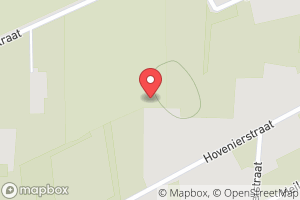
5.1872093, 51.2095416

>>> jpg.ifd0.set_location(4.362859, 48.958472, 0)
>>> ifd.dump_mapbox_location(jpg.ifd0, "test/test_location2.png")

4.362859, 48.958472

Contribute

Bug report & feedback

Use project issues.

Add / modify / fix code

Guidance words: keep it simple and solid!

  1. open a issue to propose your contribution
  2. once issue is granted
    • fork this repository
    • edit your contribution
    • start a pull request
Comments
  • Unable to open tif file on Linux but works on Windows

    Unable to open tif file on Linux but works on Windows

    Salut,

    Ce problème n'apparait que sur une machine linux, le même fichier se lit correctement sur windows.

    Ci-dessous le message d'erreur:

    File "/usr/local/lib/python3.4/dist-packages/Tyf/__init__.py", line 58, in _read_IFD typ = TYPES[typ][0] KeyError: 0

    Dispo si besoin d'infos complémentaires

    Merci

    bug 
    opened by domlysz 12
  • Restricted Geokey ?

    Restricted Geokey ?

    Salut,

    J'ai une erreur avec un geotiff :

    /Tyf/gkd.py", line 105, in __init__
    ValueError: "GeogGeodeticDatumGeoKey" value must be one of [6016, ... 6001], get 6171 instead
    

    D'après la doc les valeurs entre 6000 et 6199 sont valides, le dictionnaire qu'ils présentent n'est donc pas exhaustif.

    Possible de lever cette restriction ?

    opened by domlysz 7
  • Issue with saving

    Issue with saving

    Hi there,

    I am guessing this is a recurrence of previous issues. This is a simple code: import numpy as np import Tyf import tifffile as tiff

    filename="Test.tif" outputname="output.tif"

    img = tiff.imread(filename) exif_info = Tyf.open(filename)

    tiff.imsave(outputname, img) exif_info.save(outputname)

    And I got following error: Traceback (most recent call last): File "J:/notebook/simple_test_exif.py", line 12, in exif_info.save(outputname) File "C:\Users\sean_\AppData\Local\Programs\Python\Python37\lib\site-packages\Tyf_init_.py", line 352, in save next_ifd = to_buffer(i, fileobj, next_ifd, byteorder) File "C:\Users\sean_\AppData\Local\Programs\Python\Python37\lib\site-packages\Tyf_init_.py", line 252, in to_buffer next_ifd_offset = dump(obj, fileobj, offset, byteorder) File "C:\Users\sean_\AppData\Local\Programs\Python\Python37\lib\site-packages\Tyf_init_.py", line 250, in dump dump(getattr(i, "%s"%tag), f, i.get(tag).value[0], b) File "C:\Users\sean\AppData\Local\Programs\Python\Python37\lib\site-packages\Tyf_init_.py", line 251, in dump return write_IFD(i,f,o,b) File "C:\Users\sean\AppData\Local\Programs\Python\Python37\lib\site-packages\Tyf_init_.py", line 162, in write_IFD pack(byteorder+fmt, fileobj, value) File "C:\Users\sean\AppData\Local\Programs\Python\Python37\lib\site-packages\Tyf_init_.py", line 14, in pack = lambda fmt, fileobj, value: fileobj.write(struct.pack(fmt, *value)) struct.error: ubyte format requires 0 <= number <= 255

    I've also attached the zipped TIF file for your reference. Could you please take a look?

    Thanks, Sean

    test.zip

    opened by seanliu-oss 5
  • wrong data type?

    wrong data type?

    I'm testing a script to read and write a 16bit RGB-colored tiff file and find some error on data type. My test script is very simple like:

    tif = Tyf.open(file_name)
    tif.save(new_file_name)
    

    and result in an error:

    struct.error: ubyte format requires 0 <= number <= 255
    

    After digging into the source file I find that data type of some tags might be wrong. For example in tags.py line 200, the ISOSpeedRatings tag type is set as 1, while it is of type 3 when read from a tiff file (use function _read_IFD in __init__.py). Several data type mismatches has been found, including ExposureProgram, MeteringMode, Flash, ColorSpace, FocalPlaneResolutionUnit, CustomRendered, ExposureMode, WhiteBalance, SceneCaptureType.

    I'm not sure whether it is a problem of a special file format or of the OS platform, or anything else. Does anyone has met similar problems?

    opened by LoveDaisy 4
  • Corrupted files (re)saving TIFF images

    Corrupted files (re)saving TIFF images

    Simple operation of (re)saving TIFF image file

    i1 = Tyf.open( '/Users/xatx/Desktop/TEST.tiff' ) i1.save( '/Users/xatx/Desktop/TESTTyf.tiff' )

    produces a corrupted file.

    opened by aritgithub 3
  • Push current repo and version to pip

    Push current repo and version to pip

    Ran into current pip: https://pypi.org/project/Tyf/ @ 1.3.2

    Ran into bugger:

    WARNING:  Traceback (most recent call last):
      File "<string>", line 29, in __plpython_procedure_find_exif_19256322
      File "/usr/local/lib/python3.5/dist-packages/Tyf/ifd.py", line 75, in decode
        return self._decoder(self.value)
      File "/usr/local/lib/python3.5/dist-packages/Tyf/decoders.py", line 54, in <lambda>
        _0x132 = _0x9003 = _0x9004 = lambda value: datetime.datetime.strptime(_2(value).decode(), "%Y:%m:%d %H:%M:%S")
    AttributeError: 'str' object has no attribute 'decode'
    

    Reviewed current code and this was supposed to be fixed. Current pip is old code? Not sure.

    opened by disarticulate 2
  • Error with InteropIFD : missing / corrupted after save

    Error with InteropIFD : missing / corrupted after save

    I have an issue with the sub IFD InteropIFD : when I load a jpg and save it, it is missing or shown as corrupt in exiftool after (with this example, it's corrupted). I guess it's not the expected behaviour.

    Before :

    Interoperability Index          : R98 - DCF basic file (sRGB)
    Interoperability Version        : 0100
    

    after :

    Warning                         : Bad InteropIFD directory
    

    Steps :

    jpg = Tyf.open('testori.jpg')
    #Print some tags
    for i in jpg.exif.tags():
        print(i)
    # eventually, (re)write 3-4 tags
    jpg.save('testinterop.jpg')
    

    The source file might be corrupted, but it should be original from the smartphone.

    Files : testori testinterop

    Python 3.5.2 64bit Win

    opened by u1735067 2
  • Use enum for the types ?

    Use enum for the types ?

    I may have missed the explanation about this, but I wanted to understand the format used in tags.py and I had to find what is the second field, then try to see where those values are used. I figured out it's Type after following code. Maybe a comment could be added to explain the format ? Also I think the type specification system used, ie. list of integers, is hard to follow and should be written as enum if possible ?

    Just my feedback from trying to understand how it works, but it might makes other/future maintainers life easier.

    opened by u1735067 2
  • location_dump doesnt not work sometimes

    location_dump doesnt not work sometimes

    Hello,

    at first thanks for this library!!!

    But i have little problem with some images. I wrote a script to add EXIF-Tags with GPS to Images which don't have any. This works ok as far i can see

    part of script:

            img = Image.open(os.path.join('pictures', filename))
            exf = img._getexif()
            exf[0]['GPSLatitude'] = lpi[2]
            exf[0]['GPSLongitude'] = lpi[1]
            exf[0]['GPSAltitude'] = 0.00
            exf[1]['GPSLatitude'] = lpi[2]
            exf[1]['GPSLongitude'] = lpi[1]
            exf[1]['GPSAltitude'] = 0.00
            img.save(os.path.join('tagged', 'tagged_' + filename), ifd=exf)
    

    but jpg.exif.dump_location doesnt create images of location. For any photo taken with my Iphone which adds GPS-Tags automatically it works.

    What did i miss??

    Thanks Peter

    opened by spacemishka 2
  • open(jpg) I/O operation on closed file

    open(jpg) I/O operation on closed file

    Hi, Windows 10, python 3.5, blender 2.77, Pillow throw an "I/O operation on closed file" exception on exif = Tyf.open(filepath) when filepath is a jpg.

    Seem to be a magic number issue

    opened by s-leger 1
  • a little help for a newbie

    a little help for a newbie

    Hi, I just stumbled across your Tyf library. I need to write exif data to tiff files. But I can't figure out how to do it. Could you kindly give me a short example on how to write a UserComment to a tif file, so that the rest of the exif info is preserved? Thanks...

    opened by ZacDiggum 1
Releases(1.4.3)
  • 1.4.3(Dec 27, 2020)

    $> python -m pip install Tyf==1.4.3
    

    New features

    • [x] issue #15 fix
    • [x] Tyf.ifd.Ifd class is now an iterable
    • [x] custom map provider url for location dumps
    • [x] minor bugfixes

    Work in progress

    • [ ] Code documentation

    TODO

    • [ ] Test suite
    Source code(tar.gz)
    Source code(zip)
Console images in 48 colors, 216 colors and full rgb

console_images Console images in 48 colors, 216 colors and full rgb Full RGB 216 colors 48 colors If it does not work maybe you should change color_fu

Урядов Алексей 5 Oct 11, 2022
Napari plugin for iteratively improving 3D instance segmentation of cells (u-net x watershed)

iterseg napari plugin for iteratively improving unet-watershed segmentation This napari plugin was generated with Cookiecutter using @napari's cookiec

Abigail McGovern 3 May 16, 2022
Tools for making image cutouts from sets of TESS full frame images

Cutout tools for astronomical images Astrocut provides tools for making cutouts from sets of astronomical images with shared footprints. It is under a

Space Telescope Science Institute 20 Dec 16, 2022
Pixel art as well as various sets for hand crafting

Pixel art as well as various sets for hand crafting

1 Nov 09, 2021
thumbor is an open-source photo thumbnail service by globo.com

Survey If you use thumbor, please take 1 minute and answer this survey? It's only 2 questions and one is multiple choice!!! thumbor is a smart imaging

Thumbor (by @globocom) 9.3k Dec 31, 2022
Simple utility to tinker with OPlus images

OPlus image utilities Prerequisites Linux running kernel 5.4 or up (check with uname -r) Image rebuilding Used to rebuild read-only erofs images into

Wiley Lau 15 Dec 28, 2022
Rembg is a tool to remove images background.

Rembg is a tool to remove images background.

Daniel Gatis 7.8k Jan 05, 2023
QR-code Generator with a basic GUI.

Qr_generator_python Qr code generator with a basic GUI. ❔ About the QR-Code-Generator This project Generates QR codes to sites, e-mails and plain text

Tecixck 2 Oct 11, 2021
Simple program to easily view Euler parameters in 3D.

Simple program to easily view Euler parameters in 3D.

5 Aug 20, 2021
Generate different types of random avatars.

avatar-generator Generate different types of random avatars. Requirements Python3 pytorch=1.6 cv2=3.4 tqdm 1. Github-like avatars python generate_gi

Ming 11 Apr 02, 2022
Fast Image Retrieval is an open source image retrieval framework

Fast Image Retrieval is an open source image retrieval framework release by Center of Image and Signal Processing Lab (CISiP Lab), Universiti Malaya. This framework implements most of the major binar

CISiP Lab 39 Nov 25, 2022
This is an app that allows users to upload photos and display and store the photos in a file until the user deletes them.

Qt Photo App This is an app that allows users to upload photos and display and store the photos in a file until the user deletes them. Setup python3 -

Kathy Yang 5 Jan 22, 2022
Blue noise image stippling in Processing (requires GPU)

Blue noise image stippling in Processing (requires GPU)

Mike Wong 141 Oct 09, 2022
3D printer / slicing GUI built on top of the Uranium framework

Cura Ultimaker Cura is a state-of-the-art slicer application to prepare your 3D models for printing with a 3D printer. With hundreds of settings and h

Ultimaker 4.4k Jan 02, 2023
Python framework for creating and scaling up production of vector graphics assets.

Board Game Factory Contributors are welcome here! See the end of readme. This is a vector-graphics framework intended for creating and scaling up prod

Adam Volný 5 Jul 13, 2022
Fixed Version Of Blender Low Poly Rock Generator For Blender 3.0.0

Blender (3.0.0) - Low Poly Rock Generator This is an addon for Blender 3.0.0 to generate low poly rocks. It was based on an addon that unfortunately h

3 Mar 24, 2022
Leshycam - Generate Inscryption styled portrait sprites from any image

Leshy's Camera Generate Inscryption styled portrait sprites from any image. Setu

3 Sep 27, 2022
A script to generate a profile picture and a banner that show the same image on Discord.

Discord profile picture & banner generator A script to generate a profile picture and a banner that show the same image on Discord. Installation / Upd

Victor B. 9 Nov 27, 2022
Sample data for the napari image viewer.

napari-demo-data Sample data for the napari image viewer. This napari plugin was generated with Cookiecutter using @napari's cookiecutter-napari-plugi

Genevieve Buckley 1 Nov 08, 2021
ImageStrike是一款用于CTF中图片隐写的综合利用工具

🎈 简介 ImageStrike是一款使用PyQT5开发,用于CTF中图片隐写的综合利用工具

zR00t1 133 Dec 27, 2022