Add-In for Blender to automatically save files when rendering

Overview

Autosave - Render: Automatically save .blend, .png and readme.txt files when rendering with Blender

Purpose

This Blender Add-On provides an easy way to document & preserve a project's progress over time and to jump back to an arbitrary previous state, if required.

It saves the .blend, .png (render image, optional) and a readme.txt (optional infos) -file in a new, dedicated subdirectory on every rendering.

The new sub-directories are named YYMMDD-hhmmss + an optional short note, located in a base-directory of your choice.

Creating images/animations with Blender is usually a highly iterative trial-and-error process, that can lead into dead ends when using wrong techniques or taking bad artistic choices.

When trying to resume at a former version, it can be difficult to find the matching .blend file for that state of the project.

This add-on can be understood as a basic but efficient source control system for the poor artist.

Installation

  • download the .py file to a location of your choice
  • in Blender: Edit -> Preferences-> Add-on -> Install... and pick the .py file
  • don't forget to activate it by setting the checkmark

Developed & tested under Windows 10 on Blender V2.90.1, 2.93 and 3.0 Alpha. It should work on other OSes and/or in older Blender versions too.

Usage

The user interface appears in the Properties Area -> Output Properties -> Autosave on Render:
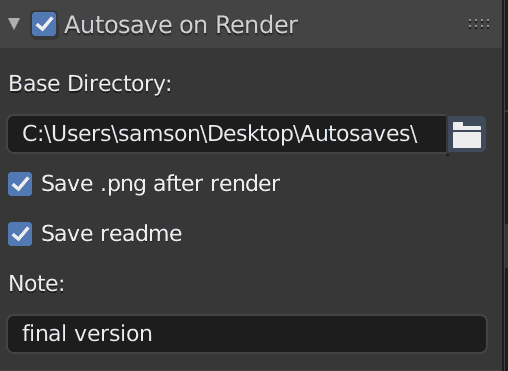
UI

  • set the "Autosave on Render" checkmark to save the .blend file before rendering

  • define/create the base-directory that will contain the new subdirectories

  • optionally save a .png file after rendering

  • optionally create a readme.txt. It can be previewed using the OS' file browser, its keywords will be indexed by the OS' search function.

    The content of readme.txt looks like:

    ---- Blender Generated Readme 211007_200350 myproject.blend
    -- Scene Infos:
         Blender V: 2.93.4
             Built: 2021-08-31 23:48:04
        Scene Name: Assets               
     Current Frame: 1
      Resolution %: 100
    View Transform: Filmic
              Look: None
          Exposure: 0.0
             Gamma: 1.0
            Engine: CYCLES
             Samples: 128
         Feature Set: EXPERIMENTAL
              Device: CPU
    -- Metadata Note:
     note from the output properties
    -- Readme Text:
    This is a text from the readme text. 
    It can contain a history of the project or longer annotations.
    ---
    

    The first section contains general infos about the Blender version and parameters used.

    The 2nd section contains the metadata note entered under Output Properties -> Metadata, if any.

    The 3rd section is the content of a document named "readme" from Blender's built-in texteditor, if a text with this name exists. It can contain information concerning this project, its history, keywords etc.

  • optionally enter a short note to be appended to the new directory's name. Free shorthand reminder like "eevee only", "applied" or "!" when used in production etc. Use only characters allowed in your filesystem (Windows: no ":<>" etc).

    This leads to folder names like "211007-145010-with geometry nodes, final version", intended as a quick reminder when revisiting the folder after a while

  • finally start the renderprocess hitting and browse the new subdirectory

Hints

  • the dimensions of the .png file are determined by the output properties
  • this add-on doesn't affect other settings like output paths etc
  • it doesn't make much sense when active while creating animations ( - )
  • manually delete directories if they are not needed
  • -Click on the folder icon opens the base-directory in your OS' file system browser
  • because the .blend file is saved before and the .png file after rendering, rendertime is documented too
  • choose your base-directory on an external or network drive. This may save your live if your SSD dies

Advanced usage

Shift your base-directory into the new sub-directory once you think you achieved significant progress with that render. This transforms the otherwise linear folder structure into a tree, having elaborated versions in its branches.

Optionally rename the parent folder with a speaking name for better orientation when browsing the filesystem later on. The latest and/or best version should then be in the latest & deepest leaf folder.

...unless you give up an idea too soon.

Enjoy!


You might also like...
Addon for Blender 2.8+ that automatically creates NLA tracks for all animations. Useful for GLTF export.

PushDownAll An addon for Blender 2.8+ that runs Push Down on all animations, creating NLA tracks for each. This is useful if you have an object with m

This an Anki add on that automatically converts Notion notes into Anki flash cards. Currently in development!

NotionFlash This is an Anki add on in development that will allow automatically convert your Notion study notes into Anki flash cards. The Anki deck c

This is a library which aiming to save all my code about cpp. It will help me to code conveniently.

This is a library which aiming to save all my code about cpp. It will help me to code conveniently.

A "multiclipboards" script for an efficient way to improve the original clipboards which are only able to save one string at a time

A "multiclipboards" script for an efficient way to improve the original clipboards which are only able to save one string at a time. Works on both Windows and Linux.

carrier.py is a Python package/module that's used to save time when programming

carrier.py is a Python package/module that's used to save time when programming, it helps with functions such as 24 and 12 hour time, Discord webhooks, etc

Synthetik Python Mod - A save editor tool for the game Synthetik written in python

Synthetik_Python_Mod A save editor tool for the game Synthetik written in python

addon for blender to import mocap data from tools like easymocap, frankmocap and Vibe

b3d_mocap_import addon for blender to import mocap data from tools like easymocap, frankmocap and Vibe ==================VIBE================== To use

 A small Blender addon for changing an object's local orientation while in edit mode
A small Blender addon for changing an object's local orientation while in edit mode

A small Blender addon for changing an object's local orientation while in edit mode.

A simple armature retargeting tool for Blender

Simple-Retarget-Tool-Blender A simple armature retargeting tool for Blender Update V2: Set Rest Pose to easily apply rest pose. Preset Import/Export.

Comments
  • render_auto_save.py

    render_auto_save.py

    Sorry not an issue ... just if you know about render_auto_save.py addon bundled with any experimental build https://developer.blender.org/diffusion/BAC/browse/master/render_auto_save.py;10ebd1e553b16e599b51b8f1afcfee764365be26

    not a bug 
    opened by mond-cz 5
Releases(v1.3.8)
Owner
Volker
Oh well.
Volker
This library is an ongoing effort towards bringing the data exchanging ability between Java/Scala and Python

PyJava This library is an ongoing effort towards bringing the data exchanging ability between Java/Scala and Python

Byzer 6 Oct 17, 2022
Palestra sobre desenvolvimento seguro de imagens e containers para a DockerCon 2021 sala Brasil

Segurança de imagens e containers direto na pipeline Palestra sobre desenvolvimento seguro de imagens e containers para a DockerCon 2021 sala Brasil.

Fernando Guisso 10 May 19, 2022
Free APN For Python

Free APN For Python

XENZI GANZZ 4 Apr 22, 2022
Flight Reservation App With Python

Flight Reservation App With Python

victor-h. 1 Nov 21, 2021
Ultimate Microsoft Edge Uninstaller!

Ultimate Microsoft Edge Uninstaller

1 Feb 08, 2022
Este projeto se trata de uma análise de campanhas de marketing de uma empresa que vende acessórios para veículos.

Marketing Campaigns Este projeto se trata de uma análise de campanhas de marketing de uma empresa que vende acessórios para veículos. 1. Problema A em

Bibiana Prevedello 1 Jan 12, 2022
Reverse the infix string. Note that while reversing the string you must interchange left and right parentheses

Reverse the infix string. Note that while reversing the string you must interchange left and right parentheses. Obtain the postfix expression of the infix expression Step 1.Reverse the postfix expres

Sazzad Hossen 1 Jan 04, 2022
A python script to decrypt media files encrypted using the Android application 'Secret Calculator Photo Vault'. Supports brute force of PIN also.

A python script to decrypt media files encrypted using the Android application 'Secret Calculator Photo Vault'. Supports brute force of PIN also.

3 May 01, 2022
Project in which we modelise an Among Us problem using graph theories.

Python-AmongUsProblem Project in which we modelise an Among Us problem using graph theories. The rules are as following: Total of 100 players 10 playe

Gabriel Shenouda 1 Feb 09, 2022
A Python program for calculating the 95%CI for GNSS-derived site velocities

GNSS_Vel_95%CI A Python program for calculating the 95%CI for GNSS-derived site velocities Function_GNSS_95CI.py is a Python function for calculating

<a href=[email protected]"> 4 Dec 16, 2022
poetry2nix turns Poetry projects into Nix derivations without the need to actually write Nix expressions

poetry2nix poetry2nix turns Poetry projects into Nix derivations without the need to actually write Nix expressions. It does so by parsing pyproject.t

Nix community projects 405 Dec 29, 2022
Table (Finnish Taulukko) glued together to transform into hands-free living.

taulukko Table (Finnish Taulukko) glued together to transform into hands-free living. Installation Preferred way to install is as usual (for testing o

Stefan Hagen 2 Dec 14, 2022
A notebook explaining the principle of adversarial attacks and their defences

TL;DR: A notebook explaining the principle of adversarial attacks and their defences Abstract: Deep neural networks models have been wildly successful

1 Jan 22, 2022
A OBS service to package a published repository into a tar.gz file

OBS Source Service obs-service-publish_tar obs-service-publish_tar will create a archive.tar[.tar compression] archive containing the published repo

Erico Mendonca 1 Feb 16, 2022
Laurence Billingham 1 Feb 16, 2022
A simple string parser based on CLR to check whether a string is acceptable or not for a given grammar.

A simple string parser based on CLR to check whether a string is acceptable or not for a given grammar.

Bharath M Kulkarni 1 Dec 15, 2021
A dog facts python module

A dog facts python module

Fayas Noushad 3 Nov 28, 2021
How to build an Fahrenheit to Celsius Converter in Python

Generally to measure the temperature we make use of one of these two popular units i.e. Fahrenheit & Celsius.

PyLaboratory 0 Feb 07, 2022
This simple script generates a backup of a given Python and R environment

Python Environment Backup It’s always good to maintain your Python and R Anaconda environment packages properly listed and well-kept in case you have

Andrew Laganaro 1 Jul 13, 2022
This is the Halloween edition of my Flask Greeting App - HAPPY HALLOWEEEN EVERYONE! :)

HalloweenGreetingApp HAPPY HALLOWEEN EVERYONE! :) This is the Halloween Edition of my Flask Greeting App! Please note, this application is mean to be

Mariya 2 Feb 04, 2022