YOLOX + ROS(1, 2) object detection package

Overview

YOLOX-ROS

YOLOX + ROS2 Foxy (cuda 10.2)

NVIDIA Graphics is required

yolox_s_result

Japanese Reference (Plan to post):Qiita

Requirements (Python)

  • ROS2 Foxy
  • CUDA 10.2
  • OpenCV 4.5.1
  • Python 3.8 (Ubuntu 20.04 Default)
  • Torch '1.9.0+cu102 (Install with pytorch)
  • cuDNN 7.6.5 (Install with pytorch)
  • YOLOX
  • TensorRT : is not supported
  • WebCamera : v4l2_camera

Requirements (C++)

  • C++ is not supported

Installation

Install the dependent packages based on all tutorials.

STEP 1 : CUDA Installation

STEP 2 : YOLOX Quick-start

YOLOX Quick-start (Python)

git clone https://github.com/Megvii-BaseDetection/YOLOX.git
cd YOLOX
pip3 install -U pip && pip3 install -r requirements.txt
pip3 install -v -e .  # or  python3 setup.py develop
pip3 install cython; pip3 install 'git+https://github.com/cocodataset/cocoapi.git#subdirectory=PythonAPI'

STEP 3 : Install YOLOX-ROS

source /opt/ros/foxy/setup.bash
sudo apt install ros-foxy-v4l2-camera
git clone --recursive https://github.com/Ar-Ray-code/yolox_ros.git ~/ros2_ws/src/yolox_ros/
cd ~/ros2_ws
colcon build --symlink-install # weights files will be installed automatically.

Demo

Connect your web camera.

source ~/ros2_ws/install/setup.bash
# Example 1 : YOLOX-s demo
ros2 launch yolox_ros_py demo_yolox_s.launch.py
# Example 2 : YOLOX-l demo
ros2 launch yolox_ros_py demo_yolox_l.launch.py

Topic

Subscribe

  • image_raw (sensor_msgs/Image)

Publish

  • yolox/image_raw : Resized image (sensor_msgs/Image)

  • yololx/bounding_boxes : Output BoundingBoxes like darknet_ros_msgs (bboxes_ex_msgs/BoundingBoxes)

    ※ If you want to use darknet_ros_msgs , replace bboxes_ex_msgs with darknet_ros_msgs.

yolox_topic

Parameters : default

  • image_size/width: 640
  • image_size/height: 480
  • yolo_type : 'yolox-s'
  • fuse : False
  • trt : False
  • rank : 0
  • ckpt_file : /home/ubuntu/ros2_ws/src/yolox_ros/weights/yolox_s.pth.tar
  • conf : 0.3
  • nmsthre : 0.65
  • img_size : 640

Reference

@article{yolox2021,
  title={YOLOX: Exceeding YOLO Series in 2021},
  author={Ge, Zheng and Liu, Songtao and Wang, Feng and Li, Zeming and Sun, Jian},
  journal={arXiv preprint arXiv:2107.08430},
  year={2021}
}

About writer

Comments
  • Run in melodic

    Run in melodic

    Sorry, I want to ask how this project works on melodic. I reported an error directly to catkin make. Before catkin make, I executed the following two commands to use Python 3 catkin config -DPYTHON_EXECUTABLE=/usr/bin/python3 -DPYTHON_INCLUDE_DIR=/usr/include/python3.6m -DPYTHON_LIBRARY=/usr/lib/x86_64-linux-gnu/libpython3.6m.so

    catkin config --instal Screenshot from 2022-03-08 19-35-00 l

    opened by hongSS0919 15
  • update docs about YOLOX_ROS_CPP

    update docs about YOLOX_ROS_CPP

    Thanks to this repository, I tried to this node easily! But, I need extra procedures to run this node completely. Specifically,When I tried to run yolox_ros(w/docker, tensorRT) following this instruction( yolox_ros_cpp/README.md), I need to install extra dependency not specified in its instruction.

    pip install empy
    pip install catkin_pkg
    pip install lark
    apt install ros-foxy-cv-bridge
    

    So I suggest to use my new dockerimage(swiftfile/tensorrt_yolox_ros).

    Thank you for all contributors of this repository! And, I'm glad to create PR for this repo.

    opened by swiftfile 6
  • resize Assertion failed

    resize Assertion failed

    I got the following error when ran it on the host with cpp TensorRT.

    [email protected]:~/ros2_ws$  ros2 launch yolox_ros_cpp yolox_tensorrt.launch.py     model_path:=install/yolox_ros_cpp/share/yolox_ros_cpp/weights/tensorrt/yolox_nano_480x640.trt     model_version:="0.1.0" 
    [INFO] [launch]: All log files can be found below /home/scorpion/.ros/log/2022-11-24-16-40-08-932533-scorpion-Alienware-15-R2-339792
    [INFO] [launch]: Default logging verbosity is set to INFO
    [INFO] [component_container-1]: process started with pid [339805]
    [component_container-1] [INFO] [1669326009.316779835] [yolox_container]: Load Library: /opt/ros/foxy/lib/libv4l2_camera.so
    [component_container-1] [INFO] [1669326009.325636382] [yolox_container]: Found class: rclcpp_components::NodeFactoryTemplate<v4l2_camera::V4L2Camera>
    [component_container-1] [INFO] [1669326009.325722473] [yolox_container]: Instantiate class: rclcpp_components::NodeFactoryTemplate<v4l2_camera::V4L2Camera>
    [component_container-1] [INFO] [1669326009.336747397] [v4l2_camera]: Driver: uvcvideo
    [component_container-1] [INFO] [1669326009.336786022] [v4l2_camera]: Version: 331580
    [component_container-1] [INFO] [1669326009.336796181] [v4l2_camera]: Device: Integrated_Webcam_HD: Integrate
    [component_container-1] [INFO] [1669326009.336804645] [v4l2_camera]: Location: usb-0000:00:14.0-7
    [component_container-1] [INFO] [1669326009.336812451] [v4l2_camera]: Capabilities:
    [component_container-1] [INFO] [1669326009.336820553] [v4l2_camera]:   Read/write: NO
    [component_container-1] [INFO] [1669326009.336828098] [v4l2_camera]:   Streaming: YES
    [component_container-1] [INFO] [1669326009.336840005] [v4l2_camera]: Current pixel format: YUYV @ 640x480
    [component_container-1] [INFO] [1669326009.336998684] [v4l2_camera]: Available pixel formats: 
    [component_container-1] [INFO] [1669326009.337010794] [v4l2_camera]:   YUYV - YUYV 4:2:2
    [component_container-1] [INFO] [1669326009.337019023] [v4l2_camera]:   MJPG - Motion-JPEG
    [component_container-1] [INFO] [1669326009.337026625] [v4l2_camera]: Available controls: 
    [component_container-1] [INFO] [1669326009.337038769] [v4l2_camera]:   Brightness (1) = 0
    [component_container-1] [INFO] [1669326009.337049786] [v4l2_camera]:   Contrast (1) = 0
    [component_container-1] [INFO] [1669326009.337060041] [v4l2_camera]:   Saturation (1) = 64
    [component_container-1] [INFO] [1669326009.337846170] [v4l2_camera]:   Hue (1) = 0
    [component_container-1] [INFO] [1669326009.337880268] [v4l2_camera]:   White Balance Temperature, Auto (2) = 1
    [component_container-1] [INFO] [1669326009.337893778] [v4l2_camera]:   Gamma (1) = 100
    [component_container-1] [INFO] [1669326009.337905088] [v4l2_camera]:   Power Line Frequency (3) = 2
    [component_container-1] [INFO] [1669326009.338695580] [v4l2_camera]:   White Balance Temperature (1) = 4600
    [component_container-1] [INFO] [1669326009.338726639] [v4l2_camera]:   Sharpness (1) = 2
    [component_container-1] [INFO] [1669326009.338739338] [v4l2_camera]:   Backlight Compensation (1) = 3
    [component_container-1] [INFO] [1669326009.338750403] [v4l2_camera]:   Exposure, Auto (3) = 3
    [component_container-1] [INFO] [1669326009.339624995] [v4l2_camera]:   Exposure (Absolute) (1) = 156
    [component_container-1] [INFO] [1669326009.339655825] [v4l2_camera]:   Exposure, Auto Priority (2) = 1
    [component_container-1] [INFO] [1669326009.339665697] [v4l2_camera]: Time-per-frame support: YES
    [component_container-1] [INFO] [1669326009.339673897] [v4l2_camera]:   Current time per frame: 1/30 s
    [component_container-1] [INFO] [1669326009.339682343] [v4l2_camera]:   Available intervals:
    [component_container-1] [INFO] [1669326009.339699280] [v4l2_camera]:     MJPG 848x480: 1/30
    [component_container-1] [INFO] [1669326009.339712384] [v4l2_camera]:     MJPG 960x540: 1/30
    [component_container-1] [INFO] [1669326009.339721262] [v4l2_camera]:     MJPG 1280x720: 1/30
    [component_container-1] [INFO] [1669326009.339730045] [v4l2_camera]:     MJPG 1920x1080: 1/30
    [component_container-1] [INFO] [1669326009.339738841] [v4l2_camera]:     YUYV 160x120: 1/30
    [component_container-1] [INFO] [1669326009.339747385] [v4l2_camera]:     YUYV 320x180: 1/30
    [component_container-1] [INFO] [1669326009.339755745] [v4l2_camera]:     YUYV 320x240: 1/30
    [component_container-1] [INFO] [1669326009.339763888] [v4l2_camera]:     YUYV 424x240: 1/30
    [component_container-1] [INFO] [1669326009.339772153] [v4l2_camera]:     YUYV 640x360: 1/30
    [component_container-1] [INFO] [1669326009.339780395] [v4l2_camera]:     YUYV 640x480: 1/30 1/30
    [component_container-1] [ERROR] [1669326009.364024554] [v4l2_camera]: Failed setting value for control White Balance Temperature to 4600: Input/output error (5)
    [component_container-1] [ERROR] [1669326009.370262533] [v4l2_camera]: Failed setting value for control Exposure (Absolute) to 156: Input/output error (5)
    [component_container-1] [INFO] [1669326009.371367868] [v4l2_camera]: Starting camera
    [INFO] [launch_ros.actions.load_composable_nodes]: Loaded node '/v4l2_camera' in container '/yolox_container'
    [component_container-1] [INFO] [1669326009.381502264] [yolox_container]: Load Library: /home/scorpion/ros2_ws/install/yolox_ros_cpp/lib/libyolox_ros_cpp_components.so
    [component_container-1] [INFO] [1669326009.509412548] [yolox_container]: Found class: rclcpp_components::NodeFactoryTemplate<yolox_ros_cpp::YoloXNode>
    [component_container-1] [INFO] [1669326009.509461932] [yolox_container]: Instantiate class: rclcpp_components::NodeFactoryTemplate<yolox_ros_cpp::YoloXNode>
    [component_container-1] [INFO] [1669326009.513420278] [yolox_ros_cpp]: initialize
    [component_container-1] [INFO] [1669326009.514141089] [yolox_ros_cpp]: Set parameter imshow_isshow: 1
    [component_container-1] [INFO] [1669326009.514170270] [yolox_ros_cpp]: Set parameter model_path: 'install/yolox_ros_cpp/share/yolox_ros_cpp/weights/tensorrt/yolox_nano_480x640.trt'
    [component_container-1] [INFO] [1669326009.514198985] [yolox_ros_cpp]: Set parameter class_labels_path: ''
    [component_container-1] [INFO] [1669326009.514240051] [yolox_ros_cpp]: Set parameter num_classes: 80
    [component_container-1] [INFO] [1669326009.514256483] [yolox_ros_cpp]: Set parameter conf: 0.300000
    [component_container-1] [INFO] [1669326009.514283430] [yolox_ros_cpp]: Set parameter nms: 0.450000
    [component_container-1] [INFO] [1669326009.514321736] [yolox_ros_cpp]: Set parameter tensorrt/device: 0
    [component_container-1] [INFO] [1669326009.514336711] [yolox_ros_cpp]: Set parameter openvino/device: CPU
    [component_container-1] [INFO] [1669326009.514348913] [yolox_ros_cpp]: Set parameter onnxruntime/use_cuda: 1
    [component_container-1] [INFO] [1669326009.514360754] [yolox_ros_cpp]: Set parameter onnxruntime/device_id: 0
    [component_container-1] [INFO] [1669326009.514372519] [yolox_ros_cpp]: Set parameter onnxruntime/use_parallel: 0
    [component_container-1] [INFO] [1669326009.514384381] [yolox_ros_cpp]: Set parameter model_type: 'tensorrt'
    [component_container-1] [INFO] [1669326009.514412877] [yolox_ros_cpp]: Set parameter model_version: '0.1.0'
    [component_container-1] [INFO] [1669326009.514426783] [yolox_ros_cpp]: Set parameter src_image_topic_name: '/image_raw'
    [component_container-1] [INFO] [1669326009.514450895] [yolox_ros_cpp]: Set parameter publish_image_topic_name: '/yolox/image_raw'
    [component_container-1] [INFO] [1669326009.612488226] [yolox_ros_cpp]: Model Type is TensorRT
    [component_container-1] [INFO] [1669326009.635604500] [v4l2_camera]: using default calibration URL
    [component_container-1] [INFO] [1669326009.635723008] [v4l2_camera]: camera calibration URL: file:///home/scorpion/.ros/camera_info/integrated_webcam_hd:_integrate.yaml
    [component_container-1] [ERROR] [1669326009.635866041] [camera_calibration_parsers]: Unable to open camera calibration file [/home/scorpion/.ros/camera_info/integrated_webcam_hd:_integrate.yaml]
    [component_container-1] [WARN] [1669326009.635908438] [v4l2_camera]: Camera calibration file /home/scorpion/.ros/camera_info/integrated_webcam_hd:_integrate.yaml not found
    [component_container-1] invalid arguments path_to_engine: install/yolox_ros_cpp/share/yolox_ros_cpp/weights/tensorrt/yolox_nano_480x640.trt
    [component_container-1] [INFO] [1669326009.651568464] [yolox_ros_cpp]: model loaded
    [INFO] [launch_ros.actions.load_composable_nodes]: Loaded node '/yolox_ros_cpp' in container '/yolox_container'
    [component_container-1] terminate called after throwing an instance of 'cv::Exception'
    [component_container-1]   what():  OpenCV(4.2.0) ../modules/imgproc/src/resize.cpp:4048: error: (-215:Assertion failed) inv_scale_x > 0 in function 'resize'
    [component_container-1] 
    [ERROR] [component_container-1]: process has died [pid 339805, exit code -6, cmd '/opt/ros/foxy/lib/rclcpp_components/component_container --ros-args -r __node:=yolox_container -r __ns:=/'].
    

    Ubuntu: 20.04 OpenCV: 4.2.0

    documentation 
    opened by 13randNEW 5
  • Edit YOLOX pth/exp values without changing launch file

    Edit YOLOX pth/exp values without changing launch file

    Hello,

    Is it possible to specify parameters in the launch file (like those in the title) via command line arguments? Or do I have to go into the launch.py and manually edit the launch_ros.actions.Node parameters? Thank you.

    opened by JonathanNash21 4
  • Support ONNXRuntime C++

    Support ONNXRuntime C++

    • Add ONNXRuntime C++ support (only CPU or CUDA execute provider).
    • custom class labels support. use launch parameter class_labels_path.
    • add parameter num_classes.
    enhancement 
    opened by fateshelled 4
  • Update node parameter

    Update node parameter

    Change

    • Delete parameter image_size/width and image_size/height.
      • Changed to automatically get the parameter .
    • Add parameter model_version.
      • Inference preprocess is different between 0.1.0 and 0.1.1rc.
      • Changed to switch preprocessing depending on model_version.
    enhancement 
    opened by fateshelled 4
  • Add TensorRT C++ Support

    Add TensorRT C++ Support

    Add TensorRT C++ support

    Changes

    • Renamed yolox_openvino package to yolox_cpp, and added code for TensorRT.
    • Changed yolox_ros_cpp node parameter to switch between OpenVINO and TensorRT.
    • Add docker support.

    Test

    I tested following condition.

    • Intel Core i5-11400F
    • Geforce RTX3060
    • docker container ( on WSL2 Ubuntu20.04, Windows 11 Pro Insider preview. )
      • fateshelled/tensorrt_yolox_ros:latest
        • Ubuntu 20.04
        • TensorRT 8.0.3
        • NVIDIA CUDA 11.4.2
        • NVIDIA cuDNN 8.2.4.15
        • ROS foxy (installed via Debian Packages)

    I tested TensorRT on docker container only.

    enhancement 
    opened by fateshelled 4
  • How to use this in Ros Melodic?

    How to use this in Ros Melodic?

    Hi!Thanks for your awsome contribution. if i want to compile and use this code in ubuntu 18.04&Ros Melodic,should i change something? hoping your reply! こんにちは!あなたの素晴らしい貢献に感謝します。 このコードをubuntu18.04Ros Melodicでコンパイルして使用したい場合、何かを変更する必要がありますか? お返事をお待ちしております!

    opened by coding9991 4
  • Problems while sourcing

    Problems while sourcing

    It was not possible for me to follow the guide: source ~/arams_ws/install/local_setup.bash

    This command leads to the error: not found: "/home/marcel/arams_ws/install/yolox_cpp/share/yolox_cpp/local_setup.bash" not found: "/home/marcel/arams_ws/install/yolox_ros_cpp/share/yolox_ros_cpp/local_setup.bash"

    I'm sorry but with my limited ROS2 knowledge I don't know where to search for a solution for this problem.

    opened by Marcel2103 3
  • Add Jetson Docker Support

    Add Jetson Docker Support

    Add Jetson Docker Support

    Change

    • Jetson docker support.
      • Add dockerfile.
      • docker image: fateshelled/jetson_yolox_ros:foxy-ros-base-l4t-r32.6.1
    • Change launch.py parameter.
      • delete parameter yaml file and add launch arguments.
    • Add yolox_openvino_ncs2.launch.py for NCS2
      • please edit Wiki.
    • Change onnx model file version 0.1.1rc to 0.1.0.
      • 0.1.1rc model was converted to tensorrt engine, but no objects were detected in my environments. 0.1.0model successfully converted and objects were detected.

    Test

    I tested following condition.

    • Jetson Nano 4GB
    • Jetpack 4.6
    enhancement 
    opened by fateshelled 3
  • Add yolox_ros_cpp for ROS2 Foxy

    Add yolox_ros_cpp for ROS2 Foxy

    Add yolox_ros_cpp for ROS2 Foxy

    add 2 packages.

    yolox_openvino

    • YOLOX ( OpenVINO ) C++ shared library.
    • This library was created based on the code in following URL.
      • https://github.com/Megvii-BaseDetection/YOLOX/blob/5183a6716404bae497deb142d2c340a45ffdb175/demo/OpenVINO/cpp/yolox_openvino.cpp

    yolox_ros_cpp

    • YOLOX C++ Components Node.
    • This node uses yolox_openvino library.

    Test

    I tested following condition.

    • Intel Core i7-8550U
    • Ubuntu 20.04
    • OpenVINO 2021.4.582
    • ROS Foxy (installed via Debian Packages)
    enhancement 
    opened by fateshelled 3
  • Green Screen when launching yolox_ros_py

    Green Screen when launching yolox_ros_py

    Hello,

    When I run yolox_ros_py on my Jetson Nano, I encounter a green screen like in the screenshot. This happens when using yolox_nano_torch for both the cpu and gpu versions - the Docker container I'm using only has PyTorch, so I can't run the other options. I've checked running a GStreamer application, and that works both in the native environment and in the Docker container I'm running yolox_ros in - I think the issue might be with v4l2 or CvBridge, but I'm not entirely sure. Is there an easy way to apply GStreamer instead? PXL_20221026_012229838 I've tried using the Dockerfile for Jetson Nano found in the yolox_ros_cpp folder, but the build fails at the 19th and 21st build commands (installing the onnxoptimizer from git and installing YOLOX from git) - if you have this image hosted on Dockerhub, I should be able to test and see if that will work by just downloading the built image.
    documentation 
    opened by JonathanNash21 3
Releases(v0.3.2)
  • v0.3.2(Dec 30, 2022)

    Japanese

    作成後、多くのスターおよびフォークを頂けてうれしい限りです。ありがとうございます。

    GitHub Sponsorsで支援して頂ければ開発とメンテナンスの励みになります!

    English

    We are very happy to receive many stars and forks since its creation. Thank you very much.

    Please support us on GitHub Sponsors to encourage development and maintenance!

    What's Changed

    • update docs about YOLOX_ROS_CPP by @swiftfile in https://github.com/Ar-Ray-code/YOLOX-ROS/pull/23
    • yolox_ros_cpp inference speed up. by @fateshelled in https://github.com/Ar-Ray-code/YOLOX-ROS/pull/24
    • Support ONNXRuntime C++ by @fateshelled in https://github.com/Ar-Ray-code/YOLOX-ROS/pull/26
    • support tflite C++ by @fateshelled in https://github.com/Ar-Ray-code/YOLOX-ROS/pull/31
    • Update package.xml by @Ar-Ray-code in https://github.com/Ar-Ray-code/YOLOX-ROS/pull/33

    New Contributors

    • @swiftfile made their first contribution in https://github.com/Ar-Ray-code/YOLOX-ROS/pull/23

    Full Changelog: https://github.com/Ar-Ray-code/YOLOX-ROS/compare/v0.3.1...v0.3.2

    Source code(tar.gz)
    Source code(zip)
  • v0.3.1(May 9, 2022)

    Japanese

    作成後、多くのスターおよびフォークを頂けてうれしい限りです。ありがとうございます。

    GitHub Sponsorsで支援して頂ければ開発とメンテナンスの励みになります!

    ---更新---

    • yolox_ros_py_utils/utils.pyを作成し、モジュール分割を行いました。共通部分のソースコードをまとめてわかりやすくすることが目的です。
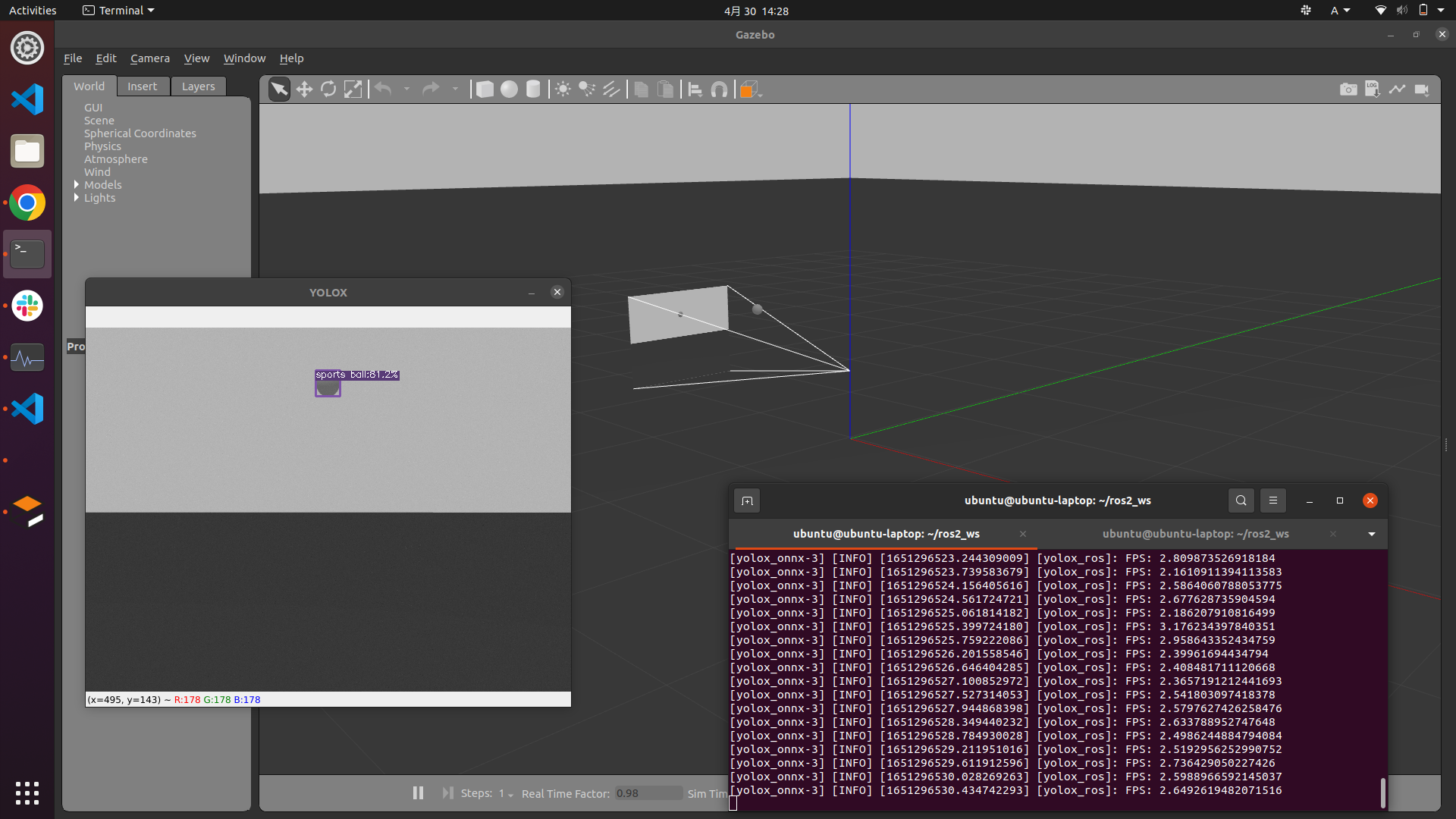
    • Gazeboのデモプログラムを追加しました。yolox_nano_onnx_gazebo.launch.py
    • yolox_ros_pyのLaunchファイルの命名を変更しました。yolox_"モデルの種類"_"計算機のタイプ"_"接続元".launch.pyとなっています。
    • yolox_ros_pyのboundingboxのトピック名がyolox/boundingboxesからboundingboxesに変更されました。
    • RaspberryPi4のCPU推論をターゲットにしたyoloxのPerson検出用TFLiteモデルPerson-Detection-using-RaspberryPi-CPUのデモプログラムを追加しました。yolox_lite_tflite_camera.launch.py
    • ReadmeにYOLOX-ROS + ?を追加しました。

    English

    We are very happy to receive many stars and forks since its creation. Thank you very much.

    Please support us on GitHub Sponsors to encourage development and maintenance!

    ---Update ----


    Contributors

    Source code(tar.gz)
    Source code(zip)
  • v0.3.0(Apr 26, 2022)

    Japanese

    作成後、多くのスターおよびフォークを頂けてうれしい限りです。ありがとうございます。

    GitHub Sponsorsで支援して頂ければ開発とメンテナンスの励みになります!

    全てのバージョンにおいて、挙動はyolox_ros.pyを標準としています。すべてのソースコード(スクリプト)のメンテナンスは行っていないため、気になるところがあればissueなどで教えてください。

    ---更新---

    • yolo_ros_pyのデモプログラムをyolox_sからyolox_nanoに変更
    • ダウンロードされる重みの変更。以下は自動でダウンロードされる重み
      • yolox_nano.pth
      • yolox_nano.onnx
    • ONNX Runtimeのサポート
    • yolox_ros_cppにおいてパラメータ image_size/widthimage_size/height の削除
      • この変更以降、trtexecによる量子化が推奨され、torch2trtの使用は非推奨となりました。
    • yoloxのpipインストール対応

    English

    I'm glad to get so many stars and forks after creating it. Thank you for your support.

    If you can help me with GitHub Sponsors, it will encourage me to develop and maintain it!

    In all versions, the standard behavior is yolox_ros.py The behavior is standard in all versions. I do not maintain all the source code (scripts), so if you have any concerns, please let me know via issues.

    ---Update---

    • Changed yolo_ros_py demo program from yolox_s to yolox_nano.
    • Change of downloaded weights. The following are the weights that are downloaded automatically
      • yolox_nano.pth
      • yolox_nano.onnx
    • Support for ONNX Runtime
    • Removal of parameters image_size/width and image_size/height in yolox_ros_cpp.
      • After this change, quantization with trtexec is recommended and use of torch2trt is deprecated.
    • Support for pip installation of yolox

    Supported YOLOX version

    Contributors

    Source code(tar.gz)
    Source code(zip)
  • v0.2.1(Mar 26, 2022)

    Japanese

    作成後、多くのスターおよびフォークを頂けてうれしい限りです。ありがとうございます。

    GitHub Sponsorsで支援して頂ければ開発とメンテナンスの励みになります!

    全てのバージョンにおいて、挙動はyolox_ros.pyを標準としています。すべてのソースコード(スクリプト)のメンテナンスは行っていないため、気になるところがあればissueなどで教えてください。

    ---更新---

    • yolox_ros_py/yolox_ros.pyのパラメータの変更

      • 削除:yolo_type(default: yolox-s

      • 追加:yolox_exp_py (default: '')

      • 実行のためには exps/default/yolox_s.py のようなファイルパスを引数で指定する必要があります。インストール手順が正しければ、share/以下にインストールされます。これは、カスタムトレーニングモデルの使用を想定しています。

            yolox_ros_share_dir = get_package_share_directory('yolox_ros_py')
        
            yolox_ros = launch_ros.actions.Node(
                package="yolox_ros_py", executable="yolox_ros",
                parameters=[
                    {"image_size/width": 640},
                    {"image_size/height": 480},
                    {"yolox_exp_py" : yolox_ros_share_dir+'/yolox_s.py'},
                    {"device" : 'cpu'},
                    {"fp16" : True},
                    {"fuse" : False},
                    {"legacy" : False},
                    {"trt" : False},
                    {"ckpt" : yolox_ros_share_dir+"/yolox_s.pth"},
                    {"conf" : 0.3},
                    {"threshold" : 0.65},
                    {"resize" : 640},
                ],
            )
        
    • Python + OpenVINO がv0.2.0上でも動作するように修正を行いました。

    • YOLOXの自動インストールスクリプトの追加をしました。

      • bash YOLOX-ROS/yolox_ros_py/install_yolox_py.bashを実行することでダウンロードできます。
    • launch.pyやparamの追加・削除を行いました。

    • yolox_ros_cpp の Jetson Nano対応を行いました。(貢献:fateshelled

    English

    I'm glad to get so many stars and forks after creating it. Thank you for your support.

    If you can help me with GitHub Sponsors, it will encourage me to develop and maintain it!

    In all versions, the standard behavior is yolox_ros.py The behavior is standard in all versions. I do not maintain all the source code (scripts), so if you have any concerns, please let me know via issues.

    ---Update---

    • Change parameters in yolox_ros_py/yolox_ros.py

      • Remove: yolo_type (default: yolox-s)

      • Add: yolox_exp_py (default: '')

      • For execution, specify a file path like exps/default/yolox_s.py as an argument The following is a list of the most common problems with the system. If the installation procedure is correct, it will be installed under share/. This assumes using a custom training model.

           yolox_ros_share_dir = get_package_share_directory('yolox_ros_py')
        
            yolox_ros = launch_ros.actions.Node(
                package="yolox_ros_py", executable="yolox_ros",
                parameters=[
                    {"image_size/width": 640},
                    {"image_size/height": 480},
                    {"yolox_exp_py" : yolox_ros_share_dir+'/yolox_s.py'},
                    {"device" : 'cpu'},
                    {"fp16" : True},
                    {"fuse" : False},
                    {"legacy" : False},
                    {"trt" : False},
                    {"ckpt" : yolox_ros_share_dir+"/yolox_s.pth"},
                    {"conf" : 0.3},
                    {"threshold" : 0.65},
                    {"resize" : 640},
                ],
            )
        
    • Python + OpenVINO has been modified to work on v0.2.0.

    • Added an automatic installation script for YOLOX.

      • You can download it by running bash YOLOX-ROS/yolox_ros_py/install_yolox_py.bash.
    • Added/removed launch.py and param.

    • Added Jetson Nano support for yolox_ros_cpp. (Contributed by fateshelled)

    Supported YOLOX version

    Contributors

    Source code(tar.gz)
    Source code(zip)
  • v0.2.0(Jan 31, 2022)

    Japanese

    作成後、多くのスターおよびフォークを頂けてうれしい限りです。ありがとうございます。

    GitHub Sponsorsで支援して頂ければ開発とメンテナンスの励みになります!

    全てのバージョンにおいて、挙動はyolox_ros.pyを標準としています。すべてのソースコード(スクリプト)のメンテナンスは行っていないため、気になるところがあればissueなどで教えてください。

    ---更新---

    • YOLOX-v0.2.0への更新に合わせてドキュメントを更新しました。
    • yolox-ros.pyのパラメータを大きく更新しました。
    • yolox-ros.pyの細かな不具合を修正しました。

    English

    I'm glad to get so many stars and forks after creating it. Thank you for your support.

    If you can help me with GitHub Sponsors, it will encourage me to develop and maintain it!

    In all versions, the standard behavior is yolox_ros.py The behavior is standard in all versions. I do not maintain all the source code (scripts), so if you have any concerns, please let me know via issues.

    ---Update---

    Translated with www.DeepL.com/Translator (free version)

    Contributors

    Source code(tar.gz)
    Source code(zip)
    yolox_tiny.bin(9.62 MB)
    yolox_tiny.xml(250.11 KB)
  • v0.1.0(Oct 19, 2021)

    ⚠️ There is a LICENSE problme in this release, but this LICENSE will not be changed. (This LICENSE is in accordance with YOLOX.) Check #4 .

    Source code(tar.gz)
    Source code(zip)
Owner
Ar-Ray
1st grade of National Institute of Technology(=Kosen) student. Associate degree
Ar-Ray
Developing your First ML Workflow of the AWS Machine Learning Engineer Nanodegree Program

Exercises and project documentation for the 3. Developing your First ML Workflow of the AWS Machine Learning Engineer Nanodegree Program

Simona Mircheva 1 Jan 13, 2022
Deep Image Search is an AI-based image search engine that includes deep transfor learning features Extraction and tree-based vectorized search.

Deep Image Search - AI-Based Image Search Engine Deep Image Search is an AI-based image search engine that includes deep transfer learning features Ex

139 Jan 01, 2023
A collection of Reinforcement Learning algorithms from Sutton and Barto's book and other research papers implemented in Python.

Reinforcement-Learning-Notebooks A collection of Reinforcement Learning algorithms from Sutton and Barto's book and other research papers implemented

Pulkit Khandelwal 1k Dec 28, 2022
Official PyTorch implementation of Data-free Knowledge Distillation for Object Detection, WACV 2021.

Introduction This repository is the official PyTorch implementation of Data-free Knowledge Distillation for Object Detection, WACV 2021. Data-free Kno

NVIDIA Research Projects 50 Jan 05, 2023
Pytorch Implementation of Zero-Shot Image-to-Text Generation for Visual-Semantic Arithmetic

Pytorch Implementation of Zero-Shot Image-to-Text Generation for Visual-Semantic Arithmetic [Paper] [Colab is coming soon] Approach Example Usage To r

170 Jan 03, 2023
Contenido del curso Bases de datos del DCC PUC versión 2021-2

IIC2413 - Bases de Datos Tabla de contenidos Equipo Profesores Ayudantes Contenidos Calendario Evaluaciones Resumen de notas Foro Política de integrid

54 Nov 23, 2022
Py-faster-rcnn - Faster R-CNN (Python implementation)

py-faster-rcnn has been deprecated. Please see Detectron, which includes an implementation of Mask R-CNN. Disclaimer The official Faster R-CNN code (w

Ross Girshick 7.8k Jan 03, 2023
DeepMetaHandles: Learning Deformation Meta-Handles of 3D Meshes with Biharmonic Coordinates

DeepMetaHandles (CVPR2021 Oral) [paper] [animations] DeepMetaHandles is a shape deformation technique. It learns a set of meta-handles for each given

Liu Minghua 73 Dec 15, 2022
PyTorch implementation of the paper Dynamic Data Augmentation with Gating Networks

Dynamic Data Augmentation with Gating Networks This is an official PyTorch implementation of the paper Dynamic Data Augmentation with Gating Networks

九州大学 ヒューマンインタフェース研究室 3 Oct 26, 2022
Ppq - A powerful offline neural network quantization tool with custimized IR

PPL Quantization Tool(PPL 量化工具) PPL Quantization Tool (PPQ) is a powerful offlin

605 Jan 03, 2023
Code for Temporally Abstract Partial Models

Code for Temporally Abstract Partial Models Accompanies the code for the experimental section of the paper: Temporally Abstract Partial Models, Khetar

DeepMind 19 Jul 13, 2022
ReferFormer - Official Implementation of ReferFormer

The official implementation of the paper: Language as Queries for Referring Vide

Jonas Wu 232 Dec 29, 2022
Simple Pose: Rethinking and Improving a Bottom-up Approach for Multi-Person Pose Estimation

SimplePose Code and pre-trained models for our paper, “Simple Pose: Rethinking and Improving a Bottom-up Approach for Multi-Person Pose Estimation”, a

Jia Li 256 Dec 24, 2022
Official Pytorch implementation of Meta Internal Learning

Official Pytorch implementation of Meta Internal Learning

10 Aug 24, 2022
Real-Time SLAM for Monocular, Stereo and RGB-D Cameras, with Loop Detection and Relocalization Capabilities

ORB-SLAM2 Authors: Raul Mur-Artal, Juan D. Tardos, J. M. M. Montiel and Dorian Galvez-Lopez (DBoW2) 13 Jan 2017: OpenCV 3 and Eigen 3.3 are now suppor

Raul Mur-Artal 7.8k Dec 30, 2022
BEAMetrics: Benchmark to Evaluate Automatic Metrics in Natural Language Generation

BEAMetrics: Benchmark to Evaluate Automatic Metrics in Natural Language Generation Installing The Dependencies $ conda create --name beametrics python

7 Jul 04, 2022
PyTorch module to use OpenFace's nn4.small2.v1.t7 model

OpenFace for Pytorch Disclaimer: This codes require the input face-images that are aligned and cropped in the same way of the original OpenFace. * I m

Pete Tae-hoon Kim 176 Dec 12, 2022
Official PyTorch implementation of "Preemptive Image Robustification for Protecting Users against Man-in-the-Middle Adversarial Attacks" (AAAI 2022)

Preemptive Image Robustification for Protecting Users against Man-in-the-Middle Adversarial Attacks This is the code for reproducing the results of th

2 Dec 27, 2021
Tensorflow Implementation of SMU: SMOOTH ACTIVATION FUNCTION FOR DEEP NETWORKS USING SMOOTHING MAXIMUM TECHNIQUE

SMU A Tensorflow Implementation of SMU: SMOOTH ACTIVATION FUNCTION FOR DEEP NETWORKS USING SMOOTHING MAXIMUM TECHNIQUE arXiv https://arxiv.org/abs/211

Fuhang 5 Jan 18, 2022
Solutions of Reinforcement Learning 2nd Edition

Solutions of Reinforcement Learning, An Introduction

YIFAN WANG 1.4k Dec 30, 2022